I have seen other USTVGO m3u around, but this one was the best out of the bunch. I will let you know what he intends to do. Although, like I said, I have bothered him too much already and I really don’t want to impose on him.
I will keep you posted on any news.
I’ve spent an hour looking and honestly, you’re absolutely right, this list was the best.
I tried to use the new URL on Tivimate. It said it processed but it didn’t show where channels. Updated the playlist and still nothing. What might be the problem. Thanks
The ustvgo m3u isn’t working right now. The developer is working on it.
The USTVGO m3u codes that are posted in this thread are no longer active. The developer of the m3u decided to make his m3u available by invite only.
If you want his USTVGO m3u. You will need to join his Discord page and ask for an invite.
An alternative solution would be to download this app: USTV 247  for Android - APK Download (apkpure.com)
I have this app installed on my Nvidia, Tablet, and phone. I use their web stream for my laptop: USTVGO channels list - USTVGO.TV
The apk works great on the a tablet and phone. If you download the app on your streaming device. You will need a mouse to navigate around the app. I use Mouse Toggle: Mouse Toggle for Android TV - Apps on Google Play
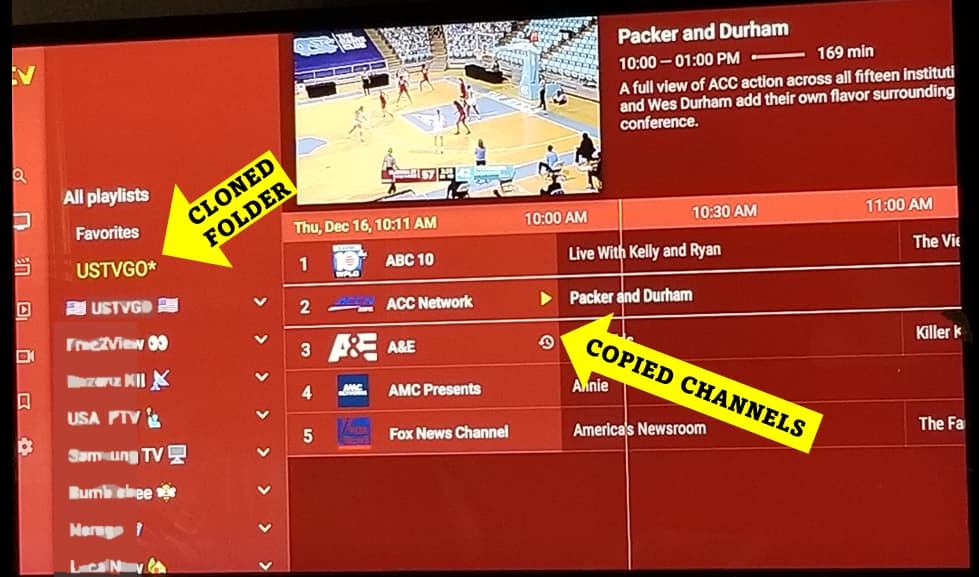
Another “thinking out of the box” alternative is using Tivimate to ‘Create’ a USTVGO folder. Go to any m3u playlist’s channel panel and long press “GO” to bring up the Channel’s Settings. Then scroll down and select “Create Group”. Click Go and select “All Playlist” and place your created folder there. Now go back to the far left Tivimate panel and search for the channels you want to include. Once your search loads click on one of the channels appearing. Once the channel starts playing click the the “Back” button to get back to the “Channel Panel”. Then long press the “GO” button to bring up the Channels Settings menu again. Then scroll down to “Copy Channels”. Check the box, Right click your remote, Check the Channel box, Right click, Check your folder, Click Copy, then Rinse and Repeat until you finish.
I copied the EXACT same channels that appear on the USTVGO webpage, but you can change out any channel you wish to. Btw, all but ONE channel I got from free sources to populate my cloned USTVGO folder. Also, when you copy and move the channel. The epg transfers along, but if you wish, you could just assign the http://bit.ly/epgsparkle to all the channels and the guide will populate properly.
I have tried searching Discord but cannot find his page to ask for an invite. I see he used to be on Telegram, but no more.
Parrot tv I’ll try to remember to send you a link when I get home.
Thank you very much. I can see how busy you are …
Can I use any of these for iptv smarters pro. I ask because I have an iPhone and offers smarters not tivi, any advice.
for what its worth…heres a ustvgo tv guide Program Guide
Found this with channels hit and miss and no epg.
says 3839 channels worldwide and 84 movies
Not sure but from reading the m3u it looks like it starts with Germany.
If you need playlists and from specific countries I can give you the m3u url for them. Have a look at Troys list.
in tivimate you can block out countries you dont want to see.
Who’s the developer? I’m on discord now
Parrot TV
HereIronman
Thx I have that list didn’t know if I could use it for Smarters
I am on discord now
Can you send me an invite link please ty
How do I create the folder. I tried looking for what you said. I have tivimate premium and don’t see it anywhere
Create what folder? I am having a hard time following what you are saying, or want.