I did not intend to break any rules. My apologies. Have tried deleting this post, but can’t so maybe Mike the leader of this cancel can do that and delete my unfortunate mistake Sorry folks, Thanks for all the info, still a beginner.
Stremio and Kodi are two entirely different apps and I don’t know anyway to put them together and wouldn’t even try. Also please read our site rules.
Thank you. Use the site search and read Troy’s tutorials and his videos. The answers on using both Kodi and Stremio are numerous and informative. For example 
Hey no need to delete it. Your post was genuine, you broke the rules, and not on purpose, and my job is to help you avoid those mistakes going forward as the last thing I want is you getting banned. It’s all good. Just reword your inquiry and forget the mistake. You fixed it and I thank you for that. So now what was your concern about Stremio or Kodi? We are here to help you and that is our goal.
Caribou
| 11:16 PM (0 minutes ago) | ||
|---|---|---|
| to Miki |  |
|---|
Thanks so much. I am a little new to this streaming stuff. I paid a guy for a couple years, and it kept buffering and buffering. I finally gave up. I was paying over 30 a month. I then signed up with a reseller in a farmer’s market about 90 minutes from me and got some good info. I then tried to do it myself, and bumping along. Bought 3 firesticks and now 2 onn boxes and trying to program them. Be 77 soon, but not too old to learn. I went through the videos of addon for Stremio and I think I got all the addons installed. I saw where there was one video/post that listed the top six platforms to work with and they could be linked/used in Kodi or Stremio. I won’t be making any more posts. I just wanted some advice, but now I don’t know how to word anything and not cross a line somewhere, so please delete my post/topic and I will keep researching on my own as to how this all works and figure it out by going over and over all the videos and comments others make.
Oh no. Please keep posting. Here are our rules. Very simple and basic really. You can always PM me by clicking my avatar and then clicking message if you have any doubts. Most of our rules are just to keep the site from being shut down because of legal concerns.
A reseller in a Farmers Market? Brilliant. Everyone else is selling Fresh Cucumbers and you get to this guy’s booth and he’s selling loaded Firesticks! This is Hilarious 

Appreciate it, thx. And who knew cucumbers could be so profitable!
Yeah, and they are doing well. Father and son team, at two different markets
Just an FYI I wouldn’t ever buy or sell ‘loaded’ streaming devices - Four accused of selling 'jail-broken' Amazon Fire TV Sticks at Auburndale flea market | FOX 13 Tampa Bay
That report was from 2020 but people are still selling them on Craigslist. I guess we should be calling them “jail-bait” sticks from now on!
I watched the Kodi add on and Stremio as well as the Ultimate Stemio Setup but can’t figure out how to add premiumize to Stremio. I have a paid version.
You add the API key into the individual addons in Stremio. So go to “addons” click it to open your addons, then click the green gear icon to open the addon configuration panel, then look for the “Debrid” section and click it’s arrow and then select whatever service you are using and then add the API key.
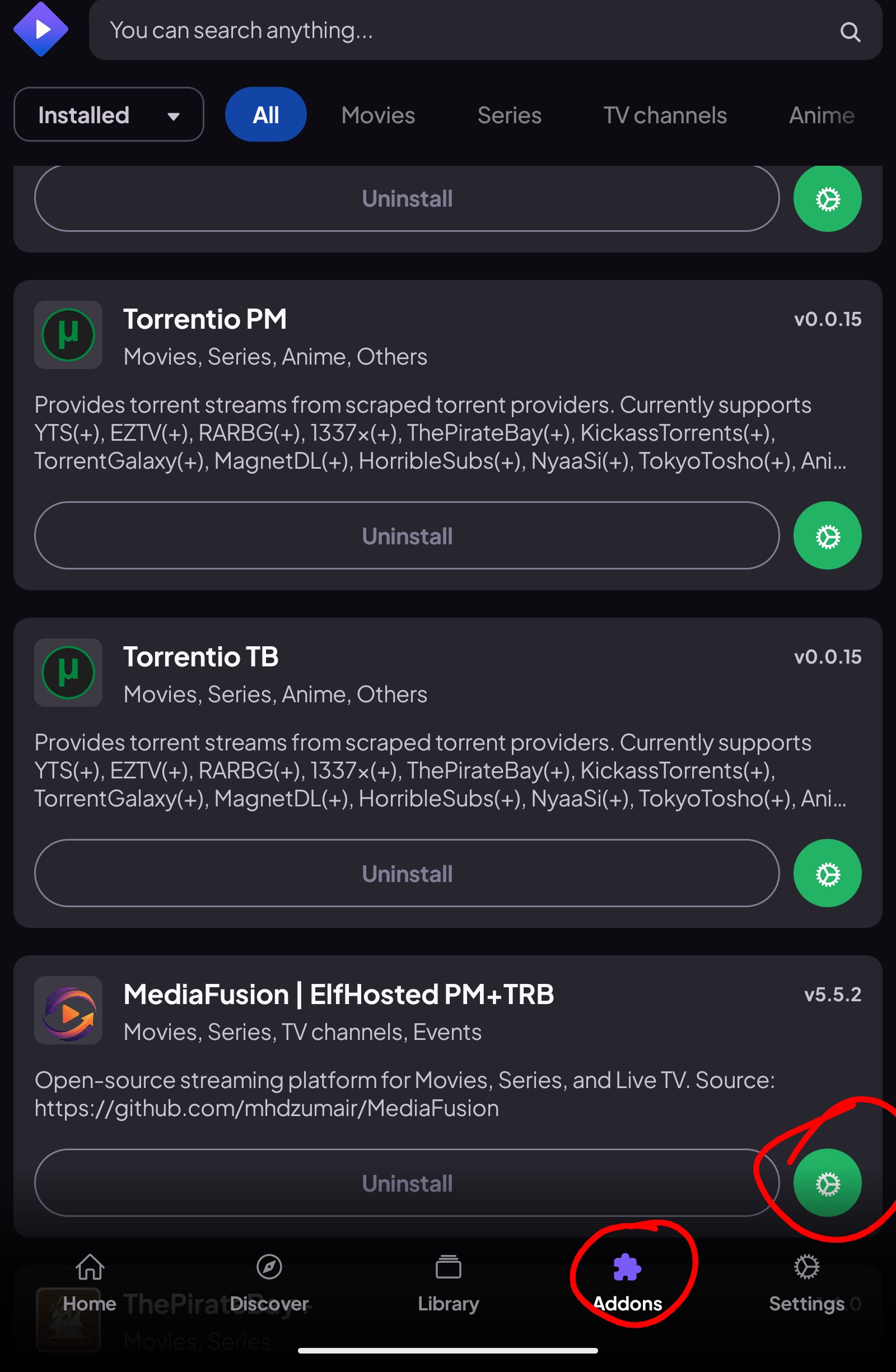
Thanks! Will give it a go.
Don’t forget, with Stremio and Nuvio the configuration is kept in the cloud and when you configure an addon it will automatically sync to every Stremio or Nuvio app you are logged into. So adding API keys are done easily on a tablet as you can copy and paste with no problems. Whereas some streamers you need to read up on Troy’s tutorial on copying and pasting.