Thanks. Yes I’m waiting for the final release as well. I like using Nuvio. Yes I’m sure it’s a lot of work.
I just added Nuvio onto a new Onn streaming device last night (on a bedroom TV), and as soon as I logged in to my Nuvio account and Trakt via QR code, all my settings immediately synced to the app. This included my addons, my watch history (Continue Watching), as well as the other various app settings that I have customized on my other device. This made setup a breeze on the new device, and was a welcome change.
This morning I updated to 0.5.2. I know that not everyone uses Trak to keeping track of their watch progress, but I do since many apps such as Nuvio & STRM integrate with it and it allows me to seamlessly move between apps (if / when needed) and stay on top of my shows. The couple of bugs introduced in 0.5.1 that I experienced were fixed on 0.5.2, at least so far in my testing. It’s still a long road before the app will be completely stable, but the primary pain points that I was dealing with do appear to be worked out for the time being. Hopefully they don’t reappear in subsequent releases…
I also tested the new release and still no difference with certain series not showing Seasons and episodes in the library. Also the glitch with deleting an episode with missing seasons info from your library series is still there where you click the delete checkmark and it actually adds a second instance of the series poster and doesn’t touch the original. Slow and steady is the ticket. 
So that being so if I remove nuvio from my Nvidia and reinstall, I should be able to keep my history, viewed and library entries and then it should sync with what I have on my pc. What do youthink?. Very worried I’ll loose the info I now have.
Technically, that should work - yes. Just to confirm though, I would first log-in to the web dashboard and have a quick review of your Addons & Settings to confirm that everything is correctly reflected in the cloud. If so, then it should pull from the cloud when you log-in to your re-installed TV app. That’s what happened for me with the fresh install I just did last night.
Just an FYI though, the website currently seems to be down. So, give it a while for things to be restored before trying this. Good luck!
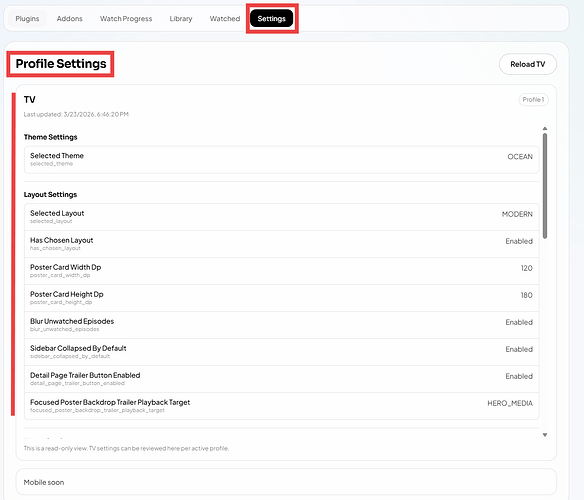
You shouldn’t, it’s in the cloud, not on the device.
Thanks. I’ll let you know.
Yeah. It keeped everything but it still did not sync the addon’s with the ones on my PC. OH well I’ll just wait till they figure it out.
Being a trekie person I have discovered long while back that some series/Movies will play perfectly fine on Nuvio, others will crash out to home screen in about a minute to minute and a half. I test the ones known to crash after every update & to date, up to the 5.3 version they still are crashing.
That’s odd. @informant- I assume you’re playing them from the same scraper source & file on Nuvio as well as whatever other player (ex: Stremio) where they work fine?
Can you provide a couple example movies that I could test out with Nuvio? I’m curious if the links sourced up from my AIOStreams config & Premiumize yield a different result (i.e. no crashing). I’d be happy to cross-test this.
Never had even one video crash out to the home screen with any update.
Please remove your post as it violates the rules. PM each other if you like 
Do not mention copyrighted TV shows, movies, sports franchises (NFL, MLB, UFC,), etc in conjunction with unverified apps, addons, IPTV services, debrid services, etc. Do not post an image depicting the same. Examples of 3rd party apps/debrid services are Kodi, Stremio, Syncler, Cinema HD, Real-Debrid, Premiumize, TorBox.
Apologies for the oversight in the detail included in my reply. My message has been deleted, and I will follow-up via personal message in an attempt to help.
Thanks for your understanding and cooperation. Much appreciated. We all get a tad zealous at times, especially in an effort to help.
Thank-You For Everything that Created and Do
Just Amazing!! Thank You! Dr… Mr.Troypoint
Ken!
I would like to know how Troy accessed Decoder Priority on his P6 and changed it to FFmpeg, I use no sound bar or receiver, just go through my tv, I cannot access mine on my P6L?
Oh I haven’t heard about decoder priority. Not even sure what that is.
Hello, I haven’t gone back into this app for a few weeks and they’ve been updating like crazy but I would assume it’s still in there. From memory when I did that, I had to first expand multiple settings options by clicking one of the options within that settings panel. The video should show how I did that.
Hey thanks for the reply, yes I seen that, but with mine I cannot access those settings?
Give me a few minutes and I will take a look at mine and get back to you.