“But I can’t seem to get pass the email address and the passwords. They never seem to match”….so that is your problem….…..go here first (link courtesy of @Explorer from this thread over a year ago)
you may just have to start all over….To activate a device, install TiviMate, then go to “Unlock Premium” screen and follow the instructions….
@Jes1 Here are two links for you that should help.
Quoting from Troy’s article
Prior to initializing Premium, users must register for an Account via the Companion App. This app is only available in the Google Play Store, therefore must be installed on Android Device or through BlueStacks or another Android emulator.
NOTE: Users can also sign up for Premium on the official TiviMate website prior to installing the companion app.
If you do not have an Android phone or device, you must install the BlueStacks emulator on your PC to access the Google Play Store.
IMPORTANT: If you’re using a generic Android TV Box with stock Android, you can install the Companion app through the Google Play Store. Devices running the true Android TV operating system such as NVIDIA SHIELD don’t include this app so you will need to set up an account on an Android phone, tablet, or through BlueStacks as shown below.
High Miki: Hope all is well for you. Troy and someone else were trying to help me with my Tivimate issue. A few days ago I was still having a hard time trying to get Tivimate set up for myself. But I could not get the Tivimate companion. Any way, I was searching through some of my older Android boxes from way back when. I noticed that it had Tivimate installed. It had one on the front page, and another where list of favorites are. It plays great. But I am trying to figure out how to set it up on my Nvidia shield. I have it on my Shield but it won’t take the companion app. I wish I could take one of the programs and put it on my Shield box. But I didn’t have to set up anything I think I set it up , long ago because it already had my favorite shows and stuff on it. I want to find out more about it. I want to see if I can put one of the programs to work on my Shield box. Sorry for taking ups much of your time.
Thanks for the repost @ilpadrino, and hope it still helps someone. there is, however, a much better and easier way (in my opinion) to get TiviMmate going and to be able to keep up with how many and what devices you have it installed on. It claims to let you Enjoy effortless TV viewing with TiviMate IPTV Player Others have posted this but since you brought up an old post of mine, I will add to the fun. Enjoy!
I am waiting for someone to tell. me how to get this Tivimate Companion App I can’t find it in the play store. Can Tivimate Companion. I have to ask this question anyway. It is important. I just read your essay again. Tivimate is still in my Nvidia tv box. It has nothing in it because I could not put a playlist or anything in it, I paid for a year and they got the payment online. So does that mean that they will use this Companion app to keep up with my how many tv”s and stuff I would use ( 2 ) and open my Premium app so I can create my playlist and set all my other stuff ???up.
The Companion app is NO LONGER NECESSARY. Use the WEB PAGE. www.tivimate.com It is EASIER and overall a BETTER way to manage your account(s). I have 5 seperate Tivimate Accounts and Manage 25 seperate devices with those accounts. I am almost constantly going to the webpage and deleting devices and adding or swapping others for my family and select neighbors. Please heed the advice on this as you have asked it several times now, and I have personally answered you concerning this more than once. We WANT to help, but if you reject our advice without even trying it, others may be reticent to engage with you further. Please do not expect to be spoonfed as you have to do some of the leg-work yourself, in this case simply by using the website provided to you (several times) with a clickable link (above).
If you wish for a step by step guide of how to OBTAIN and INSTALL TiviMate, that has also been Provided to you. Please re-watch the video again and SKIP the “Companion” part. Once Again: the “Companion” is NOT necessary anymore since the developer made it EASIER with a fully functional webpage to use. I sincerely hope you get this sorted as I know how aggravating it can be to hit a snag in your streaming journey. You can do it.
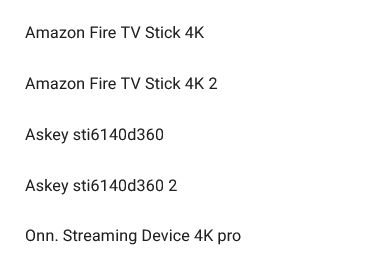
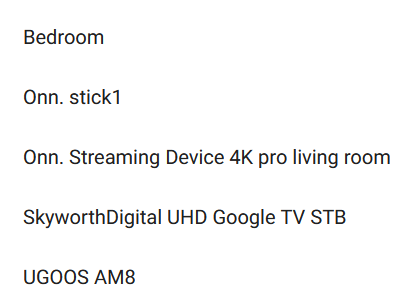
I have one problem with tivimate.com, I want to delete one of my Firesticks and add a new Max.
but all my Firesticks have the same name, not the actual name I’ve assigned.
Same with Onn’s except for the Pro. Is there a way to get more detail??
Amazon Fire TV Stick 4K
Amazon Fire TV Stick 4K 2
Askey sti6140d360
Askey sti6140d360 2
Onn. Streaming Device 4K pro
I have Tivimate. I have 5 ONN boxes. They all have the same device name. The device name Tivimate uses is a default name (ONN. Streaming Box) that is set in “About” in “Settings”. Tivimate is not recognizing the device name I gave each on the boxes in “About” in “System” on the device. How can I identify which box is which in Tivimate?
I did that and then none of my devices stayed registered. I supposed that was because the device name I assigned it in Tivimate did not correspond to the device identifier native on the ONN device.
Hello Miki !!! Guess who this is. I hope all is going well for you. I think about you sometimes but I am always Leary when it comes to approaching T Point. Anyway, I recently bought a new computer. Not long after that, I got a new N Shield. Model P2897. I don’t like Google, but as soon as I opened the box, it said Google Companion in big letters. I had already paid for a years TMate service. But there are still a few little glitches that I can’t figure out because I don’t want to use Google. I paid for my service through TMate. I don’t know if Google and TMate has to be set up together or after I set up Tmate, do I need to keep google or use Google and Tmate together. Now I am thinking that since my years service is already paid, what can Google do to me.? I could use some of your sage advice. Have a blessed day. Jesse
 from this thread over a year ago)