I solved the cramped hand when loading apps and programs by getting a wireless keyboard (or remote with keyboard on the back) and using it to type in the info required, works like a damn and is so much faster.
If it is at all possible to turn that light off…chances are the Grandkids will know how 
 …food for thought
Ya that’s a fantastic idea. I wasn’t worrying about it when I wanted to send it back lol
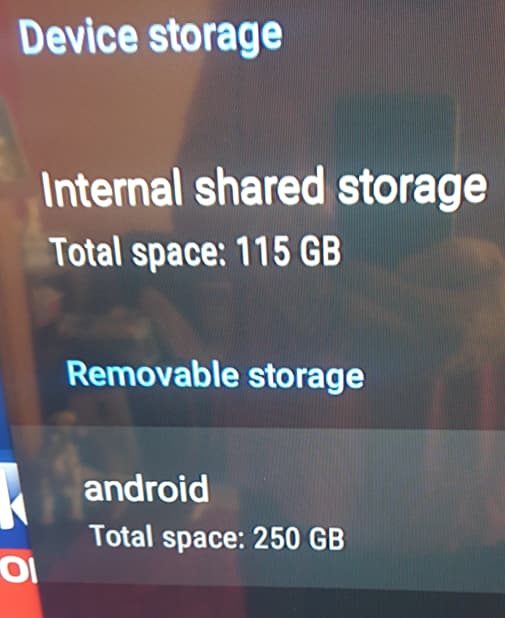
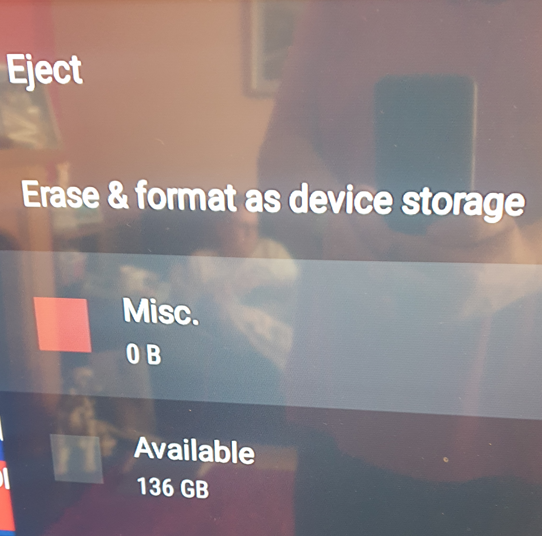
Its an issue with android 11 scoped storage and all I can say is yes its a pain and they are working on it.
Hi TX,
Thank you
So do I have the 250Gb of storage to use on my flash drive or is it the 136gb?
Not that I’m that bothered at the moment as I don’t need the extra storage, but I might in the future, I’m just curious as to what storage I actually have 

I think you should be ok. Just keep up with updates. I know on my box I see the same and although I dont need extra storage I put a 32gig flash in because it made me feel better. But the problem is google keeps making things better, therefore worse.
Thanks for your review. One thing about the BuzzTV devices is you really can’t change the launcher, but the Home Screen is so well layed out there is really no reason to have to do that. I found on my 4500 unit that in order to be able to put any background on the Home Screen you had to up date to the BuzzTV 5 by typing in 2015 on the update screen. Once the update is done, you can use the BG Image link in settings to download images for your homescreen. But first, you have to load the EX-plore app from Google Playstore and use that to download images to the BG Image file using a flash drive after transferring them from your computer to the flash drive. Kind of a round about way to download images to your BuzzTV device but it works.
@sim_bill I wish I could figure out what I did because I couldn’t make it work at first but did something right because I’ve got wolf launcher on mine with the launch manager from rapid app installer and it has been working perfectly, widgets and all. This is on a x5.
Woohoo…promo/discount code you provided ANDROIDTVBOX got me 10% off on the Canadian site - thx Ron!! Came to $254.25 including 13% federal & provincial taxes & free shipping. Regular price $249.99 less $24.99 = $225.00!
I believe you need to set it to ‘suspend’ if you have recording set correct??
I’m curious, lol. Is there a remote that is better than the one that is supplied and would another remote operate all the functions with the Buzz box?
I was thinking about this new one,buzztv arq-100 v2 air mouse, but that does not have the backlight feature on it
It’s just that although I quite like the supplied remote, I would definitely have preferred that the directional centre buttons were slightly raised (as mentioned by Troy in his review) as I do find myself clicking the wrong button occasionally if I’m not paying attention to the remote.
Hi TX,
Sorry, but I have another question,  . Do you know why my flash drive seems to be called “Android” and not a USB ?
to make is different from the internal storage name.
Ah right, I just thought it would be called “USB” and not “Android”. Not that it makes any difference what it is called,lol. 
Thought I’d mention that for whatever reason the wolf launcher does seem to be working now using just the launcher manager from the rai and of course wolf launcher. Not sure if the update corrected that or what??? But I do no my first attempt that buzz didnt like the wolf so I used ultimate launcher manager to work around buzz. But since I have factory reset the buzz and tried the typical wolf install and all is well.
Trial and error my friend…unless it bricks your device. Lol
If you enjoy watching Netflix then buy the mecool km2. It’s Netflix 4k certified out of the box and costs only $79 . If you still want iptv service you can install an app like iptv starters or tivimate. There are iptv companies that also provide their own app to stream .
Good luck  Pete
Pete
Ok I just got done watching the video and went to the company website . Although it has nice specs it doesn’t do anything that my current devices can’t do. The remote control is huge and doesn’t have voice search  my $20 onn tv box even has voice search . Come on guys it’s 2022 and your giving people a remote that looks like it’s from Grandma’s cable tv box
  to each their own I guess .
I held off until today & found out both U.S. & Canadian customers can save 20% using the promo code ‘fireworks2022’ The 128GB X5 works out to $200 + $26 federal/provincial taxes. Saved $49.00 - sure glad i held off till today - so anyone that hasn’t jumped in, you might want to take advantage of the 20% discount!