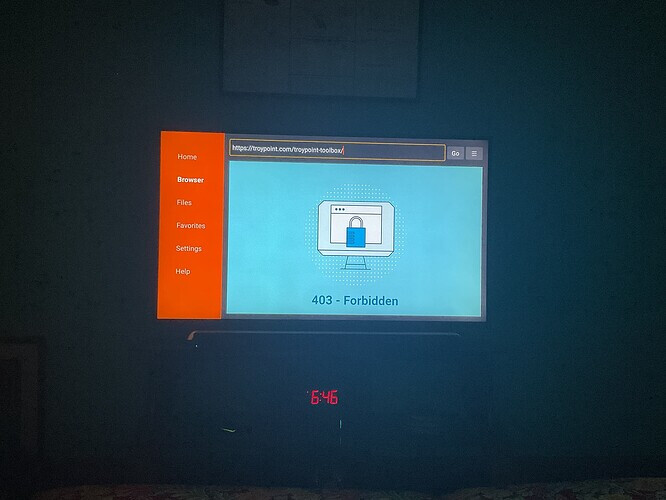
Well, that’s good news. It is something going on with your streaming device. You could try doing a factory reset but keep in mind you will need to setup everything from scratch again. There is something on your device blocking access to the Toolbox. Before reformatting you could also go into apps and uninstall any apps that look suspect and get rid of all apps you no longer use.
I am not getting a message. It looks like it’s starting to install, but abruptly just doesn’t finish tried with and without Surfshark on
I will try rebooting my router thx I’ll try now
Would I have to wipe my Samsung SSD also?
Thank you I did reboot my router and turned off Surfshark and it did install… I thank you for all the new information and addons because I don’t use a build. I am trying The Jet which looks great but when I’m on a channel for approximately 10 minutes the addon boots me back to the Home Screen. Anyone else try this addon?
No, I don’t think that’s causing the problem.
I reset the Shield Pro and Downloader still comes back with 403 Forbidden 
Hey @JerryJ not a question from me just trying to help @Anonymous out. Thanks!
I’m so sorry SoloWarrior! You must have missed my meaning. I was simply pointing out that your question was a very valid question regarding whether @Anonymous was using the code to access the Toolbox. Hopefully he will try using the code that Troy provided, rather than the address.
Sorry for the delay in getting back to you. I put in the code and the same result.
Oh, that is a real drag! Frustrating to say the least! Just curious…what device are you using?
So we’ve eliminated the router and the network as a cause, as the Toolbox code works perfectly on your phone and your desk top. To me this points to your device. Maybe try to load another app through Downloader as a test. You can just delete that test app. This would be an easy test to confirm that there isn’t an issue with your Downloader app. I seem to recall that Troy has a listing of Downloader codes that he has posted on the Troypoint site. Just do a search on the site for Downloader codes.
@JerryJ I tried everything, even deleting the Downloader app and re-downloading it. I gave up and got a Ugoos AM9 special thanks to @sim_bill for steering me in this direction. With the assistance of my daughter we got most things working. I was sad to see paid for apps like Cache Cleaner, DNS Switcher and App Killer from TDUK would not load. I am happy to report that Downloader and all the codes worked like a charm.
Lastly, but most importantly special thanks to @Troy, @Miki, @JerryJ, @SoloWarrior, @Splashking1 and anyone else that I may have forgotten to add. Without you guys I would be lost.
That’s great news Anonymous, but sad that the Shield was giving you that much trouble. I am a devoted Shield Pro fanboy. So it saddens me to think that my beloved box may be soon to fail. But I’m still baffled why you had the troubles that you had.
Whoo-Hoo for snagging the AM9! That box is on my radar especially after Troy review stating that it was a great choice for streamers, which I am. I look forward to your post regarding your new box.
@Anonymous while I didn’t participate in helping you I too am glad things are better for you now. But I would like to Thank You  for how you Thanked everyone that helped you in one post, instead of 5 or 6 separate posts, nice job….
Thank You @itzme it’s Team Work.
@JerryJ Good morning, with the new box none of the TDUK paid apps came over. Also, the AM9 would not allow Mouse Toggle or SD Maid Pro because it says it’s dangerous to the box ;-(
I have to figure out how to get the remote to use volume control? That’s all for now, have a great weekend.
If anyone knows how to make the Ugoos AM9 remote volume work I would really appreciate it. Thanks
It’s always a challenge, getting use to a new device. You might want to post a questions regarding your remote and SD Maid issues in this thread. sim-bill is very well versed on the AM9. Also, if I recall the AM9 has a built-in mouse option.
Piling on here.
I have a shield and am gting g the 403 Forbidden error on TP. It also coincided with Syncler abruptly stopping working.
I have reset me router/network
Reset the shield and redo stalled a few. work ok including Surfshark.
Tried TP without Surfshark and with it. Same 403
Went to other websites without any problem.
I wonder if shield did an os update.
Here we go again. Trying to update my apps every so often on nvidia shield. I have surfshark with split tunneling and clean web enabled. Only two apps that refuse to dl no matter what time of day is tivimate and mx player. What I have done so far.
Restart my modem
Restart shield
Kill surfshark
Try again
Got error connection refused…
Settings downloaded cleared data just in case…nope
Deleted downloader reinstalled it. Checked permissions all good.
Tried to to dl tivimate and mx player and now it just shows connecting… instead of refused and never goes thru.literally.
Why does this keep happening?
Yes I know I can dl from google play store directly but isn’t the point of the toolbox to get the latest version?
Long time Tp fan and user but this is getting aggravating.
Thanks in advance.