You can also long press the hamburger button on the remote and that shows the installed apps. I turned off the autostart Tivimate and @AJS1 is correct, on the next start it stays on the “Installed apps”, but for me that means an extra app selection to start Tivimate, so back to autostart of Tivimate on boot and then I don’t even see the installed apps or home screen for more than 2-3 seconds and TiVi has loaded and I’m on my EPG and selecting the channel of my choice, usually News while I have my morning cuppa Joe.
Thank you, AJS1! Your suggestion worked great.
Honestly I’ve not really had an issue with the Shield home screen. It’s way better than the Fire home screen and leaps & bounds better than the really awful ONN home screen.
1 Like
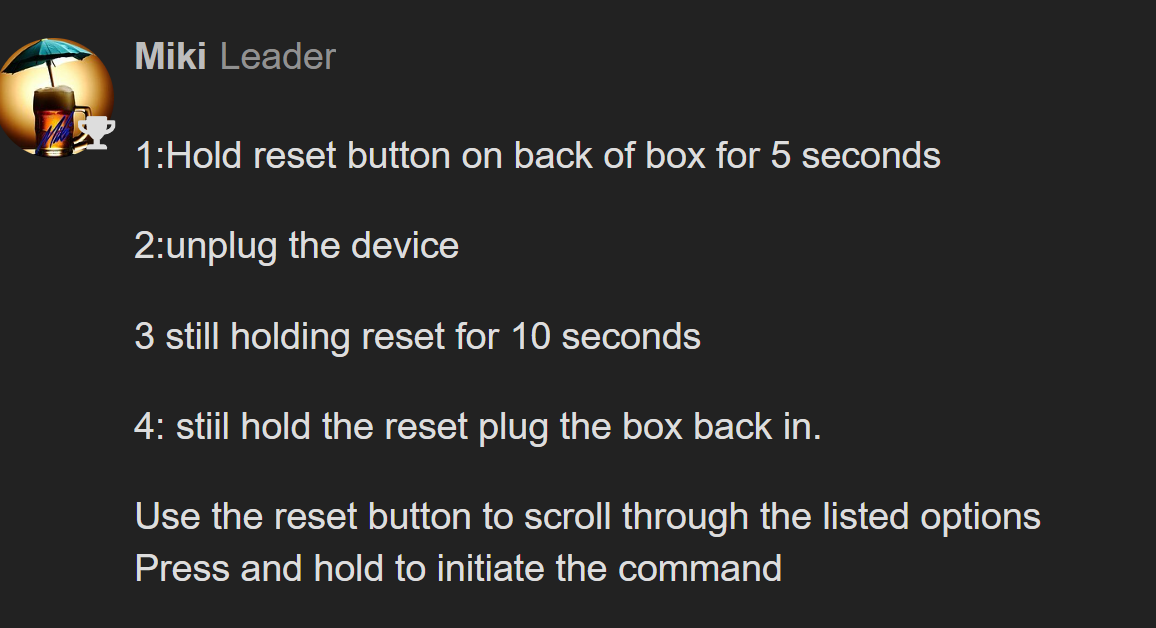
I bricked my Onn Pro, and only get a black screen. How do I do a hard factory reset? The only button on the box is for locating the remote.
Don’t worry, I’ve bricked mine twice screwing around with Launchers  The Good thing is it’s very easy to bring it back to life. Do these Steps exactly. When the onscreen menu comes up use the button on the back to scroll down to the option you want which will be Factory Reset
2 Likes
I deleted my post because I did not see that reset button next to the ethernet connection. Guess I better start wearing these glasses more
2 Likes
This may also not be too far from topic (I hope  ).
).
The apps only mode worked great except it would not show the only app I use on my Onn Pro (Wyze Cameras). It seems that if google play won’t allow it to download (had to use Aptoide TV) then it refuses to list it in apps only. I added Sideload Launcher from the Toolbox, selected it, and BAM! there is my Wyze app! No setup needed - just activate it.
1 Like