Originally published at: Over 2 Million Android TV Devices Infected by 'Kimwolf' Botnet
A dangerous botnet called Kimwolf has infected more than 2 million Android-powered TV boxes and streaming devices worldwide, according to recent findings from cybersecurity researchers. This malware turns your streaming device into a ‘zombie’ that hackers control remotely. They use these infected gadgets to launch massive attacks against websites, sell your internet bandwidth to strangers, and…
16 Likes
Please advise PEEPS if you have checked your devices. Do we have to shut off our VPNs to check each of our devices? Sounds scary to me. I’m gonna cower in the corner until you all chime in.
4 Likes
I have Malwarebytes that runs every time I boot up my devices and after every detection update. I checked mone with VPN active. All G2G here thank you. I have seen a number of articles recently about ADB and how it’s dangerous to leave it active and should only be enabled when you want to use it and then disabled immediately afterwards. So now I’ve gone onto the Developer Options on my BuzzTV P6L 256 Unlimited and turned off Internet ADB. Fingers crossed.
5 Likes
Thanks. I’m gonna make sure ADB is OFF.
1 Like
Just an FYI. I went to the synthient website suggested in the article on my PC and it was clean. I went to my firestick and used the silk browser on there to go to synthient. Sure enough I got big red letter warnings I was infected. No one likes an infection but it happens, but I didn’t freak out thinking I have Surfshark VPN and that was not my IP address. So I stopped SS (I did not see a pause button like on my PC) and checked the synthient site again and I was clean, no infection. Then I reconnected SS to a different location than before and it was clean. I’m not sure what all this means. I’m pretty sure I’m not infected per the website. Just posting for others. 
2 Likes
Onn 4k Pro, in developer options I didn’t see anything about turning on or off ADB….am I missing it somehow ?
1 Like
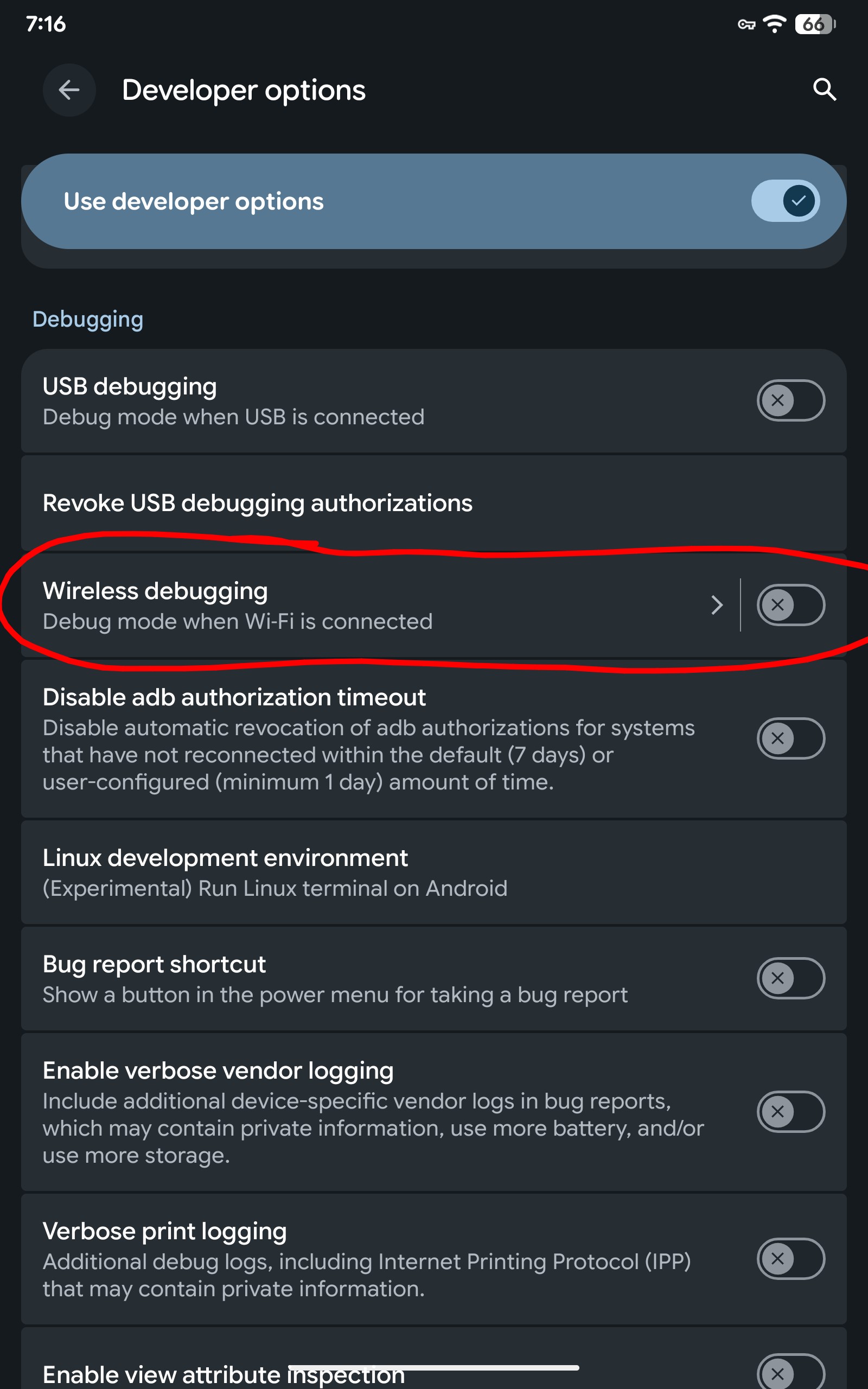
Not sure for the Onn but in my Developer options it’s under an entire section called “debugging”. I just took a look on my Tablet and as I don’t have the ADB Shell installed I don’t see the exact "ADB " just the wireless debugging used to connect phones, tabs and computers for ADB. So not sure now if that’s the same. I disabled mine as I don’t use it anyway.
5 Likes
OK @Miki OK , quit yellin’ at me  !!! and Good Morning Sir….i did see that USB debugging one in your pic, it was enabled and now it’s not, just wasn’t sure that was it as i didn’t see ADB in there among all the other options, so i prob clicked right by and missed it if it was there….thanx for helping, ur the EST of @TROYPOINT ….(do you know the EST reference?)
1 Like
Nope. Not familiar with that reference my friend, and good morning to you.
I toggled mine OFF just now too. Thank you.
Hey Troy….Do you have advice for a follower who just purchased an X88 Pro X5M who was going to run the Slimbox jailbreak? It’s still in the box. Afraid to open the thing now.
1 Like
Is this where you go in Buzz TV 6 to disengage the option in question?
That is on my Tab. For the BuzzTV P6L I go to settings, Device Preferences, Developer options, Debugging and turn off USB debugging, Internet ADB, Wireless debugging (Disabled)
3 Likes
Thank you
2 Likes
Hello, in my opinion you would be better off installing SlimBox on these generic devices rather than keeping the stock firmware. SlimBox has been around for awhile and no reports of anything fishy in that.
4 Likes
What about Network debugging? That’s the only way TDUK will work….
2 Likes
Thanks! I’ll flash SlimBox without any stress.
1 Like
@Miki Thank You for your instructions, I would never have figured this out myself. People sign up to be a Patron of Troypoint, it’s the best money I have ever spent.
3 Likes
@Anonymous you are always welcome. As you know I love helping and I especially appreciate insider members, like yourself, who thank those that give them helpful information they can use. PM me anytime you have a question and I will do everything within my power to get you an answer.
Troypoint Insider is a huge family and one I’m proud to be a part of. @TROYPOINT is the place to be, farm living is a luxury. Uh oh coffee has kicked in and now I’m flashing back to Gilligan’s Island.
Be well @Anonymous and have a wonderful Sunday. We,ve gone from -32°C yesterday to +4 today. Gotta love those barometric pressure migraines, had my first optical migraine in over a year. Now those are freaky, especially when driving.
3 Likes
@Miki, Thanks Brother! Happy New Year to you and your family.
2 Likes