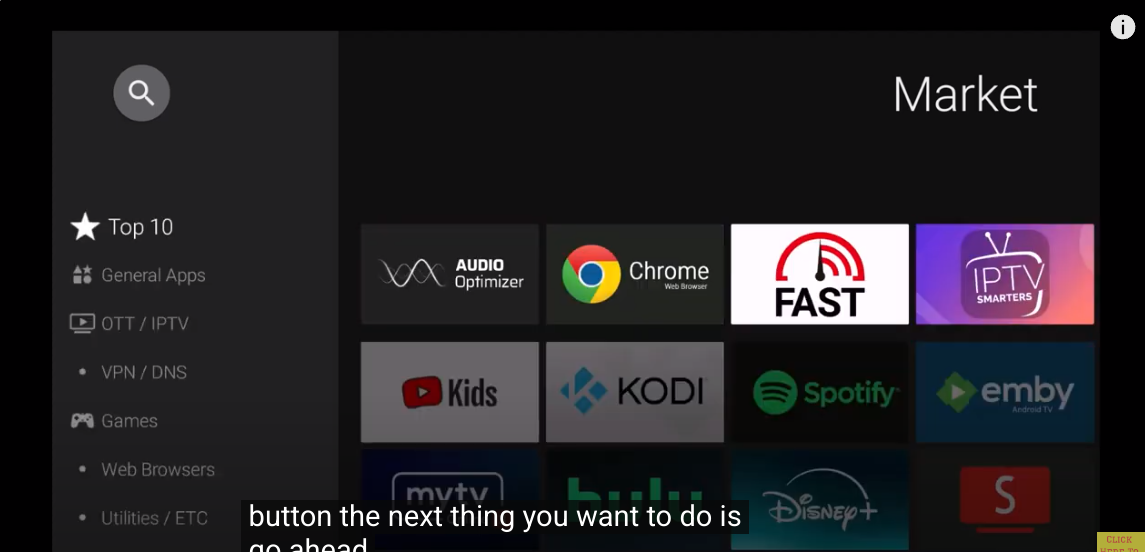
@sim_bill Will this be the first time you will use MYTVOnline 3 app?
Also noted that Troy missed one item that should be installed ( No idea why this isn’t installed by default) - Market app > Audio Optimiser
@sim_bill Will this be the first time you will use MYTVOnline 3 app?
Also noted that Troy missed one item that should be installed ( No idea why this isn’t installed by default) - Market app > Audio Optimiser
No. I’ve used it before. I have found it more complicated to set up and navigate than IBO Pro player. Just me but I like the IBO player better. As far as audio enhancement, I use the Volume Booster by Goodev app of the google PlayStore on one of my TVs, which sometimes has low volume levels on certain streams.
Daang, I really like the “mytvonline 3” iptv app. I am considering on getting this formuler just because of that. I really wish there was a work around to install this app on other android boxes.
Hello, I’am having the same issues. Mine will freeze up at any given time or will just not respond with the remote. This unit shuts down by itself for no reason. This is my second unit and not happy with it at all. Will be returning the unit.
I know that this sucks but if this happens to anyone else, I would suggest trying a factory reset. I know this doesn’t seem right having to do this on a new device but I’ve had BuzzTV Android boxes do the same thing and factory reset fixed them.
Hey! At what point will I be allowed to make a topic? I’ve been having some playback issues with my Z12 ultra that I’d like to make a post about, but I am unable to currently, I think due to my rank! 
Edit: I have just posted my query below instead of as a Topic.
Side note:
I excitedly jumped in to this hobby this week after encountering a family members Android Box and being blown away, they have a Z11 Pro with MTO3. I quickly ordered the Z12 Ultra after doing some research and discovering it was recently released, and then quickly became a Patron here after getting completely disenfranchised with the sheer amount of crap/scams on reddit while trying to find a provider.
This website is an incredible resource and using it has allowed me to understand, and get up and running in very little time with a new device, IPTV provider and a Debrid service, all without having to make a post up until now. A week ago this was all completely unknown to me, and now I feel I have a solid understanding of a lot of foundational knowledge to be able to get the most out of my hardware. Once I’ve resolved this playback issue I intend to dive into Usenet to figure out what’s going on there, and what do you know, an incredible discussion is already ongoing thanks to the recent Easynews BF sales! 
Genuinely to everyone who is active on here helping people like me jump into this hobby, thank you 
I highly recommend using the search. No need to create a topic when one already exist as I simply have to move it and close it if you do. I also recommend reading our rules and regs. Bothe the search magnifying glass and Rules and Regs are accessible by clicking the appropriate location on the header. And welcome to the insider.
Hey Miki,
Thanks, I have used the search to try to find answers to my question, but I didn’t find one hence why I wanted to post a topic
I can post my query here, it is Z12 Ultra related, but my problem is reasonably specific
Hey all,
I have set up a Z12 Ultra with Stremio, but I’m having issues streaming some content with the ExoPlayer. I know I can’t get into specifics, but generally large Remux files that are marked with DV don’t play for me using ExoPlayer. I can scrub through the content, and my TV (LG C1) shows the DolbyVision logo when opening the content, but it just doesn’t play. If I switch to libVLC player, it seems to work fine, however it shows the content in HDR, not DolbyVision.
I’ve tried playing the same content on my iPad, and on the native Stremio TV app on WebOS, and I don’t have any problem there, though on the native app it buffers every few seconds. I haven’t checked specifically, but I guess they’re not using ExoPlayer.
I’m starting to wonder if there’s a problem with my box, or if it’s a common issue with ExoPlayer and DolbyVision content?
Does anyone have any idea what’s going on? I’ve switched the default player to libVLC, but I’ve read generally that ExoPlayer is better, though maybe this is personal preference? I’m worried that I’m missing out on something by using libVLC instead of ExoPlayer. Perhaps there is an even better player I can install and use?
Thanks in advance!
Factory reset did not fix the issue for me. I performed a factory reset and just let the box sit powered on. After about 30 minutes, it rebooted automatically.
I would try factory reset again - not sure why it took over 30 minutes.
If you are still having an issue - contact Formuler support.
You need to open AI chat bot in this link

You nailed it on the head Miki. The amount of of settings and options on the Z12 Ultra is pretty lame compared with the AM9. Nevertheless, I find the Z12 is of good enough quality to be my backup to the AM9. While it doesn’t have the AI upscaling of the AM9, the HDR10 setting gives it a somewhat brighter picture.
Does it make a difference if the TV does the upscaling?
I have seen a Formuler Z11 pro max and Z12 Ultra connected to the latest LG OLED - Z12 Ultra showing the best picture with Dolby Vision
It can make a difference. I have an AM9 and the Z12 connected to my LG65 Oled which has AI upscaling. The AM9 still provides a crisper upscaled image on 720 and 1080p streams due to the NPU and the upscaling process Troy describes in his review of the AM9. The Z12 has a slightly brighter picture with the HDR10 setting, but that is the only area in which it has an advantage, particularly in a bright room.
The Dolby Vision & HDR 10 on the Z12 Ultra is a huge upgrade for sure for picture quality from it over the Z11’s but your spot on with the AM9 having much more settings & options & having the AI-SR. I would like to ask you since you have had a couple of these AM9’s for some time now about the AI-SR. I set it to high on both in the settings & noticed it fluctuate on the contrast/colors mainly in darker lighting situations with it set on high. It will visually change up and down some & look somewhat over contrasted w/colors being darker & what I would term lacking in color. I went in & set them both to medium & it no longer done this. This made me wonder if I did leave it on high would this level itself out after a period of time running it giving it time to get it’s bearings so to speak on the upgrading or is the high setting too much for it to keep it balanced in low light situations. Since you have had both of yours for some time I thought you may have noticed this issue. I bought 2 of these AM9’s so I will see what the other one does after I get done setting this one up to see if it does the same thing.
Some tv brands have circuitry which conflicts with the AM9’s picture quality AI setting, which I have set to medium with no issues on my AM9 and LG Oled. It should be turned off if you’re having any flickering issues with your tv. I have heard from some folks that this resolves the problem.
It wasn’t flickering, just a slight varying thing where the contrast would get stronger & lose color some & get darker/bolder, but I could notice it vary not staying fixed if you get my meaning. Not a real strong variance, but very visible. I would describe it like I was turning the contrast up and down while watching it. This is primarily noticed on the screen when darker footage is showing, mainly in dim lighting being shown as though it can’t keep up in lower lighting to adjust with it set on high. If the lighting on the video footage being shown is well lit it doesn’t occur. When I lowered it to medium this problem quit showing up. I may try to raise my tv’s brightness up some as I don’t have it very high to see if it does it on high settings with more tv brightness. The Sony looks better without the brightness setting up very high at all. This is noted in consumer reports on their review.