Can you jail break a Samsung Smart TV. I got a Samsung Smart back in January when my dad passed away.
Why jailbreak it. Just plug in your streamer and enjoy it.
Samsung runs on their own OS. You wont be able to download all apps like the playstore. As far as I know you cant get around that but I never tried.
I have Samsung and love the quality. I have the TV stuff set up for the family and I use my Onn as my streaming device with my kodi, smart tube, etc.
Samsung use a Linux based OS called Tizen OS. So even if you could actually hack into it, you wouldn’t be able to use Android applications.
Actually it isn’t a bad OS, I have a Samsung Smart TV but as @Miki suggested I use my Onn 4k Pro on it.
Sorry to be the bearer of bad news.
I have used Samsung for mega years. Just because it’s OS is Tizen doesn’t mean you can’t use the TV as nothing more than a super monitor and plug whatever streamer you use into an HDMI port and use it. I have run every one I have owned on my Samsung TV. Use the apps off the Streamer like my BuzzTV powerstation.
New Samsung tv’s have good AI upscaling - this is why you would want all your official apps like Netflix, Disney + etc on the TV.
All other streaming sources, it’s better to get a android streaming box where you can side load apps - AI upscaling should kick in when streaming this content.

Me too @Miki I have a new one and I have 250lb plasma Samsung, both are great television, the Plasma has an absolutely great picture but alas, not an OS, 4k Plus is on that.
As I mentioned I like Tizen OS on the other one but I use the Onn 4k Pro on it because I use Projectivy as I’m not a fan of ads.
Interestingly Samsung and Prime entered a deal to add some Prime stuff free to Samsung Plus including Fallout season starting yesterday I think. They will also have season two free and Amazon enhanced the Prime app for Tizen.
Hey @Timwort
So i very recently upgraded my Samsung tv and now have the new Tizen OS. A bit of a learning curve from the older one.
Do you or @Miki or anyone know how to stop Samsung TV Plus from automatically playing the last channel in the “Now Playing" section?
I have turned off the TV with my Onn pro, Prime and YT (TV apps) as the last played items but every time I turn on the tv the Samsung TV Plus is in the Now Playing section and automatically goes full screen if I don’t make a selection immediately.
My only solution so far is to disable STVP entirely but I hoping there was a setting I’m missing.
Any help is appreciated.
I know this sounds so obvious but I need to ask and then see where to go from there.
To disable auto-play on Samsung TV Plus:
Open the Samsung TV Plus app and navigate to “Settings.”
Select the “Auto-Play” option and choose “Off” to disable auto-play for all channels.
Save the changes and enjoy a personalized viewing experience without unwanted content automatically playing.
I dont see that option in my settings.
I opened STP and scroll down to Settings and Account. The options are Caption, Parent Control, Clear History, Customization Service and About STP.
None have the option to Stop Auto Play.
And Good Morning @Miki . Hope all is well with you.
Oh damn ya. They made it so you can’t turn it off in the newer TVs without actually disabling it, but then try this>
Settings > General & Privacy > Smart Screen Options and turn off Autorun Last App.
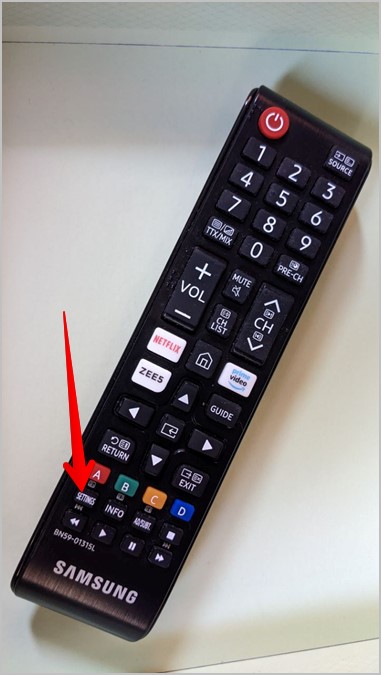
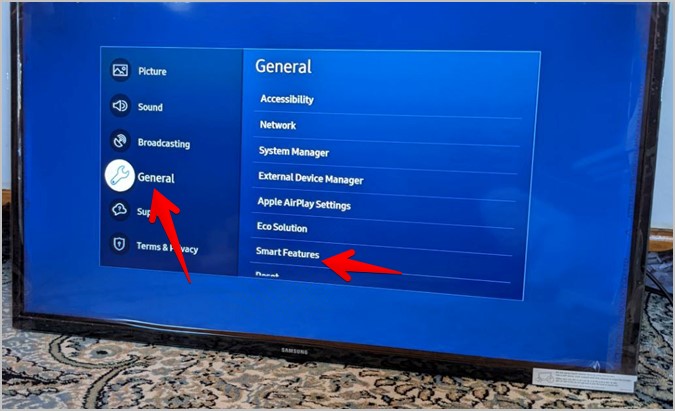
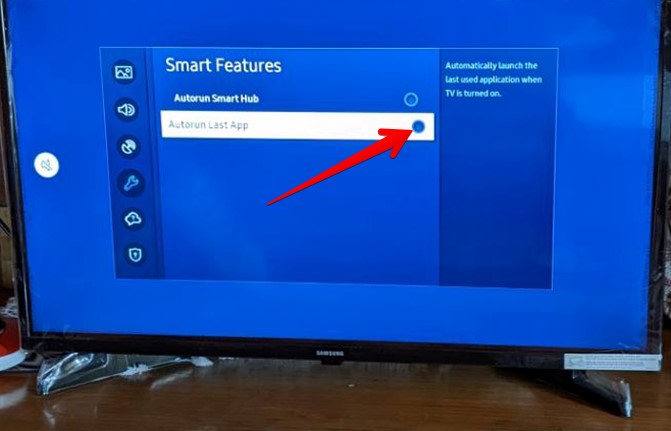
And good morning @JPM69 Everything is well here tx. Cold though. -28°C around -19°F and yes that’s MINUS. 

Bummer that the newer Samsung TV’s are forcing this Shite crap Samsung TV Plus on you now. My Samsung is about 5 years old (Black Friday deal) and thankfully this crap is not being forced on me.
Nevermind I finally found it!! But still need to change it up.
Anyone having same issue do as follows. This is for my QN65QN90F model.
On the TV setting menu go to All Settings
Then Advanced Features
Then scroll to the bottom and select Start Screen Option.
Deselect Autorun Samsung tv plus.
Now my last played app or device will be the Now Playing section. It still goes full screen of what ever I last watched by default. There is probably a setting where it can just stay in the home screen until I make a decision on what to watch.
I know. I was unaware of this new change. My TV was new 3 yrs ago and still going strong. Thank god STP doesn’t auto start for me. What a pain.
Yeah i got the early Black Friday deal this year.
I also found the setting that you can turn off the Smart Home Hub (as they call it) from automatically starting at power on.
Its right above the Auto Run STP option.
Going to test this out to see how it works.
I mean when I turn on my TV it goes to the same channel I was watching from the night before but in order to watch Smart TV Plus I have to actually download the app which I won’t. Hopefully I won’t be force fed an update to the OS that does this. I get very few OS updates with Samsung. Seems it’s been years which is a good thing I guess
Yeah i think I have the newest version of their Tizen OS.
My older Samsung had a totally different look.
Now this Smart Home Hub looks very similar to a Firestick or Android TV home screen.
You get your obligatory ad on the top of the screen and all the apps listed in a row to choose from.
Only had it a few weeks and I am still working out the kinks.
It’s in settings under General & Privacy - Start Screen Option you can toggle it off.
I tried to send this yesterday but as an ordinary human I can only post a single answer a day, seems a little over restrictive to me but it is what it is.
If you trying to use Android apps then no. You can sideload a certain apps with USB, usually in a userwidget folder. On some very old Samsung TVs we knew the dev user and pass of the developer account on tv and we could edit the url of their repo so Samsung downloaded IPTV apps from ours. Also i have heard that they used to install Oscam on certain models for satellite shering.