Originally published at: How to Update Stremio on Firestick, Android TV, & Google TV
This guide will teach you How to Update Stremio on Firestick, Fire TV, Android TV, and Google TV Boxes. If you have used Stremio in the past, you are aware that this platform oftentimes pushes out updates to the application to improve performance and more. We always recommend using the most recent “stable” release of…
6 Likes
I updated on my 4k Max yesterday. Update had a bunch of continue watching videos that I had to clear. That was a little wreid. Haven’t checked my ONN Box version yet.
The continue watching line has always appeared on my home page of stremio but I go straight to my “Library” where just my movies and series that I want to watch are. It also doesn’t show on the “Discover” page. I never bother clearing them I just go to the left side option popout and scroll down to discover or my Library. I just updated to this 64Bit 1.7.3 from 1.6.12 so now I’ll have to check out what’s new. Quickly looking through it I did notice a new feature. "Experimental ExoPlayer Libass support. Here is what that means>libass is a portable subtitle renderer for the ASS/SSA (Advanced Substation Alpha/Substation Alpha) subtitle format. It is mostly compatible with VSFilter.
I should note that on my Pixel Tab the version I have is 2.0.1 it’s my Bizz P6L Ultimate that is 1.7.3.
1 Like
I just updated, didn’t look for what changed. Let me know if there are useful updates.
I will have to test out the new feature for the subtitles to see if it adds anything of benefit, but even if it doesn’t do anything for your subtitle experience, you can turn it off in the settings.
I usually turnoff subtitles. Lol, hard for me to concentrate on movie and read subtitles.
I never have subtitles on except when a movie has foreign language parts and then I have it on (forced) so that I don’t lose the continuity of the story.
1 Like
I feel exactly the same. My old brain needs to only focus on one thing at a time. 
1 Like
That’s the version I’m updating from also and don’t notice a difference.
Just looked at the blog and evedently this is a minor update for Android TV. Maybe we gained something from other updates since that version. I tend to stick with a version that works.
The blog:
Apple TV changes:
fixed playback of live videos
added external player support for Infuse
fixed embedded subtitles showing even when disabled from settings
fixed adding to library from dropdown menu
fixes navigation bug where focus would get locked to side menu
Android TV changes:
- fixed a bug where torrent streams would not play and show “unsupported stream” error (some users enabled “tunneled playback” due to misinformation that enabling it fixes this issue, this is not the case as just opening the setting page would have refreshed the server status and fixed it too, we suggest that users disable this setting now as it can break playback of some 4K streams)
Android Mobile changes:
Fixed search bar overflow
Added adaptive icons
Prevent crash when scaling is unsupported
Added navigation bar insets in landscape mode
Fully extend scroll area when in landscape mode on settings page
Increased spacing between links on details
Fixed edge to edge display
Ya same here. I have had the 1.6.12 since the Android 16 debacle that destroyed my years long account. But This is a stable release and so I thought what the heck lets give it a go. The only noticeable change was the one I mentioned but I didn’t dig under the hood. No issues using it and no playback issues so g2g. On my Pixel Tab Android 16 it’s 2.0.1
1 Like
The changelog that @ScoobyDoosSpots just posted was the update from 1.7.3 to 1.7.4, that’s why it looks minimal. The 1.7.3 update was much larger. I didn’t have anything wrong with my previous version of 1.6.xx so I didn’t notice any change when I went to 1.7.3. One thing to note is that 1.7.3/4 updated exoplayer and libvlc to the latest so that might help others who had some player glitches.
3 Likes
Ah, that makes sense. Either way no difference here, luckily, I wasn’t having problems before and still don’t.
I do still have that odd sound dropout but I can get rid of it when using the tunneled playback option. The changelog said not to as it would affect some 4k playback. Well that isn’t so for me as I tested it last night for a few hours with 4K, HDR 10 and 10+ . So Now I will turn the tunneled playback back on as then I don’t get the second or two of sound drop out. Stream on gang and have a buffer free weekend.
2 Likes
That’s interesting! I noticed the same thing recently — sometimes updates bring small hiccups like that. Clearing the “continue watching” list usually fixes it, but yeah, it can feel weird after an update. Hopefully, the next patch smooths things out again.
1 Like
Haha, I get that! Subtitles can definitely be distracting sometimes — you end up reading more than watching the movie.
1 Like
Yeah, totally! I’ve had the same thing happen after a few updates — little bugs pop up and then disappear after a patch or two. Hopefully, the next version smooths things out for everyone.
I get a parsing error when updating
can you show the exact eror please?
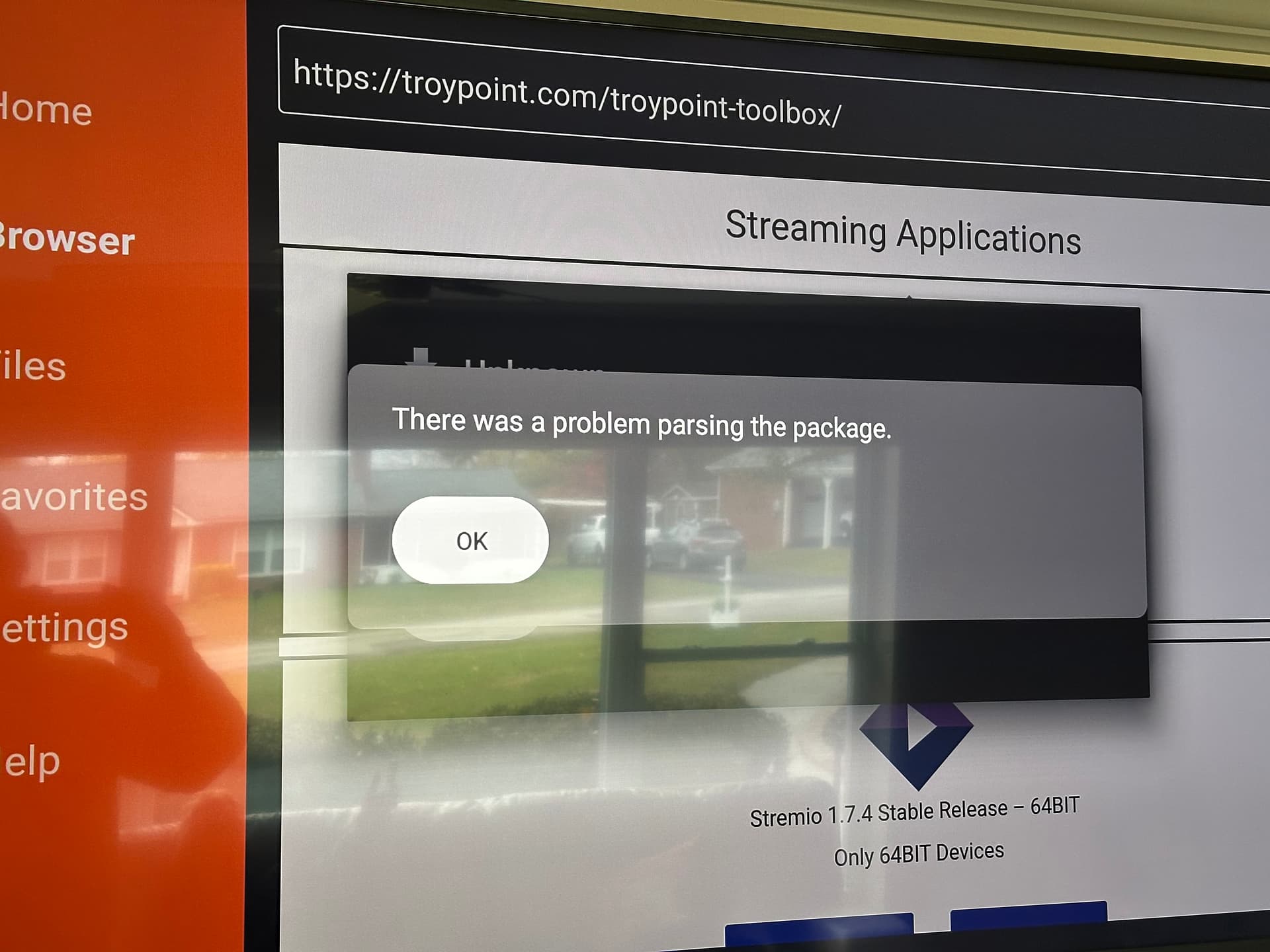
Did you make sure to choose the compatible version to what you already have? I know this may be silly but have you made sure to turn on “Install unknown apps” in the Downloader settings.