Lol. Damn you’re quick. I was just hitting the reply when yours popped up. Tx @Masterofmydomain and good to see you. Have a buffer free day my friend.
Hi guys, just wondering what you currently use with Stremio to get the most links for daily shows like XXXXXXX etc. I tried signing up for RD again after now using it since the issue they had and it seems it doesn’t produce many links at all anymore. Is there anything else you guys use and recommend?
Just checked first episode of S1 of XXX on my Stremio. Got loads of links with Torrentio, Mediafusion and Sootio, all with RD. Do you have these add-ons installed?
I did notice that some later episodes had no links
K weird. Ya I just tried S1 E1 and only get 1 torrentio RD link and 1 Mediafusion RD link
@Gumboil @jtmon3y Please read our rules and regs…do not mention copyright movies and TV shows in conjunction with 3rd party streaming apps/addons, etc. Thank you.
Ok my bad
Apologies - I unthinkingly responded to another poster. Will engage brain in future
As anyone else experienced this? I have noticed that sometimes when I look to watch a show/movie I get a “nothing found” result. But, when I clear the cache, disconnect and reconnect Surfshark and sometimes do a restart on my Onn 4k media player, then go back into Stremio, I now find results in my searches and can watch what I want. Does anyone know why this happens or know how this can be prevented? 
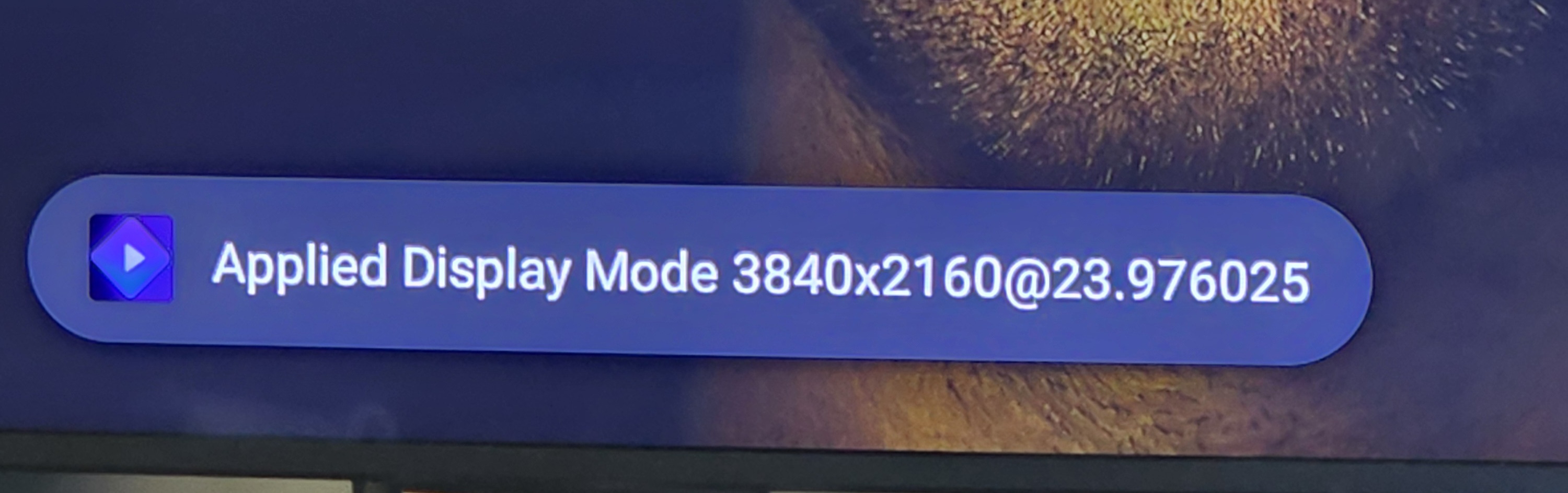
Hello to All, hoping to get some feedback and advise on this matter. I currently have a Samsung 4k TV, not sure what model offhand, using the Onn 4k box. My go to app for streaming is Stremio/Torrentio w/ RD. I try to choose a 4k stream whenever there is one available for the content I want to watch. But when I start the stream, just before the video starts I get a pop-up message like the one in the picture below. Obviously, that resolution is for FHD and not 4k (3840 x 2160). What can I do, if anything, to actually view the video in 4k? Is there a setting i need to change somewhere? Should I be using an external player, ex. VLC or MX Player Pro? Do I need a special 4k HDMI cable from the Onn to my TV? Looking forward to your replies.

Are you sure you have the 4K enabled on the TV? You may need to set the default resolution higher on the TV. Also check the settings in the Onn and make sure you have 4K set. I have a Samsung TV, 2yrs old now but it detects the res automatically. On my device I go into the Display & Sound section and choose 4096x2160p60.00 for my Resolution.
I will check all the things you mentioned and get back to you. Thanks
My 65" Samsung is 8 or so years old and I’m not even sure what it’s capable of. I’m gonna pull up model info and see then make any potential adjustments to make it the best it So my Samsung model is one of 3 in the UHD TV 7 series. Resolution 3840 x 2160.
I also have a 65” Samsung 4K UHD series 7 TV. Bought it on Black Friday of 2020 for $599. Great TV!
I like mine but you know how it goes, I COULDA fit a 75" but didn’t figure that out until it was too late. Any particular TV settings I need to check to get maximum great picture and upscaling potential? Thank you,
So i went into both, the settings on my TV and the Onn 4k device. I made some changes to video input, game mode and picture settings. Somehow whatever i did enabled me to now view videos in 4k! I went back and one by one set the settings back to what they originally were to try to find the setting that made the difference. After setting them all back i am still streaming in 4k. Lol, I wish I knew, to be more helpful to people with the same issue i was having.

Your asking the wrong person  . I’m not the type that tinkers with the TV settings. Plays 4K RD links from KODI and my IPTV service and that’s good enough for me
But what if the picture could be the tiniest bit better on our TVs with a settings tweak  ?
?
@miki Can you give us a few pointers for the best video settings on our Samsungs to make sure we are getting the best possible resolution? Both are a bit older than yours but are UHD.
I have never had to go into my TV settings for anything. My BuzzTV P6L has all the settings in it and I adjust everything from colour to contrast to brightness in there as well as my resolution. The TV is capable of displaying up to HDR10+ and auto adjusts to what ever is fed to it. Mine even has a one connect box that everything plugs Into and automatically switches the TV to whichever input has a source. Even my sound system does a full analysis of the sound feedback from the room and adjusts itself accordingly. When I first turned the TV on it went through a picture optimizing process and sound optimizing process that took a good 5 to 7 minutes, although I eventually turned off my TV sound and just used the surround sound system. The whole system has an app called SmartThings that will allow you to adjust everything to your liking or to set a sound system that responds to it’s own sound and adjust to your settings for each part of the system including the woofer and sound levels like base or what part of the satellite blue tooth speakers so you can adjust your sounds from 3 locations on the speaker, side, front and top to adjust to the acoustics of your room, same thing with the soundbar, front, sides and top. It takes a bit of learning but I loved playing with it and testing what each option does.
Thanks for the detail. I checked my TV settings and the biggest change it appears I could make is changing the picture from “standard” to “dynamic” which seems to add brightness and perhaps color enhancement. I tried it back and forth and stuck with “standard”. You can also go “expert” on it and change the gamma, RGB etc. blah blah blah but I’m not touching that stuff. I left everything alone.
What’s HILARIOUS is that without glasses, my perception of the “picture” isn’t super crisp and snappy anyway (even with super duper 4K or UHD or 8K or a gazillion K) and I’m NOT WEARING my magnifying readers to watch TV for a better picture.
Thank you all. GO BUCKEYES!