Yep, that’s what I did…super easy. Thanks!
I was under the playback settings, attempting to enable. The option to enable was grayed out and wouldn’t allow the change.
I didn’t try the first area that you referenced. I’ll check it out though. It was more for curiosity rather than a must have option to always have.
No worries.
I never checked to see if the trailer option was selectable on my original version of the install prior to two subsequent beta updates.
It likes you more than me. 
Hi All:
Thanks Troy for this very promising app. I followed your instructions to the letter but I am having a problem. My account dashboard shows that I have 7 addons installed but only 5 appear in the app when I choose “addons” on my ONN 4K Pro box. Torrentio and Piratebay are missing from the app but are present on the dashboard. I have done the following:
Force stopped the app and deleted the cache.
Rebooted the ONN Box
I accessed my Stremio account and copy and pasted as suggested by some in the channel but this has not worked.
I look forward to hearing from you.
Have you tried doing a forced refresh from the Nuvio online dashboard? That worked for me when I had an addon refresh issue a week ago:
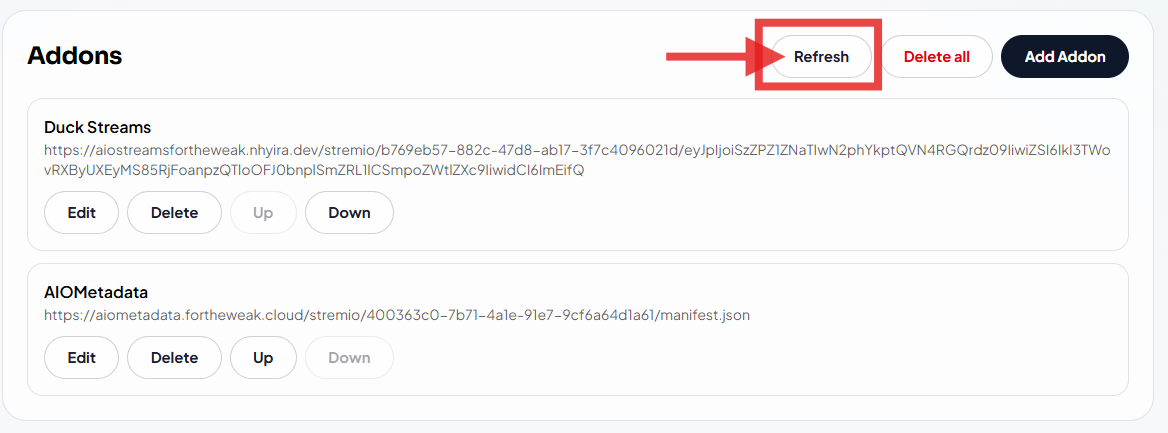
If not, there’s always the option of adding these addons directly to your Nuvio TV app. If you go to the addons section in your TV app, you can connect with your phone via QR code or with the Google TV app. You can then copy/paste in the Torrentio install URL from your phone into the TV app. I’ve done that as well, and it works as another option if there’s a sync issue you can’t figure out.
I would like to personally thank @wcr5jop1 for all his skills and knowledge with the Nuvio Media Hub. We don’t say it often enough, but ppl who give their time so freely are an amazing group of individuals and it’s insiders like this that make Troypoint a wonderful place to get help. Again. THANK YOU SO MUCH @wcr5jop1 for all your time and patience.
Does the Nuva player use all the same apps that Stremio uses an do you set it up the same way ?
@Miki I just downloaded Nuvio & it is an awesome setup, but useless until you get something in it to stream from. I haven’t watched the video yet, but need to of course. When I look at the add ons there is only a web address bar to enter whatever URL, but knowing what, where, how, you name it is another circus of mazes to figure out. I have never done anything with any of these types of apps where it’s required to have add on stuff to make it work, & have no clue if it can be aquired at all without any costs, or very cheap. These types of apps from what I know to this point will always cost you money to get an access service to get the movies/tv series stuff from, weather Debrid, Trakt or whoever. The Red Wizard does have some free stuff at least, but much of the live will buffer. I have never bothered looking in to it until the past few days.
Thanks @Miki! I appreciate the kind words 
When I joined TP back in August of last year, I relied heavily on the well crafted videos from Troy, and forum posts from the patrons to help get me going in the early days. It feels good to now be able to give back and help others along in their journey. Like you, I enjoy tinkering and testing out all this stuff. This is an amazing community, and the mutual assistance that everyone provides is a great thing to be a part of.
@Mslea It is just another internet dance!  I honestly struggle with this too as I have never got in to them before. I did download The Red Wizard which is somewhat more user friendly, well at least until I decided to download another build. Although I loved it’s build design of the new build I downloaded, I was suddenly stuck not to be able to get things to work as I could in the original build it comes with. settings were very lacking in the one I put in too. Then I couldn’t get it back to the original one with no way to see how to change it back, so the uninstall wipeout & re-install it was my fix. It is a huge amount of deciphering of web addresses & add on stuff, not to mention the finding & understanding of all the add on apps that are out there. It is fun at least for me to work on getting a handle on it, but for some that doesn’t see it as fun & have that interest to learn it may not be for those folks.
Watch Troy’s video. It explains it all.
No circle of mazes. Honestly. Just watch Troy’s video, multiple times if necessary, and read the posts here. Lots of your questions already answered. A debrid service is a must. They are very inexpensive for what you get. That and Nuvio doesn’t cost anything. Do you have Stremio? If so then the addons in there are what you use. You won’t get movies or series any cheaper than this. If you want Trakt, there is a useable free account you can get. An entire year for this setup will be less than one night at the theater and a month of a Debrid service will be about the price of a couple of cups of coffee. Absolutely an entire year for about half the cost of a month of cable.
@Miki What I was referring to on the circle of mazes which is in fact true for many things dealing with these type of apps. The differences in the builds as nothing is in the same place & much is hard to find depending on the build. Also there are not just a few addons & plugins but rather a slew of them & we have to dig to learn about them, then fight to locate them, figure out what is needed, what will work, so YES it is a circle of mazes in many aspects. Nuvio or no other app like this Kodi type designed app is plug & play. Nuvio is the most user friendly app I have seen thus far, but it only has a empty address bar for addons & plugins, & if your green like me in using this type of stuff it is totally a maze. There isn’t any info for this directly at all, it’s a “you dig” situation. It isn’t just downloading an app & click & go using it. This stuff requires far more effort & inputting many things in to it getting it functional, & requires much self education to deal with the addon/plugin things, not to mention all the research. Nuvio is a stand out as it’s very well designed & let me give a shout out to everyone that designed & built this as it is nothing short of excellent. Once I figured out I needed a plug in & put the link that Troy provided, & a huge shout out to @TROYPOINT, all is working well now, except the USA channels. A couple worked on those, most don’t. I have still some work to do in order to get up to speed on the addons & plug in’s but it is working now, not to mention I got this done before watching the video. If anyone wishes to set this up without logging in to it that is totally workable also as I just did it. Don’t get me wrong here as it’s a wonderful thing here, but it is a huge challenge to deal with the extras required to make things work & to learn what does & doesn’t work, what is good to use & what isn’t. All we rookies that haven’t dealt with this type of app it is a circle of mazes, so just please recognize that. This is why we all are here. To learn you need information. God bless all of those that created this Nuvio app. A super bargain it truly is!
I understand entirely what you are saying but it’s called learning. I embrace your so called mazes and willingly conquer them. We aren’t born walking, we must learn. We must learn to read, write, do arithmetic and it isn’t done by osmosis. We are taught how to learn, how to advance that learning and how to apply what we learn. So we do that all our life. Is it easy? Hell no, and neither is life. Does it frustrate us at times? Hell ya, but so what, the joy is in the success. Do we quit? Never. Nobody can do it for you. But you are fortunate, as you are surrounded by knowledge, and this site was designed to give it to you, but first you have to be willing to not only ask the questions, but accept the guidance you are offered, and watch the videos, read the tutorials and the posts that Troy graciously supplies, use the site search, the way out of the maze is given by those who have already learned how. And last but not least, be willing to try. Success is just another lesson.
@Miki AMEN! I tell many folks that if your determined to learn anything you will learn it. Just like when I quit smoking many years ago, I told myself I quit smoking, & done just that. Just the plugin/addon thing is crazy enough with these type of apps. Which does what? Both sound the same to me. I am going to dig for addon/plugin information that I can put in to the Nuvio app, & if you have anything to share on that please let me know. I am going to get this baby sailing!
Watch Troy’s video. Multiple times if necessary, then start reading the posts. It’s been explained many many times.
@Miki I worked with mine a bunch last night, played the beginning of a bunch of movies/tv stuff & let roll for a little while to see how all was doing without any problems except 1 - 4k feed that buffered. I then done a search for something I like to watch, then when it got to the point of pulling feeds it just crashed out to home page. Pulled up a few more from this particular sci fi I like to watch & only 1 out of 4 would work. Like Troy said it’s beta still so it’s to be expected. For the most part it’s been very stable for me except that issue which I have no clue what is causing that. I was very curious to see if it would have the sound issue on my AM9, especially since it’s Android 14 like the buzztv6 box but it worked perfectly on audio for all I ran.
I am a long time Syncler+ user (since it came out 5 years ago) and I have always tried other apps around renewal time, but I have always returned to Syncler+, that is until until now. Nuvio, even in its beta form, runs rings around Syncler+. The Nuvio app is amazing and it has so much control, from setting the maximum size files to select from to setting multiple styles for the app to display and it works with RD! This time I am not going back to Syncler+ because it has met its match and then some. It also works perfectly on a tablet and it syncs across all devices and oh, did I mention that it is totally free (for now)! I can’t remember being this impressed with a streaming app. It is definitely worth the time to set up. Great find Troy!
Just as a point of reference, I installed Nuvio on three of my Onn 4K plus boxes and also on my Fire Tablet 10. I wasn’t able to get Stremio to work properly on my tablet, but Nuvio worked flawlessly on it right from the jump. I absolutely love this app!
After a recent update at the top of the screen, even when playing videos, is a row showing the time, CPU temp, VPN and wi-fi icons. I have gone thru all related setting for layout and playback and turned everything off that I thought could be displaying this info. Forced stop and cleared cache afterwards. Are others having screens auto-showing this data also. Does anyone know how to turn it off so it is not a distraction during movie and series viewing ?
That’s strange. I’m on the newest beta version and am not seeing any of that. There’s no option in Nuvio settings that would enable those items to display.
Are those essentially the same icons you see on your device’s home screen, and they’re showing as an overlay on top of Nuvio, or are these different / unique to Nuvio itself?
Have you also tried to force stop Nuvio > clear app cache > reboot your device?