Thank you all for the responses. Looks like I’ll be giving TiViMate and My EPG a shot.
1 Like
I got the EPG working with my provider on Tivimate.
My question is about paying for the subscription. I generally prefer PayPal but that is not an option. The rest of the payment types are unknown to me. I like giving out as little personal info to these suppliers as possible.
Can I please get some advise/input on these payment methods?
Thanks, Jack
I’ve been looking into these IPTV Editors but I am a bit confused about a couple of aspects of using them.
- Do they provide any EPG information themselves, or do they just map your m3u playlist to whatever EPG source you provide? Epg.best seems to provide EPG data, but I’m not sure about the others.
- It seems that you have to provide your M3U playlist link. That link contains your IPTV username and password. Is it ok to provide this to some unknown third party?
Thanks.
Someone else will have to answer your questions, because I only use options 1 and 2. My providers are pretty quick to respond when I reach out to them for EPG fixes.
4 Likes
I have a couple questions about myepg. I got the trial and liked it so I went ahead and bought a year before the trial was over. This morning the epg source failed as the free trial is over. Once they process the payment will the same sources i installed as the free trial start back working, or will I be sent new ones? Also with strong i was sent 2 epg’s, eu and world. Does it matter which one I set as default or should I leave the one that came with strong 8k my default?
1 Like
So after the trial is over those EPG sources are dead. You will need to install the new ones. I have Strong and installed both of the new EPG links. I left the Strong EPG where it is and just added the 2 new MyEPG ones
3 Likes
Do you remember how long it took to get the new ones? I haven’t gotten a response and I sent payment 36 hours ago.
1 Like
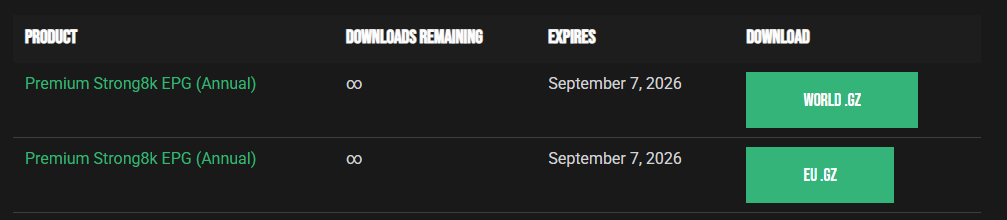
Log in to your MyEPG Account then go to Download and you should see these 2 files. There are also instructions on how to add them to Tivimate.
3 Likes
Alright people, I spent hours playing around and testing free EPG sources to supplement my providers EPG. I can confidently say that the below link is by far the most accurate for local channels and more obscure movie channels.
https://epgshare01.online/epgshare01/epg_ripper_ALL_SOURCES1.xml.gz
5 Likes
@Jayhawks659 I’ve never used an EPG service and am NEW to Tivimate. If I plug this link into my Tivimate field where it says something like “add an epg”, it will improve both services’ epg I have running on Tivimate?
Settings>EPG>EPG sources>scroll down>click Add source>click return button on remote until you are back on the Settings selection pop-out>click Playlists>highlight and click playlist of your choice>EPG sources> click on to enable any EPG sources you want or have added> back out
1 Like
Sounds like a ton of work. Sometimes I like to tinker like many years ago when KODI was brutally hard. Sometimes I just want to pay the $7 to MyEPG and have it work fabulous 
4 Likes
I agree with SoloWarrior, for $7 and it’s good for year. Now 90% filled in. You can’t beat it.
4 Likes
I use the same MyEPG for Mega. Does a pretty good job and is cheap.
3 Likes
@miki Thank you. Wow, I appreciate the detail. Am I brave enough to try this, sure. I’ll have to brew some Death Wish before I start.
Working on this NOW. Can I have several EPGs assigned to the same playlist at the same time? It appears YES. It’s UPDATING.
1 Like
Contrary to the nay sayers above, it’s easy. Just a matter of learning where and how in the app you’re using, especially for live TV.
3 Likes


@miki It is EASY! I just did it. Bravo for all who nudged me forward.
3 Likes
It’s not just a matter of having it filled in, it’s a matter of having it CORRECT. I can tell you my locals were all over the place. I had to use the official TV Guide app to see what was supposed to be on, then watch the channel long enough to verify that was in fact the show that was on and the correct channel. Then find an EPG that matched exactly for that channel. It was only the 4 major networks and a handful of movie channels. My provider does a great job of providing the rest.
1 Like
There’s an additional step if your provider EPG is your primary source and this URL is secondary. If your primary source has information but it is incorrect, you have to long press the select button on the channel and go down to assign EPG, then search for the channel by name, then assign the one that shows up under the secondary EPG. I think if your primary EPG says “no information" then it will automatically detect the second EPG. But for incorrect information, you have to manually assign it.
P.S. For local channels it is best to search by call letters.
1 Like