The Buzz comes with it’s own app for setting up the remote. BuzzTV Smart Remote. Open it and all the options you want are there. If you have no control at all, then do a power cycle. Unplug the P6L, remove the remote batteries, wait for a couple of minutes, put the batteries back in, plug the P6L back in and let it boot. It should see the remote and pair it to the P6L. Then if needed you can open the remote app to set up TV control.
thanks we’ve been trying to do that. I’ll keep at it. The problem is I get it on my cell phone, not my computer where I can print it out. But I’ll review again as when I PANIC, like now, I miss things, lol
Sorry I think you mean a remote app to install on say a phone to control the P6L. Not what I’m talking about. The home screen will have an app called Buzz TV Smart remote. It contains all the settings configurations for the remote. The remote will auto pair on a device restart, so even using the button on the front of the P6L to turn it off then back on should cause the auto remote pairing function.
So we restarted the box, using the button on the box. It did not auto pair. I did the home and ok button, red light flashing, will not stop flashing.
Would you have a PDF of the P6L remote you could email me? I can’t print what they sent me, it downloads as html. and I can’t blow it up on my computer to read it cause half of it disappears. If I have a PDF we can print and read from maybe we can fix it. Remote finally stopped flashing, Remote still unpaired. if you can send me a PDF I’m at Canadia99@pm.me
So we did remote factory reset. hold D-pad and the zero button for 4 seconds until it blinks 3 times. Did that. Then we tried pairing home button and OK (like when I got it originally). it blinked for a long time but did not pair. oh geez, suddenly it started to work, husbands hands it to me it won’t work. hand it back it stops working. Good grief. Got your PDF thank you, working on that now.
@Miki Thank you for the PDF, much easier to print and read. in the several attempts to reboot several ways and changed batteries, it finally worked. I can’t tell what we did that fixed it, except that for a while we needed to be within 6 inches of the box.If not, it would not work. Once we were sure the D-pad worked we could again use the remote from a distance and without it facing us (like originally). So frustrating.
Now I’m afraid to pair it to the T.V. I think I’ll try that on Monday, during business hours so that if I run into trouble I’ll call BuzzTV (and not MIki!).
Thank you so much for your help. I need a margarita. if I could send you one, I would!
post removed by me as i considered it “wrong place wrong time” for such an epic creation from my addled mind! (right…) Ill repost it elsewhere where it hopefully wont be deemed as “thread-jacking”
OMG @Mikki! 90 minutes working via Chat with BuzzTV and finally Mike, the supervisor called and coached me to get my remote properly paired. Apparently “pairing” just means the remote is in the library, but that doesn’t mean “connected”. When it finally did work, even he was surprised and said there could be a thousand reasons why.
Note, he said there is a problem with Analiti. It needs an update and they will be pushing through a system update soon. You likely updated yours cause you are android, I am Apple and cannot.
But to everyone reading this, the customer support at BuzzTV is outstanding! Like I said, they spent 90 minutes working with me and were so nice, I want everyone to know.
I have the 8gb version and love the hardware but hate the launcher and even tried a few other launchers but decided to sell it on ebay in the coming days so be on the lookout for a good deal!
My analiti works fine. It updated last night. Still no problems here.
Yes because you updated it. The reason mine and others won’t work is it needs an update and I guess people in my shoes can’t update it myself–I have no google account. I don’t know how to update it from the info you sent me. But, I shall wait for BuzzTV to push their update, coming soon.
oh and they explained the only reason they included Analiti is because it is a tool they use to troubleshoot issues–such as, is your router too far from your devices.
The Buzz is a 64Bit Android. If you have downloader installed on it you can use it to download and install the latest Analiti. Analiti worked for me without an update and worked perfectly after I updated it. The Google Playstore comes pre-installed on the P6L.
Thanks @Miki. I have downloader but no code for Analiti. I use to get it off the Amazon home page, but I don’t have that on the Buzz home page. You are right, of course, the Playstore is pre-installed. I opened it and downloaded Analiti but all get is a spinning circle. Same thing when I try to open the already installed Analiti. Spinning circle. Don’t know why that happens on my box. Hopefully an update will solve it. I see you found Analiti on “Uptodown”, but I don’t know what Uptodown is how to get to it to download Analiti from that website onto Buzz. I can do it on my computer, but don’t have a browser on the Buzz homepage to do the same there. I’m hopeless. I shall wait for an update. 
Have you installed Downloader? It is a browser as well as an APK installer. You just open it. Enter in the up to down url that takes you to analiti, scroll down and click on the install. The following pic is in the Downloader. The Buzz remote has a cursor as well. Just on the right beside thehome button. Click it for on and again for off. Use the direction ring to move and click the ok button to click on any button on the site. Scroll down for more but I circled what you click to get the download.

@Miki, Excellent. yes I downloaded, Downloader. I will try this tomorrow, cause my husband is watching Stremio right now. THANK YOU!
You are very welcome. Please don’t stress to much. I’ll help you learn how to use the Buzz without anything else. We’ll get it all straightened around. Lots of little things to learn like dbl clicking the home button while on the home screen clears any background running apps. Also we can change the 4 colour buttons to open anything you like. Baby steps though.
I so appreciate your help, @Miki! I don’t know why I didn’t realize Downloader is a browser. But like you said baby steps.
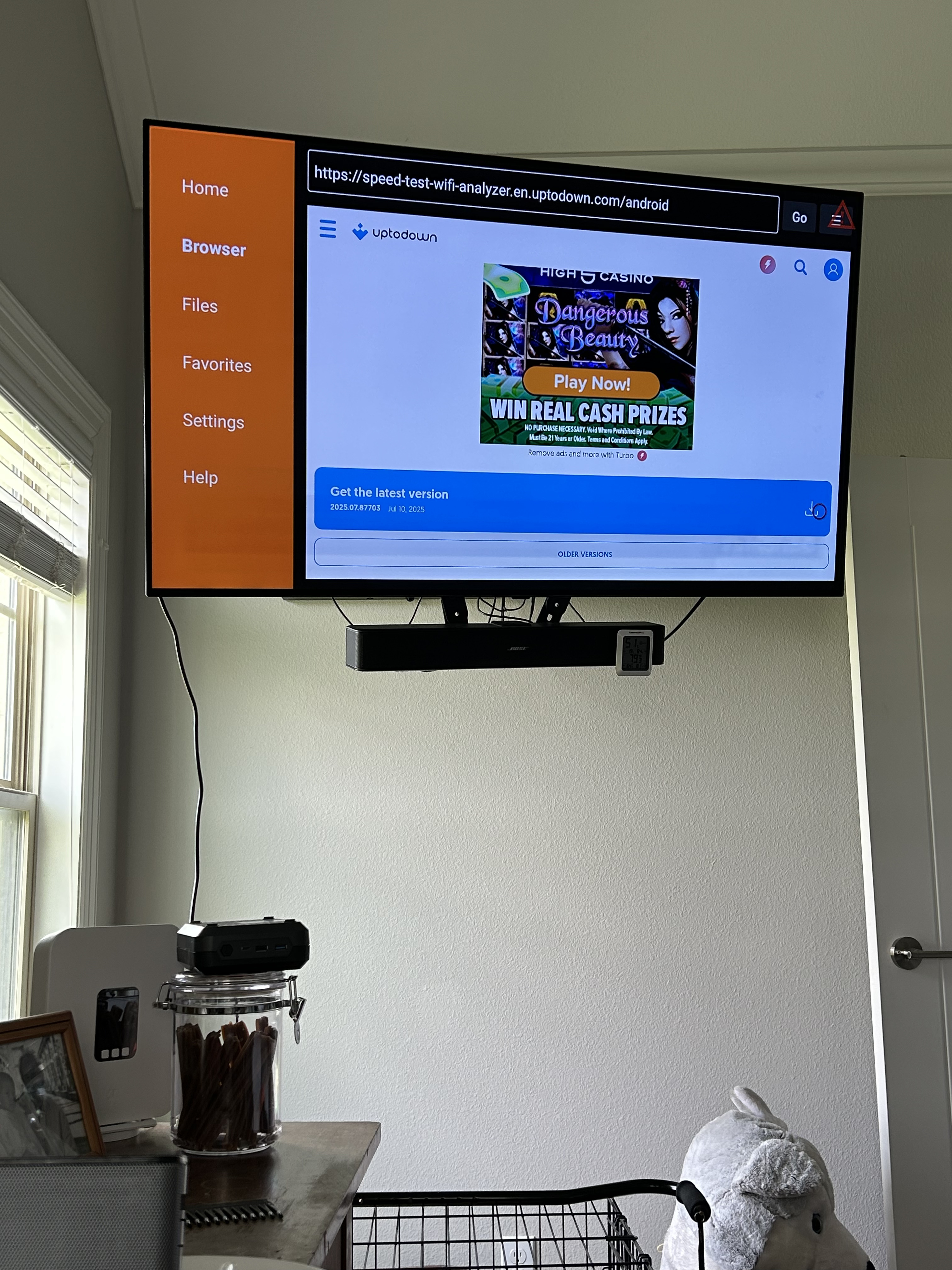
Opened uptodown on the Downloader browser [https://uptodown.com/]
On their website I searched for Analiti, found it just like it showed on the pic you sent me.
Scrolled down to get the latest version (see attachment)
Clicked on it, like I download things off of Troypoint, and nothing happened.
I also downloaded the uptodown App and searched it for Analiti, but could it would not download from there either, I wasn’t even given the option.
So I can’t imagine what the trouble is. I do know how to download from the tool box.


I dunno. When I try to download it it doesn’t download whereas the uptodown App did and then I could delete the installation file. I clicked again on the far right arrow (pic 1), then scrolled down to see what was below Analiti (pic2). and below that, if I clicked on the far right arrow it wants to download the uptodown App. With the uptodown App on the home page of my P6L you would think I could download from there. But when I search for Analiti, I can type it in the box, but then I can’t click on where I typed it in so it will search? It’s a mystery.


Also no worries @Miki, you’ve helped more than enough!!!