I am having a problem with my Ugoos AM9 pro . It’s a new box that I just set up a few days ago . After adding all my apps to it the box worked great but after doing a reboot from pulling the plug an restarting it my apps will not work . My Chrome an Brave browsers work great but when I open my apps like youtube, Bee tv, Tea tv even the play store will not work . They all say no connection . I don’t understand why my browsers are connected an working properly but the apps are not . So erased an done a restore an added all my apps back in which took the whole day to do . Then I unplugged it again an the same thing happened . I lost connection to all my apps except the browsers . I’m wondering if this box is defective . I could really use some help .
Are you turning off play protect before adding your apps?
Even the legal apps like tubi don’t even connect The app store don’t work ether .
I have the same box and never an issue like that. During setup one of the first things I do is turn off play protect, otherwise google will remove apps they have not approved. I would be concerned about sideloaded apps such as beetv etc that could have corrupted the install. Personally Iwould re-setup the box from scratch, get everything tweaked but do not sideload anything for a few days and just make sure all is well…..and in the meantime verify your source for the apps you want to sideload.
This box is even disconnecting in app google play approves so it can’t be that . even youtube wont play . I reinstalled everything an it didn’t help .
other than a poor internet connection, it sounds like malware.
My malwarebytes antivirus app don’t work so I can’t try it . My internet connecting works great on my $19 ONN box .
@scooterboy952 are saying that you aren’t able to open Play Store?
As TXRon says, keep it very simple so load only one app to test.
OH! and don’t unplug the box until you shut it down with the power off button. Unplugging while powered up is not good unless it is completely locked up.
I got the Play store to open an reloading .
Great! I would suggest loading a speed checker like Analiti, but I don’t think that it’s available in the Play Store. There should be several other speed checkers just to confirm that you have adequate network speed, on the AM9, before loading the Downloader app.
So like I said, start really slow with adding apps to make sure that there are no issues. And congrats on the new AM9 Pro. Hopefully it will work out to be a great box for you.
On my AM9 Pro, the virtual keyboard does not pop up when attempting to use search function in Stremio, Nuvio, or STRMR. Virtual keyboard works fine on my Onn 4k Plus and Formuler Z11 Pro Max. Is there a setting that could be disabling virtual keyboard on multiple apps on AM9 ?.
Strange,but it soundslike the popup feature was turned off…check that setting in Device prefs>>>Inputs and devices>>>keyboard & Autofill>>>…when you get here make sure android(aosp) keyboard is default and then click on>>>Android Keyboard Settings>>>Prefs…and make sure Popup on keypress is selected.
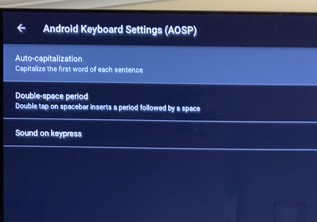
Under Preferences, I only have Auto-Capitalization, Double-space period, and Sound on keypress – all are enabled.
something strange going on if thats all you see under device preferences??? I have about 14 sub catagorys under this heading, one which is inputs and devices where the info you need is listed.
This is what I see after clicking “Android Keyboard Settings” >>> Prefs. This is several layers below Device preferences. I am seeing a “Sound on keypress” but not “Popup on keypress” that you mentioned.
so you do not see “Inputs & devices” ?
Yes. I followed your instructions: Device prefs>>>Inputs and devices>>>keyboard & Autofill>>>…when you get here make sure android(aosp) keyboard is default (It was the default). Then I clicked on Android Keyboard Settings>>>Prefs to see if Popup on keypress is selected. There was no Popup on keypress ONLY Sound on Keypress.
ok….this is where I find the setting in inputs and devices>>>Keyboard & autofill>>>Android Keyboard(AOSP) settings>>>Prefer
ences… 4 lines down on this page is where I find Popup on Keypress
im fixing to leave for awhile…but also check stremio permissions. Might also enable developer