Wolf also works well on the homescreen. Here’s mine with the Vortex Galaxy live wallpaper off Google PlayStore.

4 Likes
So now that you have had a chance to run it through its paces what do you think so far? Any problems?
Thanks for checking in. I haven’t messed with it as much as I would have liked before reporting back. I caught a flu bug this weekend, so I was just not feelin’ it. I have set up the launcher (ATV Pro) and a decent amount of the apks, and from what I have seen so far, I have really been impressed. I even threw on the live wallpaper @sim_bill recommended to test it, the picture is fantastic and smooth. I can say, the box hasn’t hesitated AT ALL. Fast fast fast…the menus are snappy, the programs quick to load and function. Kodi runs very well (even though I only have 1 add on so far). I have been impressed enough to get it its own fan, like I posted above. My concern about jumping to stock android was how it functions on a TV. But it really isn’t a big issue at all, especially with the bluetooth remote with air mouse. One click to turn on air mouse, use pointer, click and then turn off air mouse to go back to a more Google/Android TV experience. As time goes on and I use it more often, I’ll continue to give my thoughts.
4 Likes
With the choice of available custom launchers, stock android can pretty much seamlessly function like Android TV. Versus “certified” devices, it’s even better since you don’t have to contend with bloatware. Much easier to customize as well. One other thing, some folks are indicating they are waiting for the AM9 Pro, which is supposed to have up to 8 gbs of RAM. If you use your device for streaming only, and not gaming, you’ll see no difference between 4 gbs and 8 gbs on the RAM.
4 Likes
I think the only time I ever use the air mouse is in the Play store, which is very rarely.
Besides gaming I think the only real application that benefits from 8gb would be Kodi with one of the skins like Artic Horizons etc. with a ton of widgets set up. And maybe a hair bit better performance if you app hop a lot.
I just want 64bit OS, 8GB ram, Dolby Vision and other HDR formats, all audio codecs and up to date codecs. Every box leaves Every box leaves one of those off and it is frustrating.
That being said both the Ugoos SK1 and AM9 are great. I don’t see myself buying another certified box unless an unbelievable deal comes along or something changes.
1 Like
No doubt. It is a bit frustrating that none of the manufacturers seem to have built a device yet that has ALL of the latest or best hardware/software features but that’s the world we live in. That said, we are getting very close to the point where any further advances in streaming technology are so minuscule, they won’t be noticible to anyone except those fortunate enough to have the space and budget for a supersized tv or monitor over 100” in size. That said, except for a few bugs in the Android 14, the AM9 comes close enough for me.
1 Like
I’ve been looking for a way to connect/control the UR02 (SK1’s BT remote) to the current TV I am using. As of now, it is just a cheapo TV to get the box up and running, but one of the things I enjoy about Google TV is the ease of connecting the TV and being able to power on/off and change volume on the TV it is connected to. How are you guys controlling (or are you?) your speakers, etc with this box/remote?
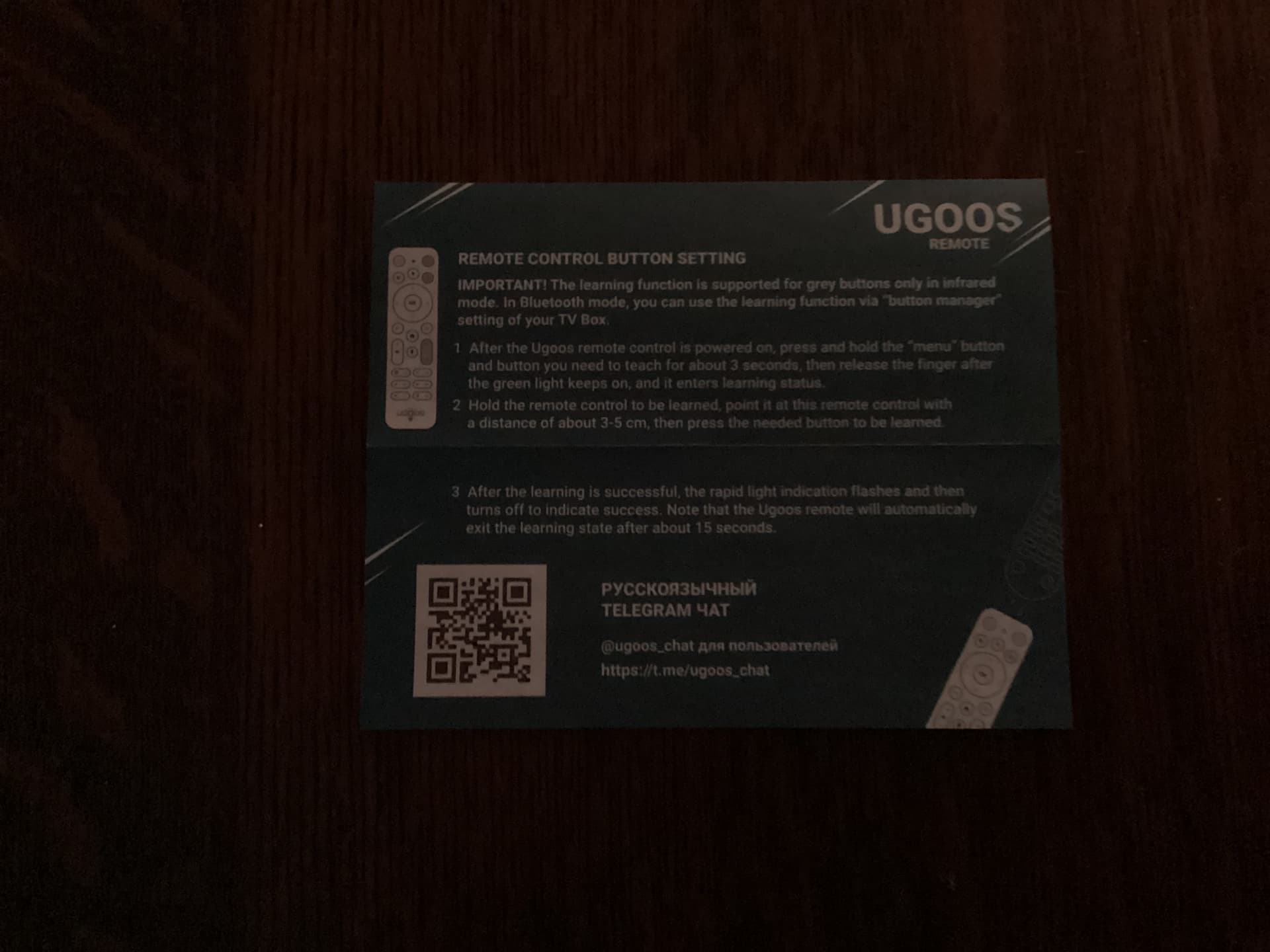
Much will depend on your tv. I have 2 LG OLEDs. The SK1 remote seemlessly and effortlessly paired with my newer B2 but not with my older 55” set, which was a 2016 model. Below are the printed instructions from the UR02 remote regarding pairing with your TV’s remote control.
3 Likes
I’m using a Samsung tv and a Yamaha 5.1 sound system. I have my SK1 connected directly to TV with hdmi. I have audio out from TV to my receiver using hdmi. The red power button on the UR02 remote turns all 3 devices off or on.
The volume buttons on the UR02 controls volume level on the Yamaha Receiver as well as mute. How I got this all working properly is a mystery  now cause it’s been awhile
  if you have any specific settings you’re wondering about, I could send you screenshots of what I have.
2 Likes
The instructions @sim_bill posted should work with just about anything but make sure you try CEC first. The CEC options are under settings>device preferences>inputs & devices.
1 Like
Thanks you guys. I really just need to take it downstairs onto my main TV and test it. I have a 65” Samsung QLED TV hooked to a Yamaha receiver for my surround sound. I just hooked the box up to a cheap TV without bluetooth and all that to get it up and running. I was thinking maybe I missed the menu option to go through and be able to control the power/volume even on that TV, i.e. newer Google TV boxes and Firesticks. They have the function to go through and identify the brand, and has you test those buttons until they work.
Ugoos came out with firmware updates for a few of their boxes today. One of them being the SK1. It’s being updated to android 14 and requires complete data wipe. Also huge downer for me is you need a computer to do this and since I don’t have one and am computer illiterate, I’m s*** outta luck. Files needed can be downloaded from their Telegram channel. Now I’m going to pout.

3 Likes
Dang, not sure if I really want Android 14. Sounds like maybe I don’t have a choice. I haven’t put the SK1 on as my full time box since my family is so used to the Shield. We will see how this goes. Thanks for the update Papa.
1 Like
@PapaS, just for you 


2 Likes
You won’t be forced to upgrade, there is no OTA way to push this update, that is why it requires a full wipe.
I really like A14 on my AM9 but this will be the 32bit version since they don’t have a 64bit SDK for the S928x.
I’m probably going to do it since I see any future development/features being on A14.
1 Like
I won’t be updating my SK1. Certainly not to Android 14. The SK1 works just fine with Android 11. I won’t do it even if they update the RAM to 8 gb or enable 64 bit processing. Android 14 is that bad and has had it’s share of bugs.
3 Likes
I have no problems with Android 14 so went ahead and updated.
Took about 30 minutes to reflash using the PC method and install Projectivy, Stremio, TiviMate, Sparkle Player, Plex, YouTube, Smartube, Downloader and Aptoide TV. Everything went smooth and it is running great. I’ll probably set Kodi up later.
It may be the placebo effect of a new toy (or a t least a freshened one) but I would say it is just a tad bit quicker, but it is hard to tell since the SK1 was fast to start with. Other than that, no major changes for me, I just prefer to have my AM9 and SK1 running the same version OS.
2 Likes
As an update there are people on Telegram reporting there may be problems playing back interlaced IPTV content so that may be a reason to hold off. I haven’t run across it you but have only watched a few programs on IPTV so far. I have watched a good bit on Plex and no problems.
One user reported that they were able to use the PC burn tool to revert back to the Android 11 firmware.
1 Like
I’ve tried to do some research and it just doesnt seem like the upgrade is really that much of an upgrade, if at all. 14 doesnt boast a lot of extra features, and seems like it has more issues. I think I’m gonna wait and keep an eye on it. I just don’t see an issue running 11, unless they were going to use this update to boost to 64 bit or something…
2 Likes
Yeah, as of right now I can tell no difference and there is no real benefit other than I like to “play”. The only way I would know is to go to the about in settings to check.
Unfortunately, they have ruled out 64bit. No chance at all because of Amlogic so not Ugoos’ fault.
The good thing is these boxes are hard to brick if you have a PC with the Amlogic burn tool, so I may go back to A11 or even try the Slimbox Android TV build.
1 Like