Until last night I have had no issues with shows working. Last night it started showing waiting for a debridio download. I know there is a fix but can’t remember how to fix it . Also , I use Offcloud and it doesn’t seem to be working. Thanks
My OC did not seem to be working last night accept in Meteor. So I checked some settings as when I got back from my trip there were tons of updates. I found that in SS the Ad blocker was turned on and that has always seemed to interfere with my source scraping, so I turned it off this morning and now OC sources are fully back and scraping is back to normal.
No issues using KODI Umbrella + Torbox
Ditto!!! 

I did turn off ad blocker but hat didn’t help. How do we know when OC or Torbox updates? I have had this happen before but it corrected itself on it’s on
[Debridio] Download Queued
Not sure what this is. The feeds have always worked very well
I don’t use download, I configure it for cached only.
Silly question is that done in the app or thru torbox and such
It’s usually in the addon configuration, in this case your TorBox account dashboard.
I had to go and sign up again because I lost my account info, no biggie. So where in there is this at so I can take care of it
If I remember correctly it’s a setting that says “Exclude uncached Sources”.
I will look Thanks
Sorry I no longer use it or I could go on my dashboard and give you the exact route.
@Remy sorry what app are you using? and can you check if you can do it through that?
It’s on Nuvio but also on Stremio and Kodi. However, I think it’s resolving it’s self. Working better than last night. usually very reliable. Trying to figure out how to only use cache feeds
@Remy I believe for Nuvio if you log into you account then go to addons the ones listed if have a config button should be able to select and save in the addons at least saw that option in Meteor I just now turned it on also at the bottom of that one said “Already using Meteor, on its own or through AIOStreams? Updates happen on our side, so there is nothing to reinstall or change.” I guessing if it’s turned on it will update to that not sure but I enabled cached only so we’ll see - didn’t see an option for cached in Torrentio so not sure about that saw the option in Comet config advanced checked box for cache copied link went back to edit in url field replaced what was there with the one I copied and saved so we’ll see there too I’m hoping that is all good I know there are others here smarter than me Ha so if something not correct here hopefully someone can let us know I’m still learning on some of these apps as well
Went through and updated all with new Torbox API since I had to renew from scratch. I still get the wonderful blue Debridio error message waiting for the item to download, which it never does. I want only cache items but can’t find where you make these changes. Still working on it
When you log into your Debridio dashboard click > go to addons> then click explore debridio> you will be on the configuration page. 
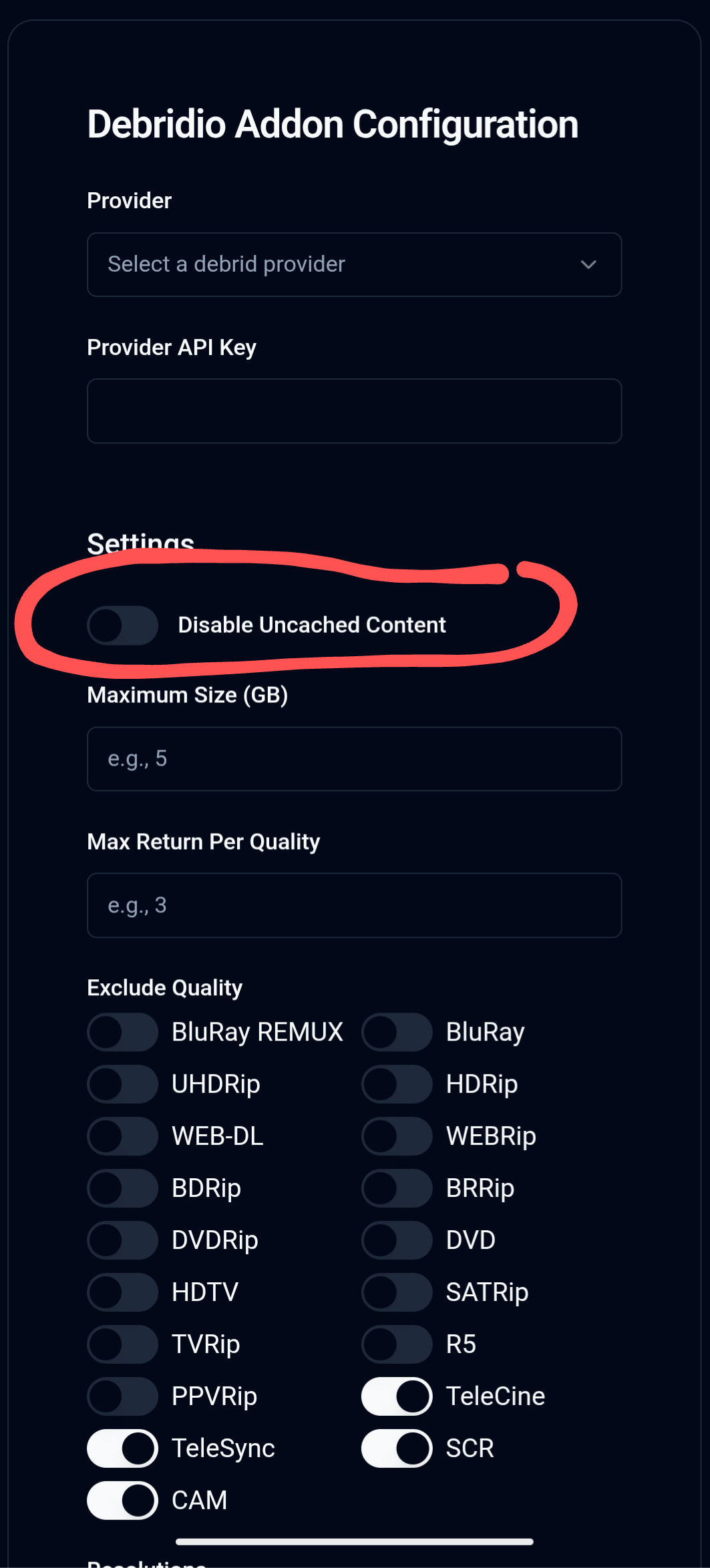
After doing the full configuration to your needs click the copy instal URL down the bottom. Then open Nuvio, go to settings>Content & Discovery>Addons and paste what you copied into the Addon Url line then click the Add Addon button and you’re done.
Just went back in and redid everything and uncache still shows up but I will figure it out. FYI, I have no issues on movies just TV series where there are a lot of episodes over many years