LMFAO = Laughing my f’n ass off 
@Masterofmydomain ….well duh uh  i shoulda got that one….

Hello, and Welcome to Troypoint.
First go through the guide linked above.
Not sure why it is not a clickable link in the guide, but here is a link to the start of Ducks set up.
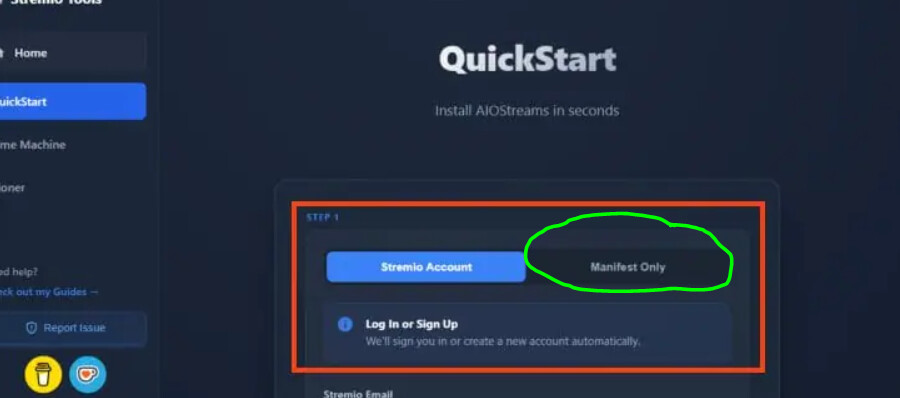
When you get to that page and click quick start you should see something like this. click on the Manifest tab instead of the Stremio tab. it will give you a URL you can add in STRMR under Scrapers. Then follow along with the guide and enter all of your information like API keys. Duck has made some changes to it since I have used it last and it seems this would be the best way to get that URL you will need.
@PapaS PapaSthis is not the stremio post . This is Strmr
@DaveZerf DaveZerfthis is not the stremio post this is strmr post
These addons work in Stremio and Strmr
Okay, my mistake.
No worries . Just didnt want you to see answers or suggestions and they be for strmr not stremio
.
Do you @Miki @PapaS have any suggestions why the Strmr app won’t work on my ONN tv box ? I followed @TROYPOINT ‘s video exactly .
What does not work? Doesn’t open? wont play? won’t find streams?
Says no sources found for everything i search for
I have torrentio , and premiumize set up . On it .
How do we get the long URL into STRMR?
What do you have set u p for the scrapers?
I use atvTools on my phone. You could use google tv app if your phone and tv box are both on the same wifi.
I do it a long way but it works for me.
I copy URL, I have telegram on my computer and my phone,I set up a group just for myself, well I have 3 actually, but after copied on computer I paste in my group and it shows up on my phone, then I copy it and use atvTools to paste it in to STRMR on my TV box.
I have Torrentio
Ok i got it to work on my phone . How do I transfer it to my ONN plus tv box ?
I am not sure, I had been reading that there have been issues with torentio, I don’t use it, you have the other one disabled?
what did you do on your phone to get it to work?
I just installed it like I did on yhe onn box