projectivy works a treat for me, very simple to use, use it on all our google android boxes.
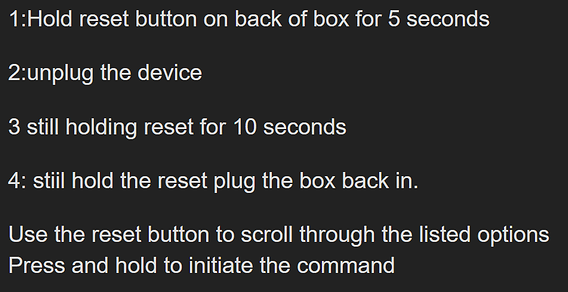
That should be the correct method to factory reset it
Thank you for the reply Throttlejocky!
I was hoping that it would just do a basic reset. I didn’t want to go through the whole set up again.
Not sure what options it’ll give you, just have to do it and see. Good luck
I thought there was also a way to use a Voice command like “Settings” to get to settings?
Any comments?
That might work? worth a try.
Well, of all things, the box started up normally when I turned it on yesterday. Go figure! I didn’t check to see what version of Android it was. But most all of the apps needed to update.
The one thing that I remembered right away was just how much I H-A-T-E that stupid remote! And mine is the backlit (?) one that doesn’t light up until you hit a button. And I fat-fingered the OK button when trying to fast forward and I don’t have fat fingers.
I did a search and found some info on doing a soft reset when you have a blank screen. It was posted by somebody that goes my the initials “AI”. The sequence was;
-
unplug box for 60 seconds, then plug back in.
-
Press HOME button 5 times.
-
Press UP button 1 time.
-
Press REWiND button 2 times.
-
Press FAST FORWARD 2 times.
I used AI the other day, just wanted to fix volume button on FS remote…The instructions I followed RESET my FS to factory settings and I have to re-download everything…I’m still working on it! I will not use for anything technical again!!!
I was getting poor reception with 2 separate playlists. So I unplugged my wireless router the ONN box power and tv connection then reconnected everything. The box booted, showing ONN and Google TV then nothing, just a dark screen. After a few minutes the screen saver comes on. Suggestions?
More information, I asked Google to open tivimate, it just described what it was. I then asked it to open Netflix (I have a subscription) and it did. Launcher issues? Basically I can’t get to the home screen.
I asked Google to open playstore then downloaded downloader and Nordvpn. From downloader I opened troypoint toolbox, added back to my favorites, downloaded tivimate and projectivity launcher. I logged onto tivimate and was able to restore from my backups (yay)! I went to system settings. Oddly I was still shown as a developer and everything seems like I set it except I can’t manage to reconnect my memory stick (fried?).
Now that I am mostly back to normal, can anyone tell me what hat happened and anything I can do to prevent reoccurrence?
Tedebear, glad that you were able to get everything running again.
My first thought, originally was to change the batteries in your remote. The issues sounded consistent with a battery issue. But apparently that wasn’t your issue. My second suggestion would have been to reset your remote but again, not the cause. So in hindsight, I’m thinking that you had a gremlin giving you grief.  To check the the memory stick, try plugging it into a computer or try to reset it.
Personally, I never use voice commands. For me it always seems riddled with errors which may be caused my voice.
voice was the only way I could access anything as I had a blank screen. I trtied plugging in the memory stick into my pc and it wasn’t recognized. Oh well, they,re cheap.