All of a sudden I noticed it not updating last night. Is anyone else having trouble with myepg?
I have been using a third party epg service named MYEPG.TOP
It’s worked great since last December 2025 but now it won’t update and I continually get “failed to update”. I’ve been working with their Telegram support and the owner(?) without luck. I went through 4 or so new URLs and now a brand new whole set-up as if I bought a new service.
I must doing something wrong but I can not get it to load onto Tivimate.
Failure to update over and over. Do I need to activate it somehow on their website??
Thanks in advance
That’s Strange mine is set to auto update every day. Just checked and it already updated for today. Did you change anything or possibly add another EPG source. I do now the entry string has to be correct even one wrong typo will break it
If I were playing the odds, I would bet on user error.
I subscribe to one of their services and it works in both tivimate and sparkle players.
You may be subscribed to a different service than mine, so my results may not be relevant. (I don’t want to know what service you have, so don’t post it.)
If the problem was on their end, it would be solved by now. Time to focus on your end.
I am going to make a few suggestions for you to consider.
Download another player and try the EPG in it. With the EPG now in tiny url link there should be minimal error in entering.
Linking the Tivimate manual. Read the section on EPG. It has to be a small detail thats been overlooked. I make plenty of mistakes and I know how these things happen.
Good luck.
https://manuals.plus/m/30ff495668235bd5098f5b8bcfe10354f153b3ed71d39d0b90c6de1c5fab2067
A quick edit: Did you update the playlist after adding the new EPG source?
I had the same problem. I had used it for 3 to 4 months straight with no issues and then all of a sudden the epg would fail. When I tried to update, failed…what i did to fix it was i went to the myepg site and used the function to shorten the url. I then manually typed in the much shorter url into tivimate. And since then no issues. That was about a month ago. Fyi I only use the “world” url, and it still fills in 90% of my guide, maybe a little more.
Got to the MYEPG area, but cannot figure out how to post. I am replying to this post, perhaps a veteran can redirect? Purchased this service last night in hopes of just getting my favorites category (39 channells) to populate the guide, but sadly 11/39 still have no information. TiviMate allows me to set a source for each channel, is there a dedicated feed MYEPG offers for each channel, or would this be direct sourcing somewhere else? Any input is appreciate. Thanks!
You may have a few that don’t populate. That is just the nature of this game. Most will show up though. Use both Links if you are using something like TvMate. If other’s are having additional issues just delete the link & reinstall new copied Links. If using Android Cell Phone use the Google TV feature go to MyEpg copy & paste open the app & install through mirroring. It makes it a lot easier than hunt & peck with remote. 
Not sure what service you have and you probably shouldn’t tell me here but for my service there are 2 URL’s that I entered in Tivimate. There is an EU one and a World one. Unless your Favorites are obscure channels myEPG should really help with the EPG. Also not sure how what your setting are for updating the EPG but did your EPG update after setting up myEPG? did you try a manual update of the EPG?
I am in the USA, my stations are mostly local, but I do have SKY Sports for NFL and that doesn’t seem to populate. I have multiple netwrok stations for different cities, some populate, some do not. I set the URL to what I purchased and forced a manual update before exit, those were my results in my previous post. I remember going to a EPG site previously where you looked up the station and it genereated an EPG url specifically for that channel, was going to try that for my troublesome 11, but can’t for the life of me remember that site…anyone, any ideas?? Thanks
My thought is you haven’t correctly added the MyEPG in Tivimate.
Your service provider credentials auto-generate an EPG, which is usually minimal. Services like MyEPG fill the void, being tailored to specific providers.
My suggestion is to review your steps. Also, you can find help on their telegram channel by clicking on the link on their home page. You haven’t provided any details so I am at a loss to offer any possible solution.
After seeing this statement I’m going to have to agree with what @Steve_Vee said and that was my initial thought and why I included the link on how to add MyEPG to Tivimate. A lot of my Favorites are local common network channels and they are typically 100% populated in the EPG
And their Telegram support is very responsive as well
What about channels like A&E, TBS, ESPN, espn2, HBO, true tv? Is the epg filling in for 80% of those? If so i would say its entered correctly and you just won’t get the specific channels you want with the service…If not, I would say your epg is not correct for some reason.
80% is bare minimum, mine is like 85% on all locals
Thanks, I am rechecking. Pretty sure I did it correctly, but going through it again now. What details are you asking about?
@SoloWarrior left you a link on how to add MyEPG to Tivimate. I was looking for how you followed those instructions to provide a clue or misstep. Lacking that information, I will assume you have followed those instructions correctly.
Lets talk about the playlist setting menu. The site has a pictorial illustrating how to associate a new EPG with the playlist. There’s another step not covered that is required.
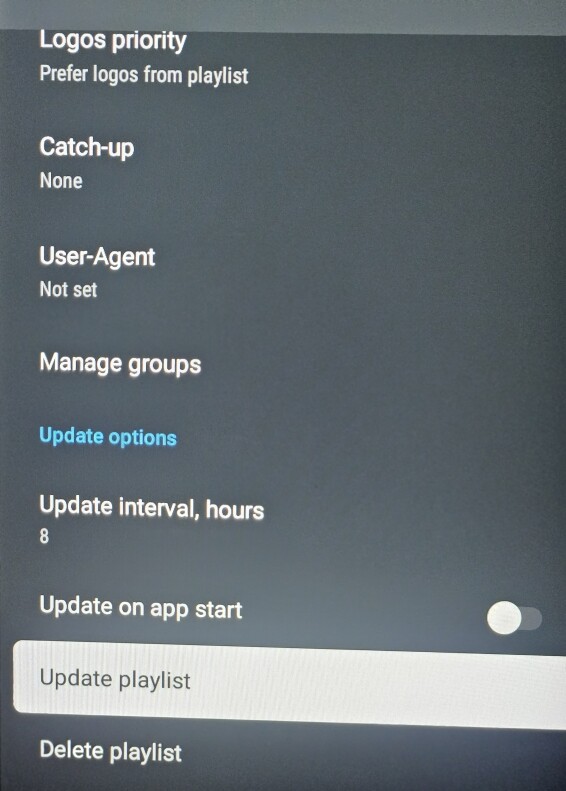
I’ve included the bottom half of the playlist settings menu not shown at MyEPG. In particular, I want you to take notice of the “Update Playlist” selection. Any change to the Playlist settings must be followed with Update Playlist. You manually make changes to the playlist, but those changes are not followed until you update the playlist.
This way its possible for you to do everything correctly, but your changes not take effect.
Not now. Not ever. Never.
If you have update on app start, the changes will be made on app start.
This is something for you to think about. Its the only plausible explanation I can think of that matches the information you’ve provided.
Did every step, including “UPdate Playlist” Added a few more and just changed some channels from west to East to avoid the fight. Got most of them now. HAve about 7 EPG sources 