Am testing out a better paid EPG service. So far the test with IPTV EDITOR tool seems to be going well. It’s very fast and works well to reformat amber account m3u data. It’s important to reformat the data because am using NEXTPVR to do automated recordings of shows,via EPG guide data. Not sure if I want the $10 or $15 account with IPTV EDITOR.
Some say should just do free tools, but the free tools are a mess, in my opinion. Or do a paid IPTV monthly that has a great EPG, but nothing is close to Amber account prices, plus paid EPG.
Am giving up on EPG BEST as too pricey and too difficult to manage.
Tried that MYEPG, but NEXTPVR did not like it for some reason. My fault as I insist on using nextpvr. IPTV EDITOR works well. In American dollars it’s $18 a year for five m3u sources, so I can blend it all.
IPTVEDITOR is a little flaky to set up, but it’s rock solid with performance and extras. Well worth the $18 a year (after euro conversion) cost.
So add the $30 a year AMBER account; and that’s around $50 a year grand total for great technology that can be experimented with on a variety of IPTV player/DVR tools.
We own a WIN11 headless PC workstation (cheap computer) for doing tests and recording and NAS storage in the network. So no extra costs
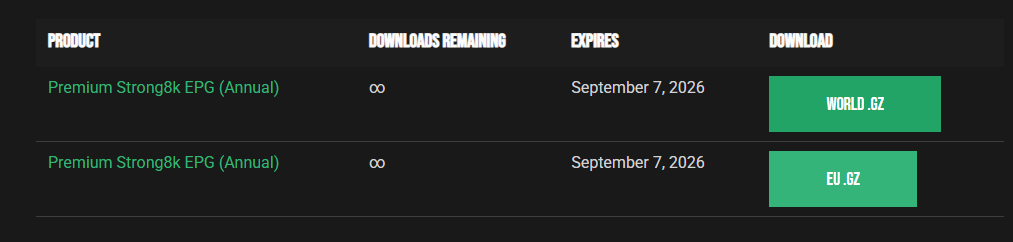
I can’t seem to figure out how to add the epg downloaded file(s) to Tivimate. The instructions on their website tell you that the url should be some long link that we all know and love about these damned things, but then the only thing they give you are two download buttons that send you two 250 megabyte xmls in .gz format. Tivimate wants a url and they even offer a url shortener right on their website to alleviate the pain somewhat but… - what the heck am I missing here? I feel pretty dumb at this point. Help?
Right click on each .GZ file and then copy into a browser or somewhere else you paste fiiles. You will then see a long URL (String). You need to either copy that entire URL or use the MyEPG shortening tool (recommended) to make the URL shorter into tivimate. To do that open tivimate, then go into Settings then EPG, then EPG sources, then Add source. Then you need to enter BOTH URL’s from MyEPG
Thank you Solo - in my micro-brain it never occurred to me that others might have this question. Then a lightbulb went off and by golly, I searched here for MyEPG and wouldn’t you know that I found your answer?! LOL - thank you for your help I really do appreciate it!
Still using IPTVEDITOR online and it works nice. Everything makes sense and as I learn more am getting more functions out of it. Just a super tool for $18 a year.