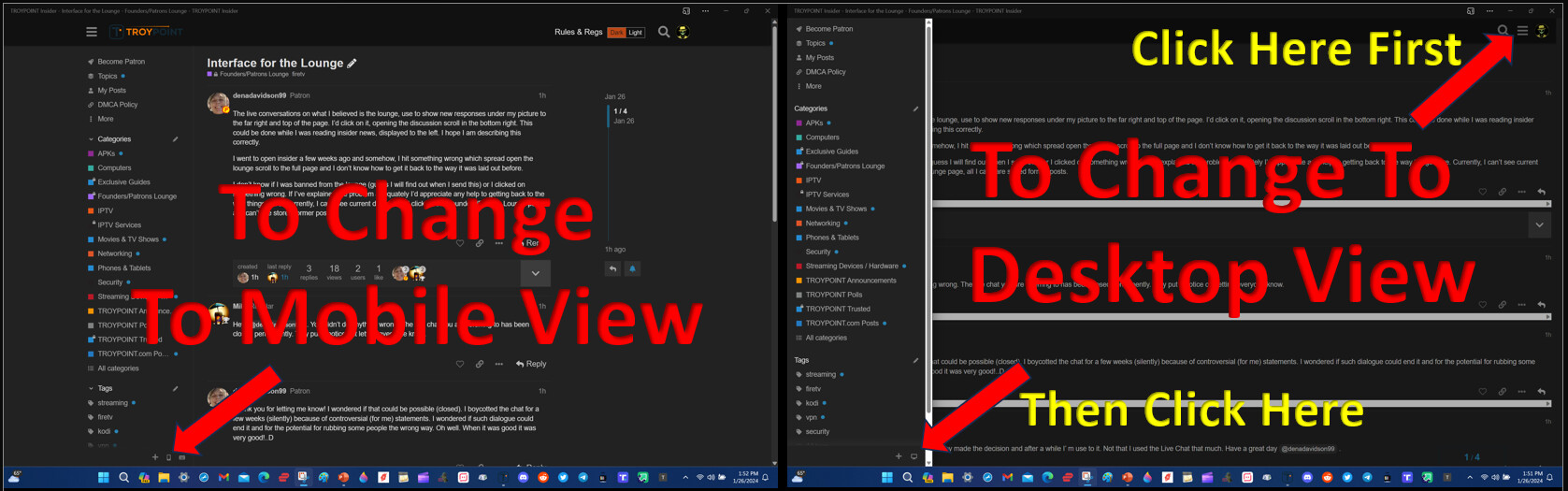
The live conversations on what I believed is the lounge, use to show new responses under my picture to the far right and top of the page. I’d click on it, opening the discussion scroll in the bottom right. This could be done while I was reading insider news, displayed to the left. I hope I am describing this correctly.
I went to open insider a few weeks ago and somehow, I hit something wrong which spread open the lounge scroll to the full page and I don’t know how to get it back to the way it was laid out before.
I don’t know if I was banned from the lounge (guess I will find out when I send this) or I clicked on something wrong. If I’ve explained the problem adequately I’d appreciate any help to getting back to the way things were. Currently, I can’t see current dialogue. If I click on the Founders/Patrons Lounge page, all I can’t are stored former posts.
Hey @denadavidson99 . You didn’t do anything wrong. The live chat you are referring to has been closed permanently. Troy put a notice out letting everyone know.
Thank you for letting me know! I wondered if that could be possible (closed). I boycotted the chat for a few weeks (silently) because of controversial (for me) statements. I wondered if such dialogue could end it and for the potential for rubbing some people the wrong way. Oh well. When it was good it was very good!..D
I agree. Not sure exactly what the issue was but Troy made the decision and after a while I’ m use to it. Not that I used the Live Chat that much. Have a great day @denadavidson99 .
I only read on my Mac Pro. So I don’t see that option either. But I thank you for sharing it. I’ll look for something like it on my Mac. Love your memes!
Bottom line is you inadvertently clicked on the Mobile Icon which took that page to full screen. To change it back you would need to click on the Desktop Ian.
Not sure exactly where they are located on a phone or tablet I don’t know. My cat is asleep on my tablet right now and don’t want to disturb her and I rarely ever use the Insider on my phone and have in fact removed the shortcut app on my phone…