Sometimes we are our own worst enemy 
Even to try the free version to see if you like it you have to enter your payment details and the next payment is 5bucks
The essentials plan is $3/month, and really all most need.
Unless your regularly downloading 5+ torrents at a time.
Black Friday sale should be coming this week, making it closer to $2/month if you get the annual sub.
Does it work with FlixVision? That’s the APK we’ve had the best luck with. Premio just didn’t jive with us, but perhaps we’ll give it another try. We have been having trouble getting a good amount of real debrid links lately.
I have followed the video to load Torbox to Stremio. I have done it 5 times, and all looks OK on my computer, but when I go to Stremio on my Fire TV, I have no addons.
I cannot see what I am doing wrong.
Appreciate any possible help. Thanks
Start out by clearing cache on Fire TV. Then force stop Stremio app. Also may want to logout of Stermio on Fire Tv then log back in.
Are you using the official Stremio and not some modded premium one?
I noticed the same thing on my Firestick 4K Max.
Try searching for a TV Show or Movie. If you see “[TB+]” in the results, you know these are TorBox links (per Troy’s video).
RD+, PM+ and TB+ are cached sources.
Thanks I did that, but when I open my Streamio account on my fire TV cube, I show no add-ons. The button is there to sync additional add-ons, but for some reason, there’s no communication between my fire TV cube where streamio sits, and the work I did on my PC to get tor box working.
Everything went very well on my PC yesterday when I set everything up, it’s just not showing up on the Streamio account on my fire TV cube
Thanks
I am using the Streamio account that is downloaded from the Troy Point toolbox that sits on Downloader
Yes you get the app from the toolbox and you have to make an account to log into and where your configuration will be stored.
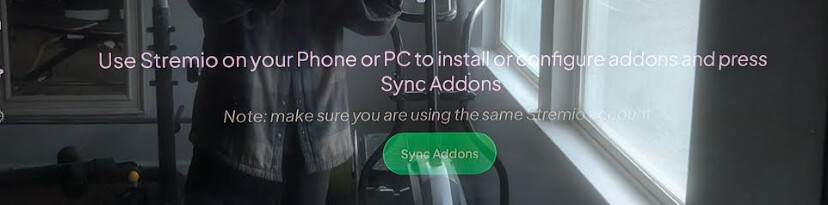

That’s same version we have in our Toolbox. We are serving the latest APK for Fire TV and Android TV devices.
Yes I’m aware of that. It seems like @tbraun0116 has has the mobile version as he shows no addons. On 4K max and Cude, you can’t see addons as those need to be managed on PC or Android phone. He should be seeing this screenshot below on Fire TV when he looks at addons in Stremio.

I did the Torbox installation on my Windows 11 PC, as well as doing the work through Streamio boot strapper.
When I go to my Stream account and select add-ons, I do get the screenshot that has been sent to me above. The issue I seem to have is when I click on it to “SyncAddons”, I get a message that says add-ons successfully synchronized, but then when I go back to add-ons, it’s the same screen with no additional add-ons.
I did the download from the downloader code to make sure I had the correct streamio account. I did, but I downloaded it anyway.
Nothing has changed yet.
Hey Miki I did what the Troy Point video said to do, but I don’t really understand what you’re saying I should do on this message to me.
Thanks
As long as you have a Stremio app installed on say your Tablet and are logged into it, then any addons or changes will sync across any devices where you have Stremio installed and logged in.
Looking for Torbox/Kodi experts (though his might apply for Stremio apologists also):
I select a link for a program to stream. There’s no problem with the streaming at all. However, when I go to the Torbox dashboard, I cannot locate the download of the file that I accessed.
Is there a setting on either the dashboard or on the POV addon that I need to change in order to find to download it to my computer, similar to how that can be done with Real-Debrid?