For what it’s worth, I signed up for the 7-day trial. I clicked on Recordings and in the upper right hand corner there is a Storage button.
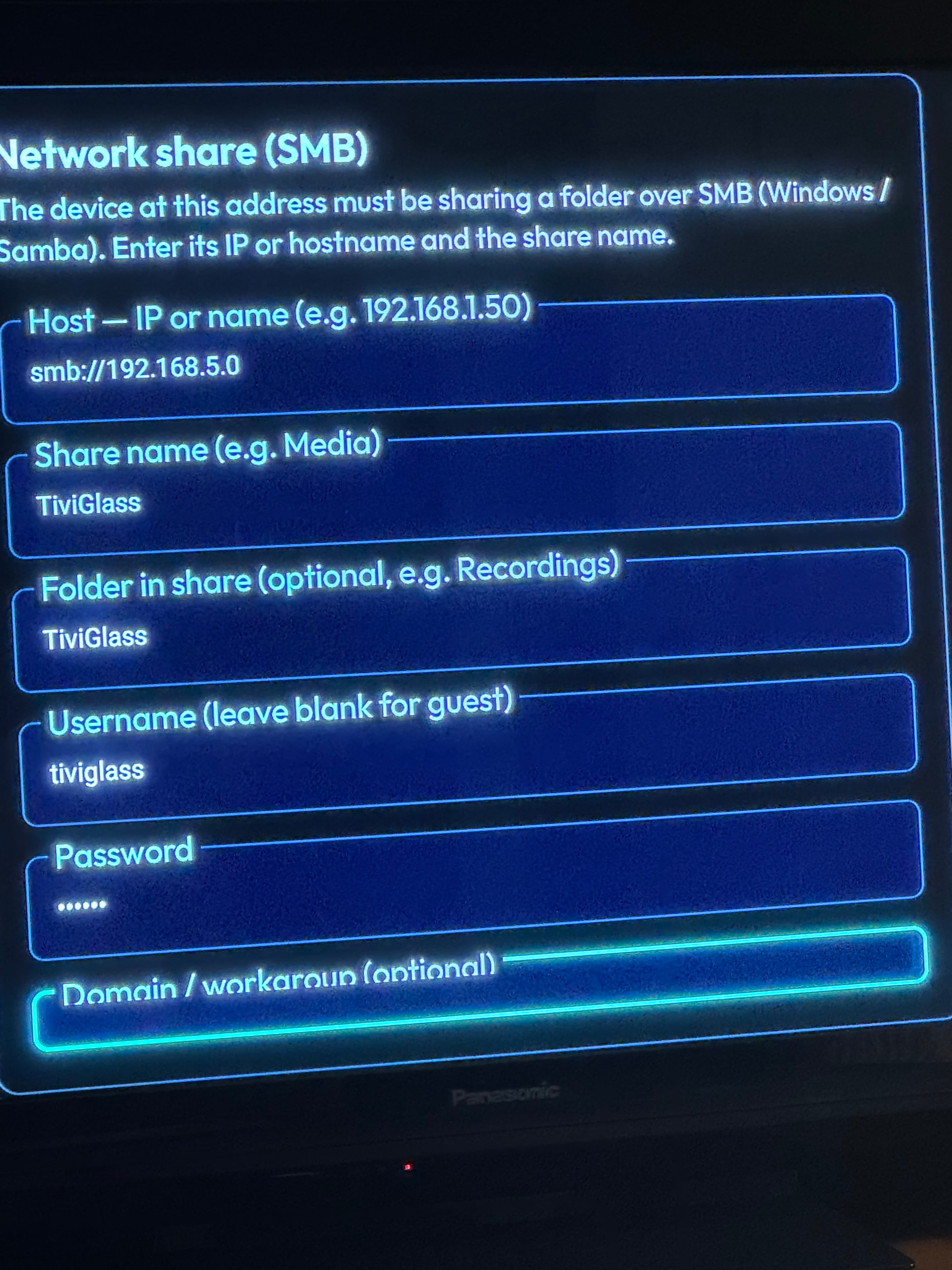
One of the options is SMB drive. However, when I fill in the information for my shared network drive on my NAS, I can only go so far down. The last field is “Domain/workgroup (optional)”. My cursor can hit that box, but I can’t scroll down further, or find a button to “ENTER” or “SAVE”.
Has anybody set that up successfully? See my SCREEN CAPTURE IMAGE from the TV screen:
Hey Miki. I’m trying to set up my Tivi Glass. Once I enter the provider URL it states sign out of your provider. Not sure just what I have to do to accomplish that. Any ideas?
Is that the red sign out below your playlist? If so just ignore it. That will sign you out of Tiviglass and you will have to go through the whole login process again.
If you scroll and click around in your online dashboard you will see what updates there are as well as what they contain, not to mention a ton of info for you to read.
Also anyone wanting to keep up with the upcoming improvements and updates can do so by going into Settings>System & about>in the right panel click updates at the top and then turn on receive Beta updates.
I have it on a tablet and have figured out how to access everything. My only problem is the player functions. I can start a feed but can’t shut it off or do much of anything with it.
New update to 2.0.4. lots of improvements. Now we can create our own groups, add channels from multiple playlists and even searching across all playlists at once. The Dev is definately listening to his customers. Join the Discord site and place comments and suggestions there.
I have tried and like the interface and account sync. However, for me the colors are muted when in full screen and this is across all channels on multiple playlists.
Do you mean the colours in the IPTV app display, or in the native player itself? If in the actual video player I don’t find any difference between this, Tivimate, Nuvio or Stremio. Maybe an adjustment in your device aettings?
No I don’t have any issues. Did you do a backup to the cloud? Perhaps go into your device settings>apps>TG> force close, clear cache, restart your device and then restart TG. Make sure the playlist you added shows as active.
It seems to be a common glitch. That’s why I suggested the forced close, clear cache, restart your devices, open up the TG that you have designated as the master device and then upload your master to the cloud, then on the other devices refresh from the cloud then refresh your playlists and epg. I know it’s a pain but sync everything and that seemed to work for me. The latest update also seemed to make it more stable and I have not had any issues or buffering anymore accept that caused by the source.
Thanks Miki. I think I will delete them all tomorrow and just work one at a time and make sure that one is working and it will be the master device. Once that is accomplished will device #2 and #3 automatically pick up what was accomplished on the master through synchronizing or will I still need to input the providers URLs?
You need to make any changes on your master device. Then sync it then make it the cloud master copy. All things in it will be sent to your other device after you overwrite them with the master copy .
Also make sure to go to your Tiviglass dashboard and access all the information there. It has lots of tutorials and explanations on how to do things and solve issues. Well worth the time. Fingers crossed and please let us know how you make out. Changes almost daily and improvements. I like things they’ve done by allowing priority designation for EPGs and the fact that it merges them all into one for playlists to access. Improvements to options to create groups as well as much more for recording etc. when you long press ona channel in your epg. It does have a lot to learn but with help I believe it’s worth it. I am playing with “Appearance” options now. Let us know how you make out.