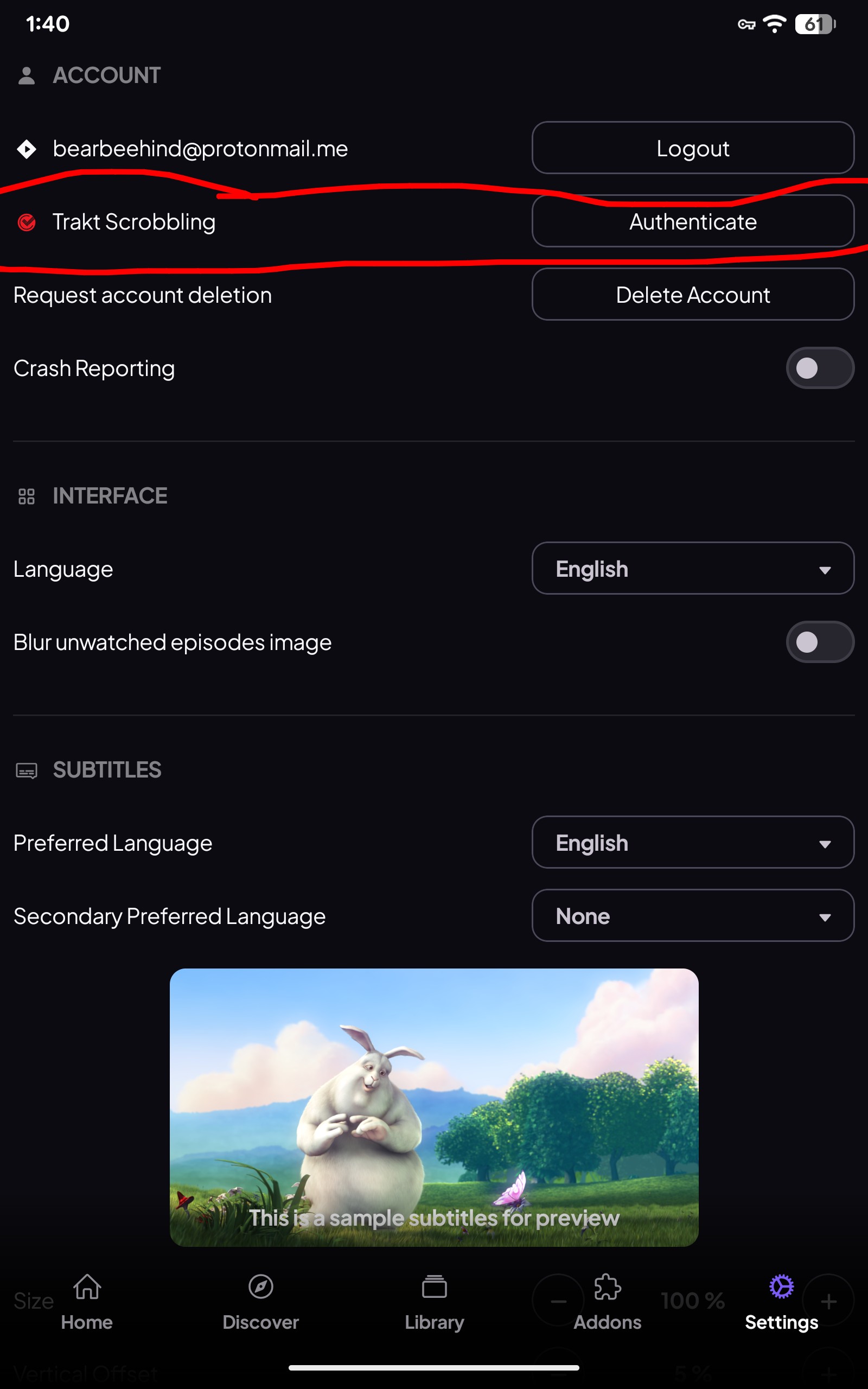
The links require you to go into the addon and configure it. This is where debrid becomes a valuable tool. I have 3 Debrid accounts Premiumize, Real Debrid and Torbox. I am using addons like Duck Stream and the advance configuration but even then the sources found sometimes do not work or are the incorrect ones etc. but you get to recognize the good suppliers and their uploads and ignore the garbage. Even Torbox may not return any sources for me but often this is because I do not except any sources under 1080 and no dual languages, English only. So if you truly want an amazing experience then it does require you to learn how to configure addons. Now the easy install like the bootstrapper is certainly a great option for the beginner but as a more advanced user it wasn’t for me. I do believe this wipes your history and favourites but most likely not if you have a Trakt account as it keeps the records for you. Now it’s quite easy to get it functioning in Stremio, just install it on your device where you are using stremio and in the stremio settings you will see Trakt scrobbling. So have your Trakt app running and logged in the do the the authenticate and wait for the confirmation that it has been activated. The notice may take a few minutes. I also recommend that you become a patron to get access to special vids and tutorials, create topics, pm other Patrons and have access to special categories. Worth the money to be able to get advice from others and make more than 2 comments a day.
thank you very much for the info! I have tried at least 6 different ways to get Trakt to work and thought I had it done but couldn’t actually find it in stremio. And now I can’t seem to get anything to work in stremio.. Up until a day or two ago, it was working pretty well and i was getting good links. I set it up following Troy’s install video. But now when i do get links and click on them, they are giving me a button to click to change players and when I do that, it still doesn’t work. I spent several hours trying to research and deleting and reinstalling addons but it didn’t help and sent me into a migraine from too much time looking at the computer. Just very frustrated bc I have spent too much time adding to the library and marking what has been watched since I loaded it and started trying to use it in October to lose it all again. With my recent neuro issues, I won’t be able to recreate it. I wish I had extra money to become a Patron but I just don’t right now. I can’t spend even a dollar on anything that isn’t absolutely needed. As far as languages, bc of the messages that i was getting about configuration (when the only configuring that was done was to eliminate all but english) I deleted about 3/4 of the languages and now I seem to be only getting links that are french for one show I was trying to watch and with another, I keep getting the UK version instead of the US version.It is just beyond frustrating bc I just don’t have the concentration or brain usage these days to deal with it and it is my only option for watching much of anything since I don’t have cable or other paid services. TV has become my escape from my current reality and without it I go into a tailspin.
Integrating a Trakt account is simple, at least it was for me and I hate trakt. My Stremio keeps track of what episodes I have watched, shows me upcoming episodes, shows me what series have a new episode to watch and all my series are kept in my library.
But if you must use Trakt then make sure it is on in the device where you have Stremio installed and you are logged into both accounts. Open stremio and go to the settings. Look for Trakt scrobbling. Click the Authenticate button on the right. Wait for a couple of minutes for it to pop up a notice that trakt is integrated into Stremio. From there the Trakt setup is up to you.
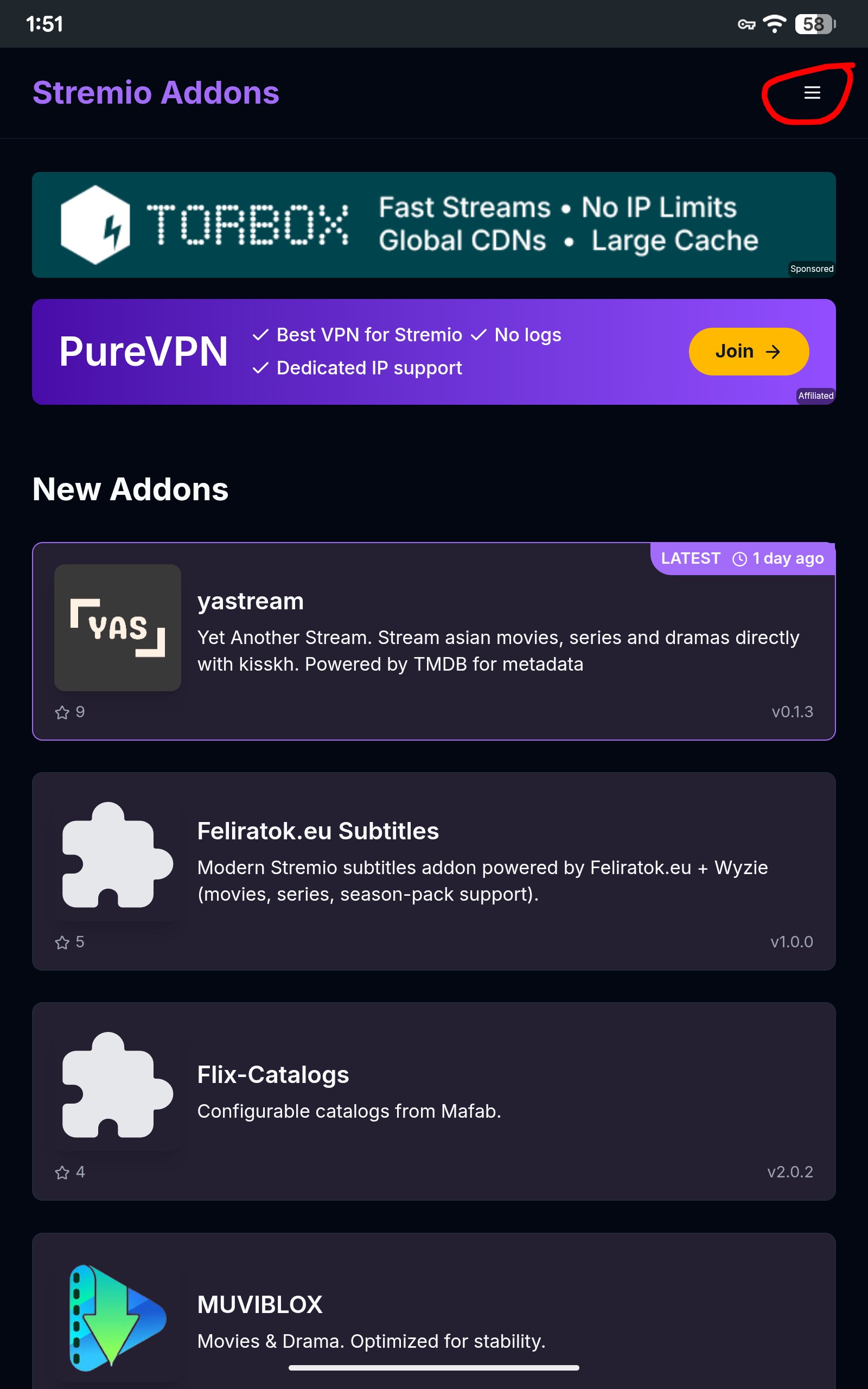
Now as far as addons go Torrentio as an example is the easiest to configure of all. Go to
{https://stremio-addons.net/} and in the top right click the hamburger (2 horizontal lines) that opens the search, then in the search line type in Torrentio and enter. Now the Torrentio page opens with a green install line, click the install. A pop up opens, click the “configure” line. Then go line by line and configure it the way you want, from all the sources to scrape to languages to where you add your Debrid API, it’s all there. I can’t make it any easier than that. Remove the brackets around the addon link above.
I wasted way too much time last night on Stremio. Installed easily on my Firestick, but the Add-ons never displayed using Bootstrap. Spent quite a bit of time looking for a solution. Gave up.
This has been mentioned a number of times and I have addressed this. You will need a Stremio install on say a tablet and do all your configurations there. Seems Amazon may have blocked the display of add-ons on the firestick.
Hello Miki, ive watched videos and tutorials for several years on Troypoint but have never used this insider to ask a question. You seem very knowledgeable so I’ll ask you my question. I’ve used bootstrap to setup my stremio and have synced everything. I’ve done this multiple times last night and today. Each time, the USA channels show up in the discover tab and work well for the most part, but no options for series or movies show up at all. All of the add-ons are there but none seem to work. Help please
You don’t set up addons in the bootstrapper, it comes with a fully functional setup, You will need a VPN and a Stremio account that you are logged into. The bootstrapper will wipe any existing setup. During setup you can add a Debrid service like Premiumize or TorBox. After you have installed the bootstrapper you can add extra addons like Torrentio wit any other Debrid services you may have. Just need to configure any addons you install. Just follow the instructions in Troy’s tutorial. Also to eliminate paid links showing, after setup go into you addons and remove “Watch hub”.

Having two Stremio logins is not a bad thing. I have 2, one is like a beta for testing.
Have you tried the Duck streams setup? It worked twice for me yesterday.
Thank you for the reply. I did do a search before posting but nothing came up. This should be added to the email that troypoint sent out in the beginning of February on ‘how to install stremio’. Those were the instructions that I was following. Honestly more trouble than it’s worth and I’ll just stick with Kodi Have a great day!
I point that out in all of the addon tutorials that we provide. If you watch the third video in the guide that I emailed out you will see that I specifically state that you should use a computer, phone, or tablet in the first minute of the video.
I’m on my Windows PC but you can do this on any device with a browser such as a phone or tablet
Unfortunately, with most things in life today, people aren’t willing to put in the time to watch the entire video which does provide the necessary details.
For whatever reason the search feature on one of my stremio accounts just straight up doesn’t work. I have the same setup across all my boxes (OnnPro4k), with separate accounts. On my main box the search feature works completely fine, on the one with the issues when I go to search, the screen just goes blank. Is there a fix for this? Is it something within the OnnPro android settings that I might have switched on/off?
This seems to have happened to a bunch of ONN boxes. The solution was to log out of Stremio, do a fresh install and then log back in, give it a bit to sync and then try it.
Unfortunately I already exhausted that avenue to no avail. Hopefully it just magically starts working again haha.
If you updated to the 1.9.5 uninstall it and go back to the 1.9.4
Bootstrap stopped working today
After installation, the descriptions in Stremio are all Spanish. How do you get them in English?
Go into Stremio settings>Interface>Language and change it to what you want.
Thank you. I am not liking the way bootstrapper set up Stremio. Is there a way to disable it or reset?
Use the Factory option under Configuration on the Bootstrapper home page or restore your previous configuration if you saved it before installing Bootstrapper. Make sure you refresh Bootstrapper home page before doing the Factory reset.
If you want to redo the bootstrapper it should be as easy as going into the addons in Stremio, it the little puzzle piece, and then find the bootstrapper and it should have an uninstall button at the bottom, then reinstall it again if you want or leave the bootstrapper in and just add more addons like Torrentio or Comet.