Better is subjective. Simpler maybe but I don’t think better.
There are many differences but the ones that stand out to me is the total control over your homepage and being able to set it up exactly how you want. Profiles, enough said. Advanced filtering of links by various factors like bitrate etc. Support for Android TV home screen channels. A built-in debrid manager and more.
Syncler took 10 minutes to install and setup. After that it will sync new installs, I don’t see much difference in that from Stremio.
Use whatever makes you happy, many find the extra features and control well worth the $15 a year.
Did you activate Syncler+ like he showed with the S2 key or buy a subscription?
Something is off, I’d double check every step. Either Syncler+ activation or Jaked Up is probably not installed etc. Something has to be off for you to have never had it working. Maybe reach out to the developer because something isn’t right.
After spending 2hrs. last night trying to get it working, just uninstalled. Maybe in 4-5 months I’ll circle back and give it another shot, (just a sucker for punishment I guess lol). But not overly worried about it, like I said, I have Kodi
Just setup Syncler and its amazing! One question I have is, how do turn the volume setting up? I have audio but i have to turn the tv volume up to 90, to get a normal volume, the ‘override HW codecs’ is on. As with Kodi, you can set the the volume output.
I just can’t see it anywhere, any help would be appreciate its super annoying when accessing the menus as the clicks are too loud… many thanks in advance
That comment is like saying you like the color orange better than green. It’s personal preference and I respectfully disagree with you. Been using Syncler for a very long time and is my favorite streaming app by far. Not as many custom settings in Stremio and I like the layout of Syncler better. Again, my opinion, use what you like best.
I have Enable SW codecs and override HW codecs disabled.
I prefer my hardware to handle the codecs for audio pass through.
You could enable SW codecs just in case hardware codecs fail.
Thank you for your reply. The codecs is working, its just the output volume is low, hence why I have to turn the volume up on my TV to maximum, just to have a normal volume. When using Kodi my TV volume is around 30%. There does not appear to be an option (like kodi), to increase the output volume…
One quick question for you long time Syncler users. I have used Stremio for years and tried Syncler on the odd occasion. What I can’t find in Syncler is anywhere where it shows that there is a newly released episode, nor that there are “upcoming” releases. Now I open Stremio and go to “Library” and look at my series, if there is then a newly released episode it will show that with a number on the artwork for that title, and when I open any title “future” episodes will have an approximate or reported date on them with an egg timer overlay. I can’t find anywhere where that is shown in Syncler, even using the trakt. So I can’t find any way in Syncler where it to will show me I have an “unwatched” episode or episodes.
I have gone over every setting in Syncler without any luck.
I’m not going to be much help since I don’t watch many TV shows as they come out, I usually wait until the season is finished.
That being said when I go to my continue watching section Wednesday shows up and when I click on it it shows the next episode is Aug 6th and I haven’t watch it in a very long time, so something is tracking it and keeping up. I’m assuming it is syncing from Trakt, so I would look at Trakt.
There may be more extensive integration like you want but I’m not sure since it doesn’t apply to me. Sounds like a good feature to suggest to the dev.
Using Trakt in Syncler.
It all appears in continue watching.
Everything you are currently watching appears in there and if a new season is released, it will appear in there as well.
You also have a watchlist and a collection list to use.
You can also add personal lists.
It’s similar to what you see in Kodi using Trakt.
But you have Next episode or In progress on Kodi.
I am in Trakt in Syncler and do not have any “continue watching”. I have a “Watch list” in Trakt but it isn’t a full watchlist. If I go to the options pop out on the left and click Watchlist, then I have my entire library of series I watch. None let me know there are episodes I haven’t watched unless I specifically open that series by clicking “more episodes”. Heck I can’t even figure out how to remove a series from the watchlist. No wonder ppl get upset, it takes a lot of learning. Time to find more vids.
I guess it is just a different philosophy on how the idea is approached. If the show is in “Watching” then there is a recorded progress, and the next episode is displayed. If you select a show and the next episode hasn’t actually released, then it shows the date it will release. So, what you’re missing is the date showing on the watching screen? Maybe sorting the list by “Last Aired” would help since the newly released shows would be at the top.
Syncler supports rewatching shows and keeping up with the new watch progress so to remove it from the watching screen you can long press on a show, select “manage this title” and select “remove playback progress”. Since it is no longer in progress it will not show up. If you search for the show again it will show “Start Over” as the play option, so it retains that you have watched it before.
I have no idea of how removing a show that is in the first watch will affect the play status since if was bad enough to remove before finishing, I had no desire to go back to it.
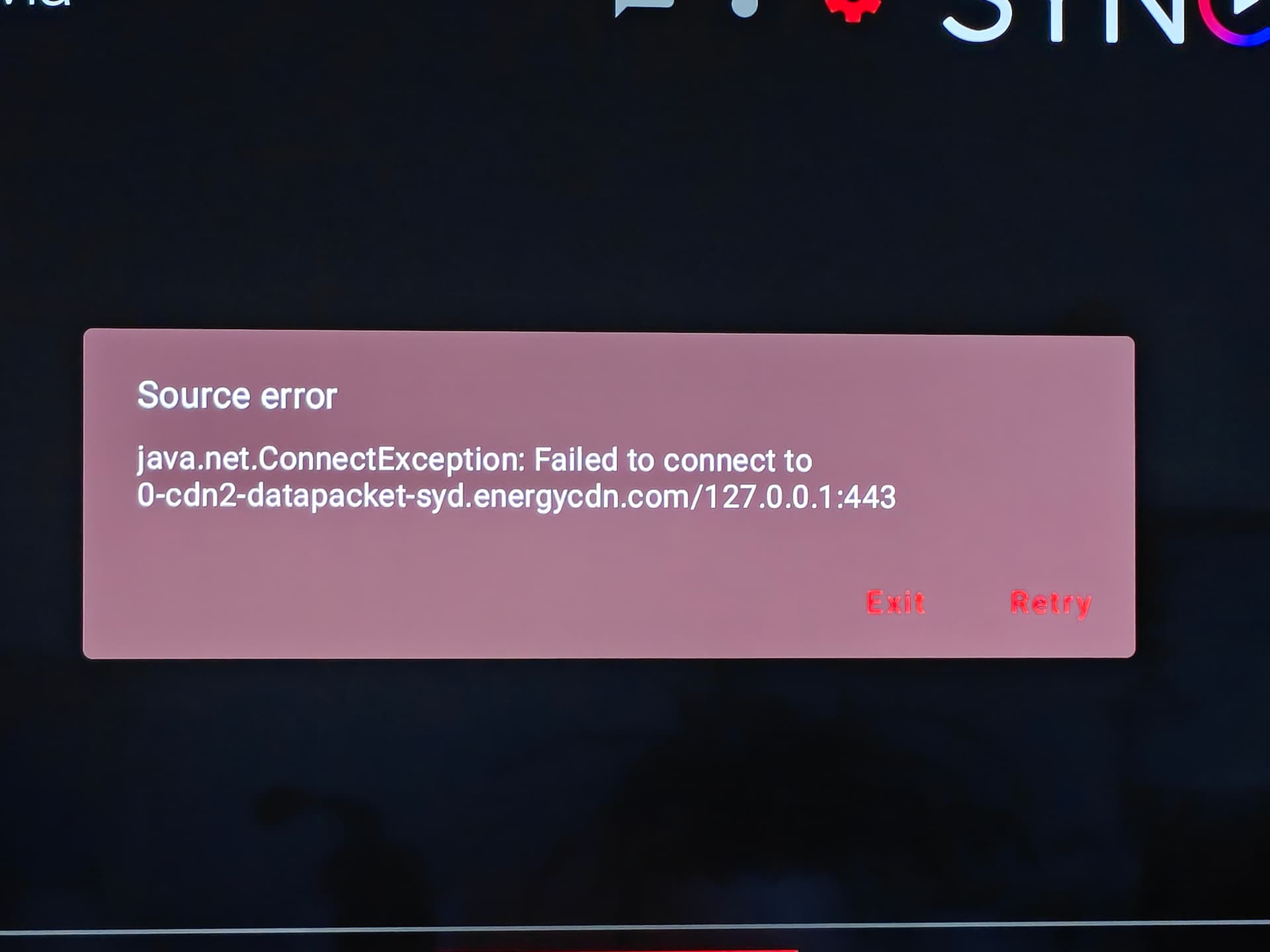
Syncler V2 Getting Source Error on Play
Have installed Syncler v2 on multiple devices, signed in to Syncler account and added Premiumize.
Surf Shark is always active on all devices and in this mode the error message below appears when PLAY is pushed.
Disconnecting Surf Shark allows viewing
What can I do to continue to employ Surf Shark?
In Trakt and my watch list I click on a saved series and it opens with everything from start over to + My lists to More episodes and so on. Absolutely no dates accept the one at the top that shows the year and month the series started. Then you click on more episodes and all the seasons pop up. Nothing to say there are “new” episodes. Yes of course if I scroll down to the last season and click ot then I can scroll down to see what episodes I haven’t watched. Now I’m trying to understand how that helps in any way. In stremio I simply open my series library and all the series I watch are displayed with their posters and if I haven’t seen a newly released episode than there is a number displayed right on the series poster and I know there is a new episode for me to watch or 2 or 3 depending on how long I’ve been away. So you can kinda see that I am having a hard time understanding how syncler or trakt are better. I think I will take the trakt out of Syncler and see if that’s better or at leastmprovides ease of use, cause it sure and blazes doesn’t at this time.
I’m having a hard time understanding what you mean by "In Trakt and my watch list "
When I go to the popout menu in Syncler on the left and go to the 3rd item “Watching” It has everything I have been watching. All of the TV shows have either the current episode # with a progress bar if I am part way through or just an episode # of the next up if I finished the previous episode. For example, Wednesday that I mentioned has S2E1, which is the next episode to be released. If I select Wednesday, it shows the next episode is S2E1 -Here We Woe Again and has the date it will be released, Aug 6th. There is also a popup that the episode hasn’t been released yet. So, you want a # of episodes instead of the episode #?
Hi I have been getting sources through debrid on Syncler but when I try to play many of them I receive the following message - Source Error java.net.ConnectException: Connection Refused. I scoured the insider topics but nothing seemed recent or applicable. I have a paid key account. Has anyone else encountered this and found out how to resolve it? Thanks
 its super annoying when accessing the menus as the clicks are too loud… many thanks in advance