No I mean on the remote . In the app opener app you have to assign a button on the remote to open Projectivity launcher and Surfshark . The Nvidia Shield their is no numbers to choose from so witch buttons is the best to use on that remote ?
Just checked, Projectivy Launcher no lomger in the Amazon Appstore.
I have the onn 4k pro and I use projectivy launcher but ever few days the volume goes away so i have to unplug and reset it. Anyone know how to fix this?
This did work for me, I do not have projectivy launcher on my 4k pro
I know that there is a “How to Install Projectivy Launcher” video, but thought that it might be a helpful idea to have a “version 2”. This more advanced guide could go a step deeper into other customizations within the app, as well as some of the neat features you can unlock with the Premium version (which costs about $8).
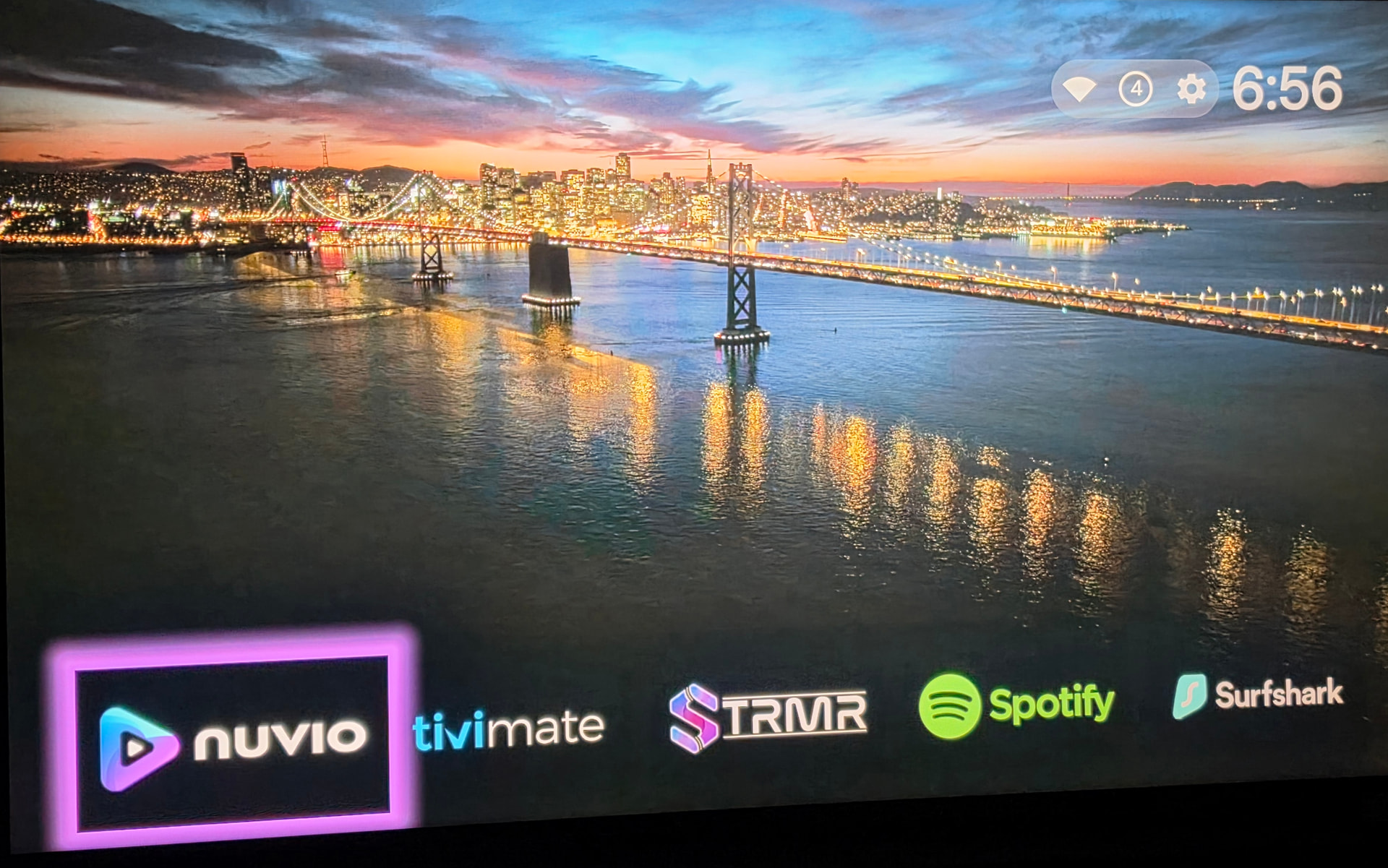
I’ve been happily using the [free] Projectivy Launcher on my Onn 4K Pro since last summer, and just came across some documentation the other day via Duck Guides which discussed some of the cool customizations that are possible. The two things that really jumped out at me, were:
- The * Projectivy Icon Pack: over 800 custom icons w/ transparent background
- The * Projectivy Wallpaper Overflight: provides Apple TV’s Aerials screen savers as video wallpapers for Projectivy Launcher
I did not see any guides here on the TP site for this, and so I spent a fair # of hours playing with different settings until I got it “right”. As I do with all of my customizations, I write the steps down so that I can easily repeat them in the future when setting up new devices. I wanted to share those steps here in case it’s helpful to others and saves you time.
Projectivy Premium:
- Unlock the premium version of Projectivy (roughly $8)
Installations:
-
Download & install the Projectivy Icon Pack (you can do this directly within Downloader)
-
Download & install the Projectivy Wallpaper Overflight via Downloader
Category & Cards Changes:
To take full advantage of the beautiful video wallpaper, I recommend moving your categories / channels to the bottom of the screen:
-
Projectivy Settings > Appearance > Categories / Channels:
- Show Title > off
- Top Margin > 80%
With the transparent icons, it’s helpful to make the card in focus (selected card) have a highlighted border to increase its visibility. Here’s how to do that:
-
Projectivy Settings > Appearance > Cards:
- Rounded Corners: 0
- Card Spacing: <I set mine to 26>
- background color > grey | Luminescence: -100 | Opacity: 5
- Focus card:
- Size: 3
- Focused Card Effect: Glow
- Glow Animation: None
- Icon Pack > Projectivy Icon Pack
Wallpaper Setup:
- Projectivy Settings > Wallpaper > Launcher Wallpaper > Overflight
*Adjust the update delay setting if desired. By setting it to “1”, the video wallpaper will change to something new every 1 minute.
I’ve included an example image (above) of what this configuration looks like with the video wallpapers, the top margin adjustment, and card glow effect. The following (brief) video demo also demonstrates how it looks when you’re navigating the launcher with these settings applied:
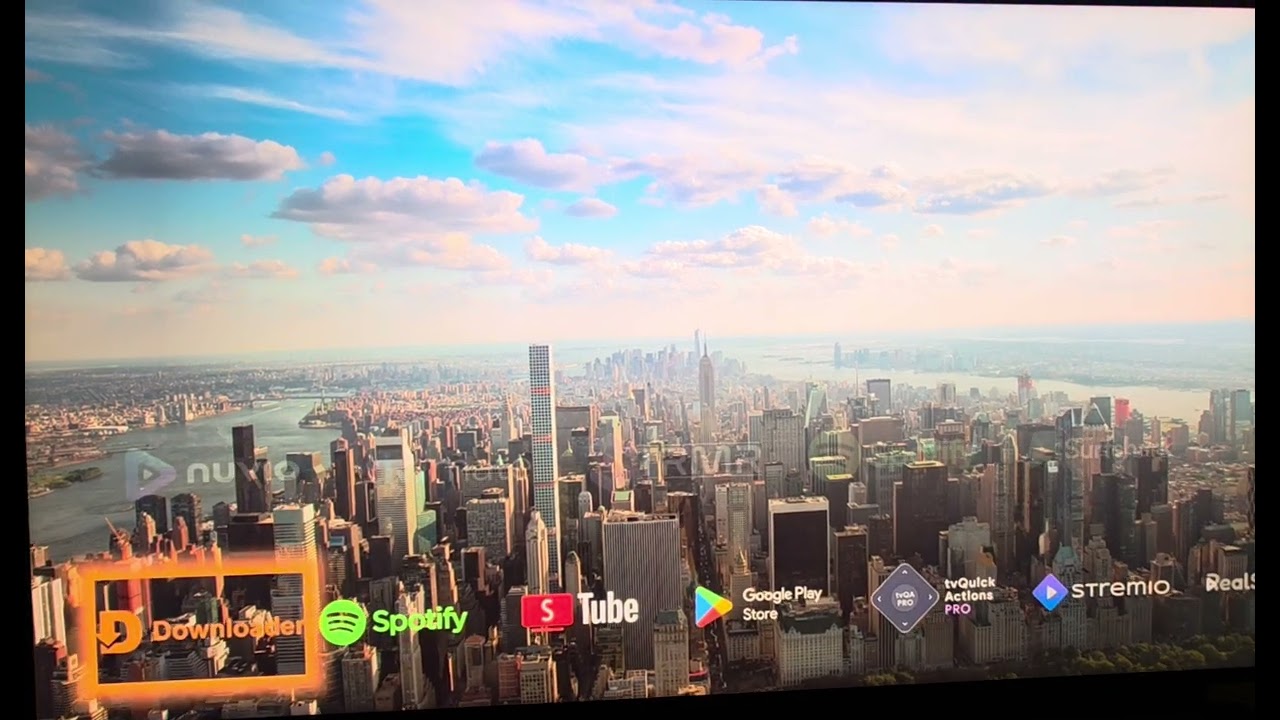
These are just some of the many customizations that are possible within Projectivy to take the launcher to the “next level”. It’d be great if TP would make an “advanced” configuration guide for people who may want to take the basics one step further using the tips above as well as the other options worth considering 
If using Overflight, I also like to turn on the ‘Hide rows above selection’ option (under Appearance > Categories/Channels) as this keeps the top section of the screen completely clear for the video wallpaper when you scroll down to other rows of apps
Strangely enough, I can’t get mine to glow around the edges while leaving the background transparent the way that you do - the glow always shows through the background. Possibly different chipsets / video capabilities
That’s a good setting, thanks for sharing. For mine, I have it set to be mostly opaque so that just a hint of it remains visible (Categories / Channels > Unselected row opacity > 5). Good options to play around with whether it’s hiding them completely or keeping them just slightly visible.
For the edge glow, did you change it so that rounded corners is turned off (Settings > Appearance > Cards > Rounded Corners > 0)? Until I made that change, it was making the entire card glow and not just the outside border.
This is with rounded corners set to 0:
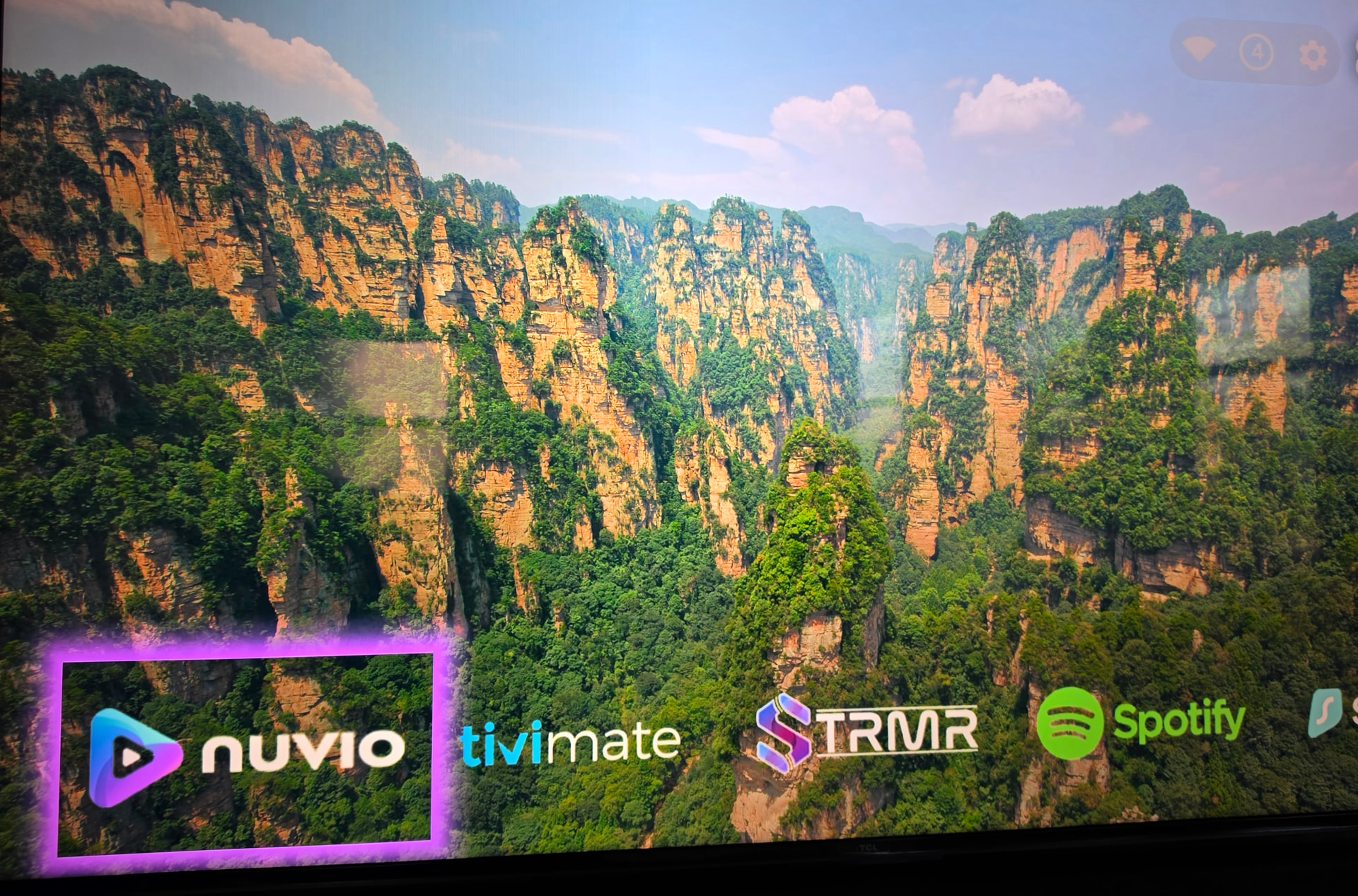
This is with rounded corners set to 40%

That’s fixed it thanks 
I had rounded corners set to the lowest setting, once I reduced it to 0 the effect worked as per your images.
Bit strange that it won’t work with rounded corners I’ll see if I can send a report of this behaviour and perhaps it’ll get fixed in an update
Projectivy is great. However I purchased premium version and could only install on one device (ONN). Thought it could installed on multiple devices. Am I wrong?
Also paid for TROYPOINT Patron status. Received confirmation email, but my access has been blocked after day one. Any help would be greatly appreciated!
The one-time Premium purchase applies to all devices signed in with the same Google account, meaning you don’t need to buy Premium separately for each device. Once purchased, you can install the app on any compatible device and access Premium features—such as custom video wallpapers, icon packs, and parental controls—across all of them.
Important: Premium is currently purchased directly within the app using Google Play services, so you must have a Google account set up on your device. If you encounter issues on a TV (e.g., no response when clicking the purchase button), you can buy Premium on a smartphone or tablet using the same Google account and then install the app on your TV.
and @TROYPOINT will probably see your post about paying for Patron status and look into it….
Projectivy is a free app with a premium version that can be installed on as many devices as you want.
Paid/free doesn’t matter. Install and enjoy.
Really appreciate you taking the time to respond
Hopefully can get my patron status resolved
@wcr5jop1 I bug-reported the glow behaviour to the author (spocky) and it looks like coding for rounded corners would be too inefficient and would result in interface lag
This was his reply
This is unfortunately by design.
What users usually expect is a glow only around the card but to get something smooth and efficient (=using low-level native os functions), it can’t be done that way : what you see in the bottom image is not a solid card with glow, it’s a card with glow (technically the glow is not just around the card but also underneath).
There’s one notable exception : when rounded corners are disabled (and only then), Projectivy can remove the inner color in the glow.
To say it another way, Projectivy can only crop rectangular shapes, not rectangular with rounded corners.
Hey recently had to reset to factory my Onn4k pro. Got it all back to where I want it, only thing I don’t remember how to is: how to get cont. watching options for my stremio & syncler & even my Netflix that my wife uses regularly, with my Projectivy launcher. Really liked that trick, just haven’t been able to figure it out. 
@mrpink - On your Projectivy launcher screen, go up to the gear icon, and then click on ‘Edit Channels’. Within the channels list, you can choose which channels you want to display. If you click on Stremio for instance, you can select to have your ‘Continue Watching’ show up on your Projectivy launcher screen.
Just did it n it worked fabuloso  You my friend are the bomb- dignity
Hello!
I bought Projektivy Launcher and I love it. I use it on my TCL55C6K Google TV. I customized it very well. I read somewhere in a Forum that there is a way to make this launcher the default even after a complete shutdown, so I used Launcher Manager. It does its job perfectly. Respect to the developer!
However, a few days after installation, I noticed that the program guide does not appear in the usual way for TV channels. That is, not at all. Using the button on the remote control for this purpose does not enter it.
I performed a factory reset on the TV and without Launcher Manager I have a program guide again.
Now I am looking for the reason why the Manager interferes with the TV guide processing.
I am sad, because without it Projektivy only remains permanently in the standby shutdown state.
Could you advise me what could be the reason for this phenomenon?
Thank you very much !
Yes, it appears ONN has fixed the AI setting to stay set to high AI-PQ/AI-SR
It does improve the picture and set it once and forget it.
There is a very LARGE update coming for Projectivy, too many updates to list. Check out the changelog on his github page. This update is still beta but looking forward to the release.
Hello!
I bought Projektivy Launcher and I love it. I use it on my TCL55C6K Google TV. I customized it very well. I read somewhere in a Forum that there is a way to make this launcher the default even after a complete shutdown, so I used Launcher Manager. It does its job perfectly. Respect to the developer!
However, a few days after installation, I noticed that the program guide does not appear in the usual way for TV channels. That is, not at all. Using the button on the remote control for this purpose does not enter it.
I performed a factory reset on the TV and without Launcher Manager I have a program guide again.
Now I am looking for the reason why the Manager interferes with the TV guide processing.
I am sad, because without it Projektivy only remains permanently in the standby shutdown state.
Could you advise me what could be the reason for this phenomenon?
Thank you very much !