only difference is *maybe because I pay for projectivy and my am8 is rooted? not sure. But I did read one time that projectivy was more functional on a rooted box, so I did
No probs Ron. Again, many thanks for your time.
Projectivy now allows for user made video live wallpaper. I downloaded one of my custom made mp4. The visual is working fine, but I cannot figure out how to get the sound to play.
Any ideas would be appreciated.
That’s an interesting thought PF. I have read through the change log for each version ( Releases · spocky/miproja1 (github.com)) but just don’t see anything about sound on the background. Are you sure it is possible? If it is, maybe a different file format? I’ll try to fiddle a little and let you know if I see anything.
You would think if they allow a mp4 file to install. Then you would think that would also include the option for sound. Otherwise using a high-quality gif in my SOL3 is still better because SOL3 has a ton more options for customizations.
Projectivy has very limited app icon customization. Spacing is awkward and I don’t see any option for widgets.
In order for me to customize the app icons. I have to make shortcuts for all of them. Basically, creating another app for the same thing.
Although, I think the shear simplicity of the launcher is appealing to those who just want simple.
Here is a link to what I have going so far. I want to add a space ship flying through nebula and I have to customize at least the 16 apps appearing on the homepage. Gonna make some transparent logos with just an outlined box. But that means I will have 16 more apps sitting hidden in the apps catalog.
I’m in no hurry to do it, though, because I still like SOL3 over Projectivy. lol
I have to select every time from the firestick ui.
Thks TX…great post and very informative. On your recommendation i installed it domectime ago, but cannot get “up next etc” to display, no matter what i try.
Maybe cos I’m only using the free version.
It’s hit and miss with that feature. Tivimate so far is not compatible but stremio is and apps like pluto seem to work. Also check all permissions for projectivy such as read all tv listings.
Thks. I dont use Tivimate for VOD.
I use Syncler Weyd and Stremio
Syncler snd Weyd show up in the settings menu page, but there is a greyed out no entry sign alongside them. And no sign of Stremio in there.
Can’t find " tv listings " in settings or permissions. Must be part of the paid version.
Not to worry…was worth the search.
not sure if thats a paid perk or not, I bought it so long ago…I forget 
I find the setting in settings>>>apps>>>projectivy>>>permissions>>>additional permissions>>>read all tv listings… Also under settings>>>apps>>>app permissions>>>other permissions>>>read all tv listings>>>show system apps>>>and projectivy should be shown here
Thks for that info. Got it all setup in settings.
Showing Syncler only. Set up " watch next"…nada…
Not to worry…have to open the piggy bank and find a couple of dollars 
Where do you save live wallpapers for projectivity.I 'm using it on my TCL so no external box
My firestick 4k max gen2 is now in an endless boot loop thanks to installing Launch on Boot as per the guide.
All steps in the guide were easy to follow, but firestick would not allow for “Notification Access” and special permissions. It seems the GUI doesn’t have this option at all currently. I restarted firestick to check if this option appears, and the firestick started booting over and over again showing only the amazon logo.
Factory reset with remote back+right can’t be invoked during the boot stage, so my firestick is permanently damaged.
Thanks for the guide @TROYPOINT. Do a service to the world and delete it - or try the steps yourself on a clean firestick… if you dare.
First thing is to try a power cycle. Disconnect everything. TV, Modem and firestick. Wait for a few minutes. Plug everthing back in. Use a different HDMI port than you were using. Always plug the firestick directly into your house power and not the USB plug on your TV. Turn everything back on and see what happens. If no luck, when you go to bed tonight leave the firestick trying to load and see if it resolves over night.
For anyone wanting to up the eye candy factor for Projectivy there has been an icon pack with transparent backgrounds released that is absolutely beautiful.
From the github: Github link
The Projectivy Icon Pack is designed specifically for use with the Projectivy Launcher application.
Created and based on the Blueprint project—which made the icon pack possible—it’s easy to apply, with icons configured to automatically assign to all supported applications, saving you the time and effort of manually selecting icons for each app.
All icons are custom-made to deliver a modern and consistent look, with transparent backgrounds that enhance visual consistency and allow you to assign your preferred background colors in the launcher.
Tip: For the best results, it’s recommended to use a dark background for icons, as the icons are designed to look their best on darker backgrounds.
Note: The Projectivy icon pack is designed and tested using Android / Google TV. If you are using a TV device that is running a mobile variant not designed for TVs, some icons may not auto-assign due to some applications using different activities for mobile operating systems. In this scenario, you may have to assign them manually.
To see what they look like check out some of the videos/pics that people are posting on the Projectivy Reddit sub.
https://www.reddit.com/r/Projectivy_Launcher/
Below is a frame from a video posted bysambo7262 to give you an idea.

ETA the dolphine scene above actually uses a different icon pack but it shows how you can customize Projectivy even more. https://play.google.com/store/apps/details?id=uk.co.randomvector.outline
Way cool. Tx.
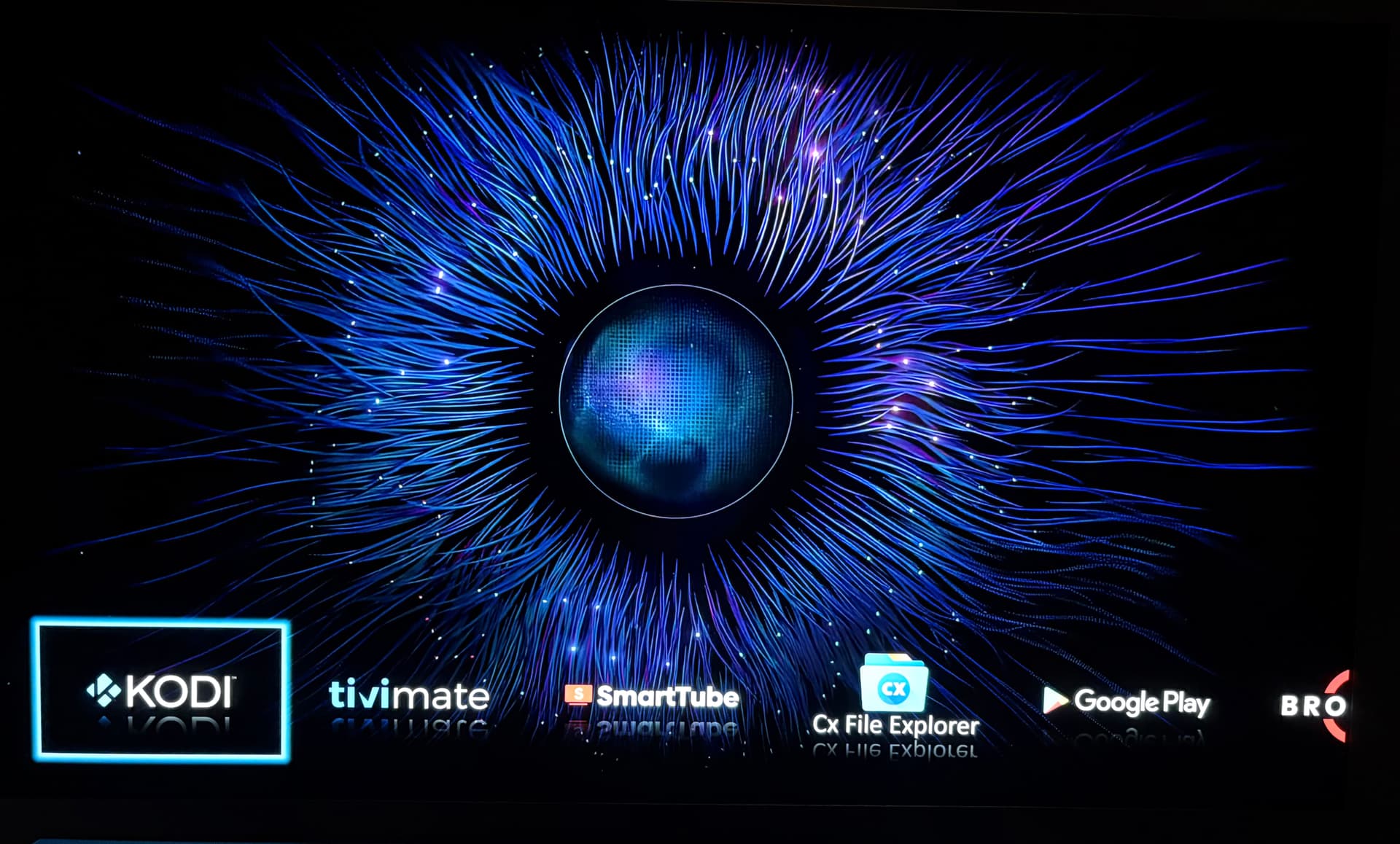
Here’s a recent icon pack project that has been released. They are transparent but don’t have the glass effect like the ones I use shown in my screenshot.
https://www.reddit.com/r/ProjectivyIcons/s/5BoOxZgZeR
You can download the pack from the GitHub link and make requests for new icons
I have cleaned up my Nvidia Screen screen with Projectivity. This maybe an obvious question. Can the free Google TV application be added as a screen option?