Originally published at: How to Install Comet Stremio Addon (Multi-IP Debrid Access)
Learn how to Install, configure, and use the Comet Stremio addon with our exclusive tutorial guide below. Comet is a high powered, well known Stremio Addon that uses torrent providers or your favorite debrid service to serve up media links. The most important factor and the main reason that thousands love Comet is because users…
Ya can’t load stremio anywhere i am using firestick and Google TV finally got the app wants me to sign in with Facebook but won’t let me
Hey @Bubs exactly what do you mean? I would love to help you, but I haven’t a clue what you’re saying. Please provide more details and lets get ya going.
I need to add comet back to my stremio app. If I use the bootloader it will completely reset my stremio app. I have gone to elfhosted. com and configured the add-on but once I press install it says attempting to install to stremio but I never get a confirmation it does and it’s not in the app. I read that I could use trakt and then I could use the bootstrapper to redo stremio without losing all my progress. I would be open to doing that but there is nowhere in the settings that I see that has anything to do with trakt or any service like it. I would prefer just to add comet back to my stremio setup but I’m open to most anything at this point. Any help is much appreciated. I am using an onn 4k plus box.
Did I not just go through this whole process with you about 2 weeks ago? Go here go section by section and configure things the way you want, once done click the install button down the bottom or the “copy link” button. If using the copy link button then open Stremio, go to the addon section, paste the copied .json into the line at the top that says you can search anything, then click the purple stremio icon that will open a window with the “install” button down the bottom, click that. Done.
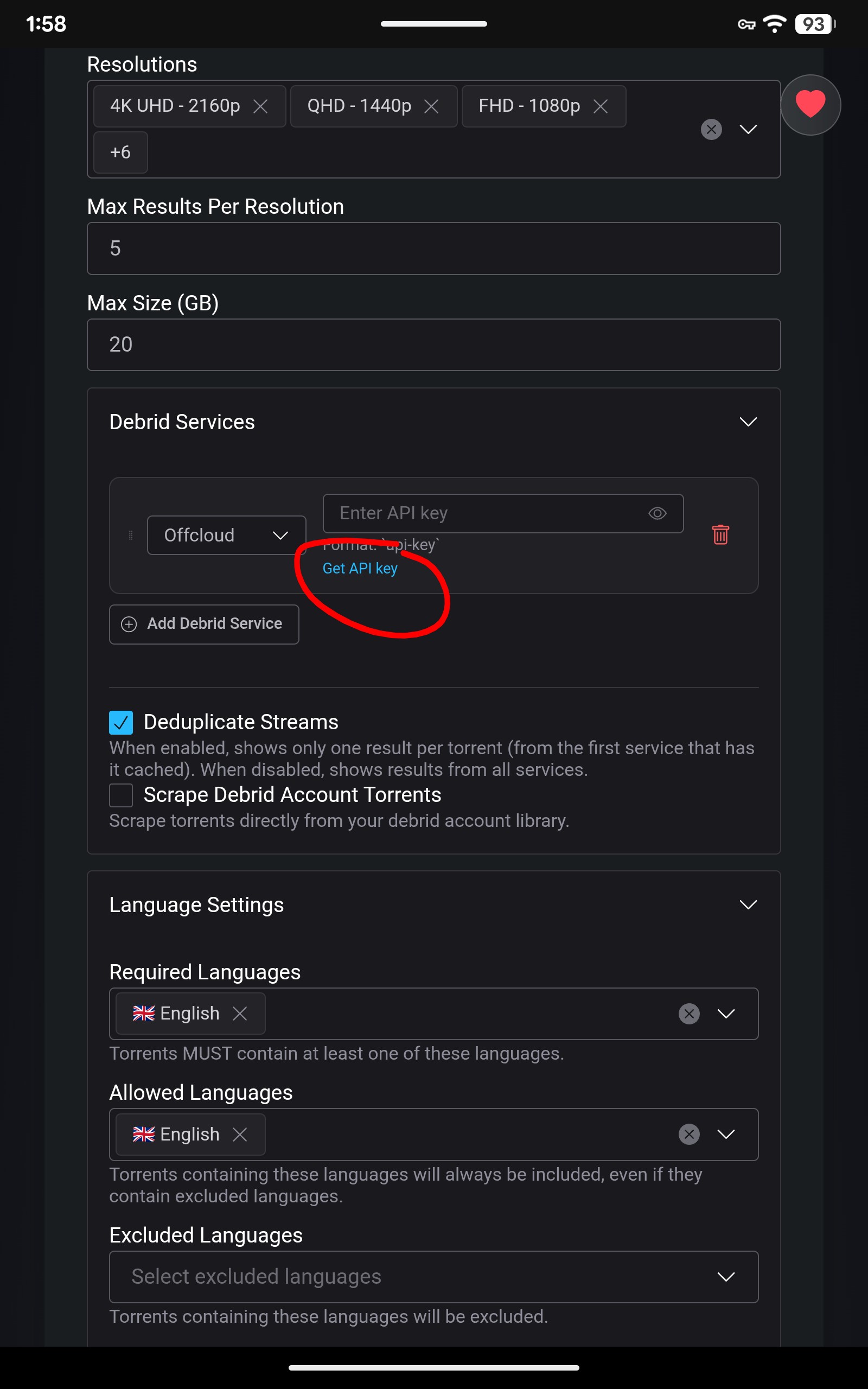
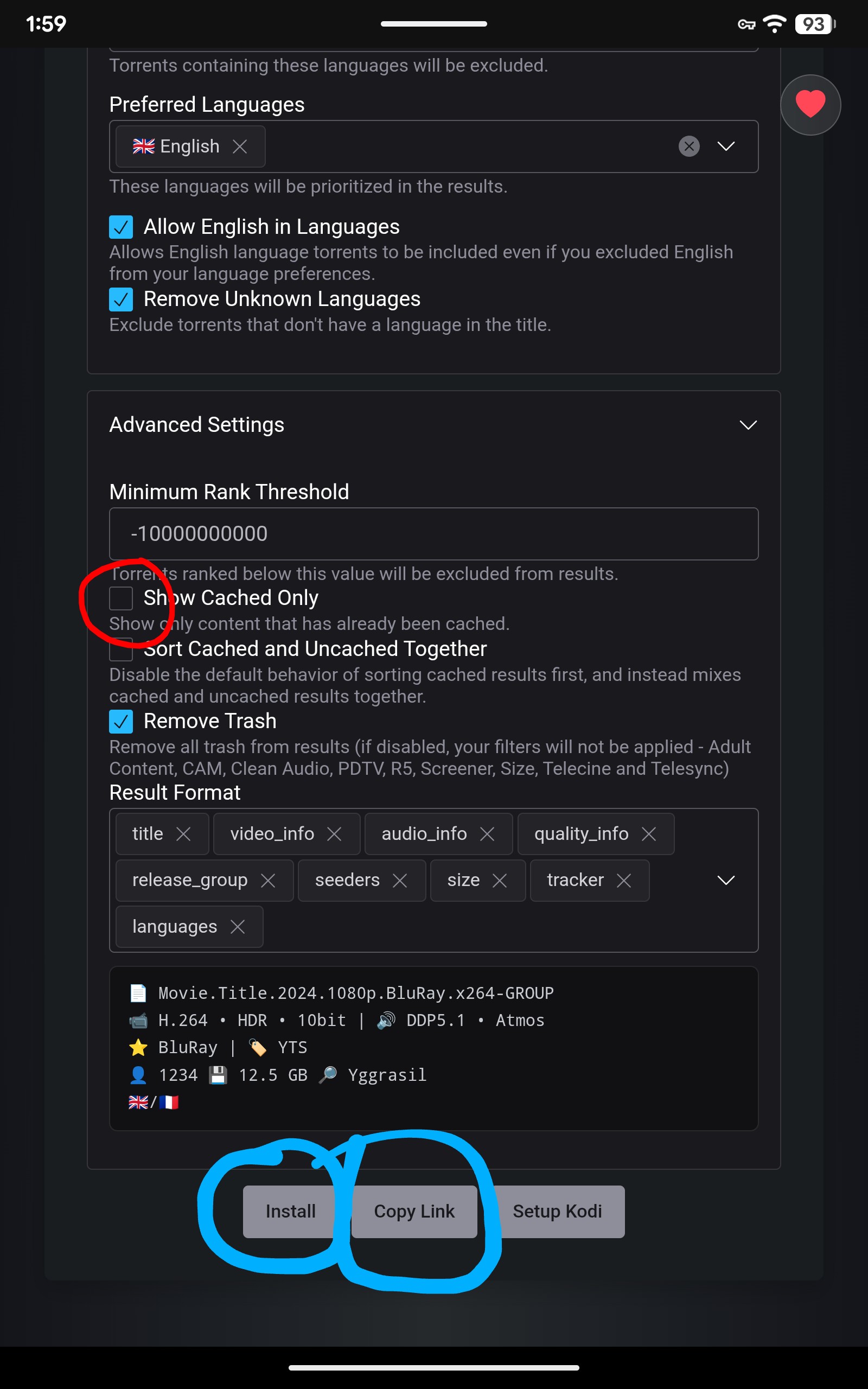
Don’t forget to check off the Show cached only.
You did but it didn’t work and there were a couple of boxes I wasn’t sure what to put in. Like for one how many results do I want? I put 15. And there was one other box that I was unsure of what to put but regardless I had everything filled out and clicked to add it to stremio like I said in the post but it never confirmed and it didn’t show up in the app. This is the first I’m hearing of copying a link.
There are two ways to do it. Click install or copy the link both work. After installing an add to be sure it syncs to the cloud and any other devices you have stremio logged into, force close Stremio, clear the cache and restart. Do the same on the other devices. You can always PM me for further instructions or to answer any questions. There has to be a step you are missing as I can add any number of comet addons to the same stremio on both my Tablet and my P6L. Once you search for a movie source, at the very top you will see all your addons listed, click on any one, like comet, to show only it’s results or simply stay on the default “All” to scroll down through the found sources.


Perhaps a VPN is goofing it up or blocking it.
Did you have a stremio player open on your computer or phone that you set Comet up on?
I usually do things on my laptop, so I go to stremio and open the web version and sign in then set up my add on and it installs.