Originally published at: How to Create a Stremio Build with AIO.TVFlix
In this guide, we will show you How to Create a Stremio “Build” by using the AIO.TVFlix Stremio tool. If you are looking for a high functioning Stremio configuration, make sure you check this out as it will turn your app into a media powerhouse. Unlike other singular Stremio Addons, the AIO.TVFlix tool uses two…
Looks nice, but what a chore setting up and installing!
It is a lot of work but the end result maybe well worth the effort. I added Duck Streams and it works well with just the basic setup, but if you want the advanced setup it takes some extra work. The Bootstrapper addon is still the best for beginners IMHO, and those that just want to see what Stremio is all about and how well it works.
I tried to get this working multiple times, initially it installs, but when you start to check it, the Aio add-on starts to populate, the movies, and series, then it all just disappears sadly.
I tried far to many times to get this ultimate setup, so i think i’ll not be using the AIO add-on anymore.
I’ll just stick to Installing add-ons separately.
Does the Duck Streams do the same thing for you? It’s basically a preconfigured AIO addon.
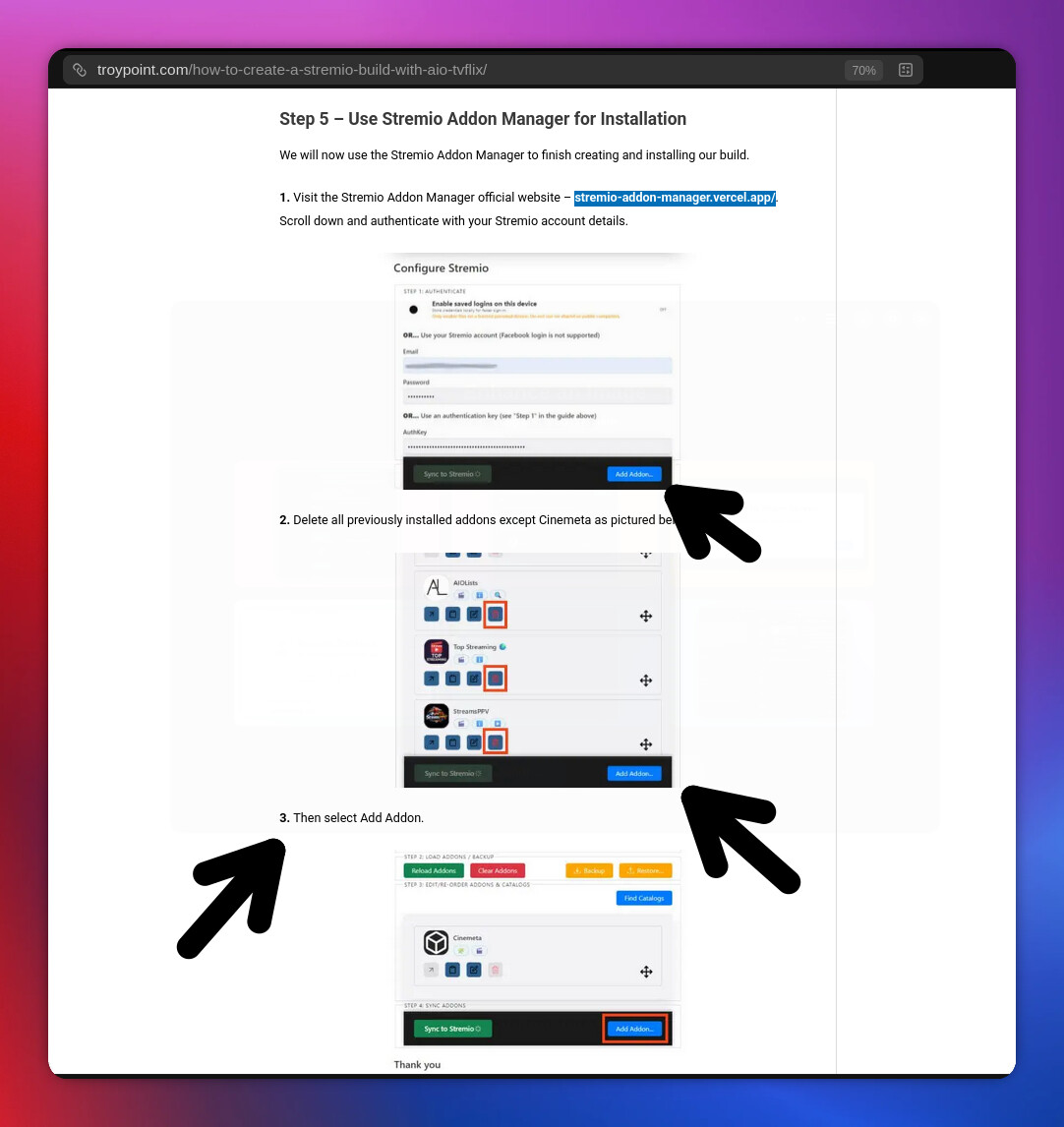
Step 5 - https://stremio-addon-manager.vercel.app/ has no “Add Addon button.
-ok-
was able to add manifest url directly in stremio app
It isn’t an addon. Follow the instructions given when the link opens. As it states, the last button you click is to Sync and that applies the changes you made to you Stremio account.
My Streamio setup is currently with the Bootstraper add-on. If I want to give duckstreams or this AIO setup that Troy shared a try, do I have to remove the bootstraper add-on first? It has been a while since I set it up and I cannot remember how I set it up or how to remove it first. Sorry somewhat new to Streamio setups
When I had the bootstrapper you could add additional addons without losing the bootstrapper setup.
If you follow this guide it will wipe everything you have and only install the 3 configured addons.
Thank you!!
TVDB states they no longer give individual API codes? What should I do? Thank you.
re: the TVDB API code. I am getting the same and it will not let you proceed without it unfortunately. Anyone have any thoughts on how to get around this and if it’s possible?
I just did it. Sign up to the site. Then on the lower left click API. Fill out your details. It asks for a company, I just put in “This is for personal use only”. Then in the description I put down that “I don’t have a company. I just need the personal API key to configure an add-on in Stremio” and clicked the button down below that and it gave me an api key.
Ah… I got a message that said that they were no longer releasing personal api keys unless you apply as a developer. That threw me initially. Perhaps I initially clicked on an incorrect link. I tried it again based on what Miki said and I was then able to get the API key. Thank you for the assist Miki
Their documentation states they aren’t using Private API keys but allowed my application as being a “Project” as I sated it was to be used in an add-on for Stremio. So I take it that sort of means they think I’m a developer. 

The key will be found in your dashboard once you log into the site under your dashboard options on the top left.
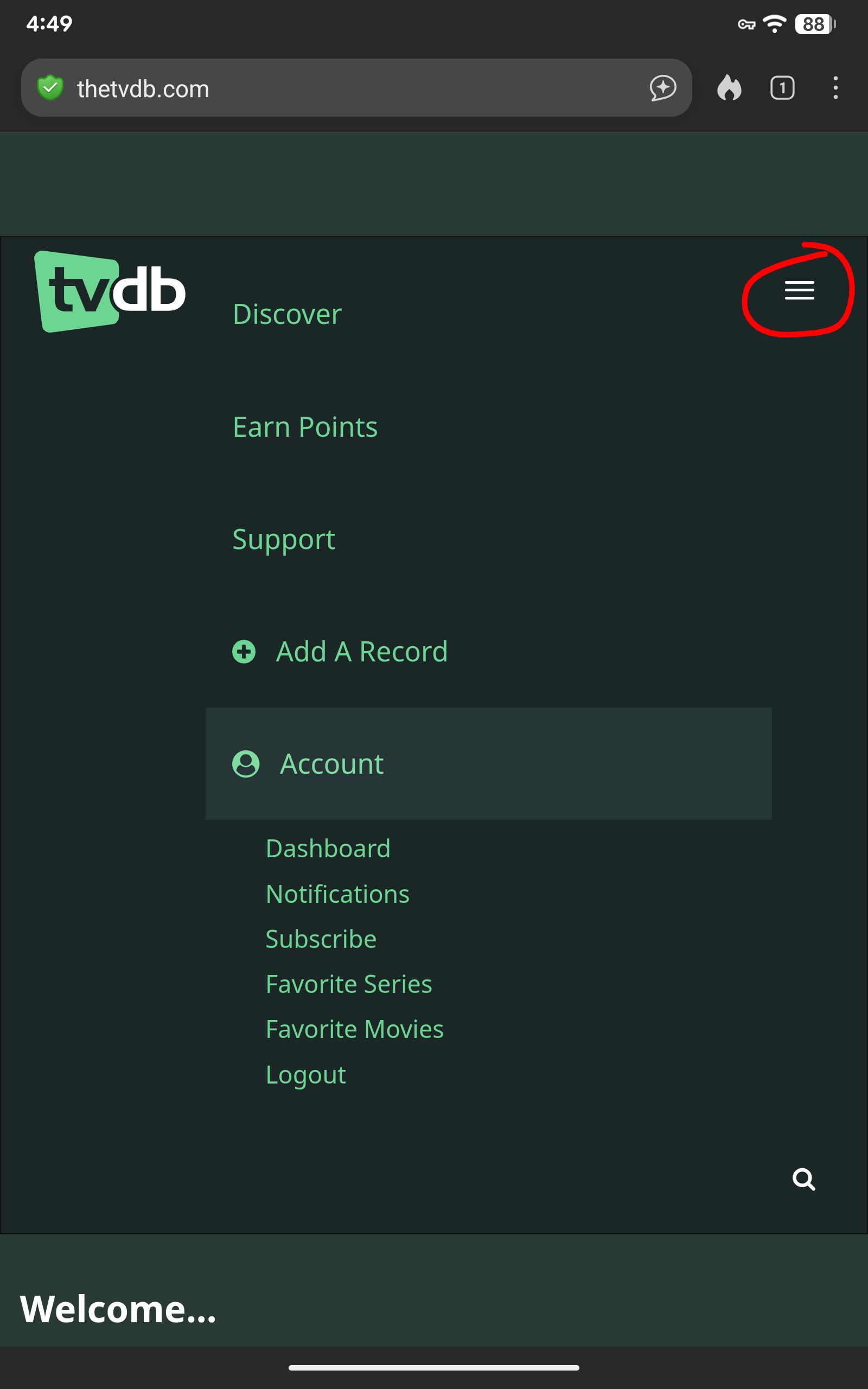
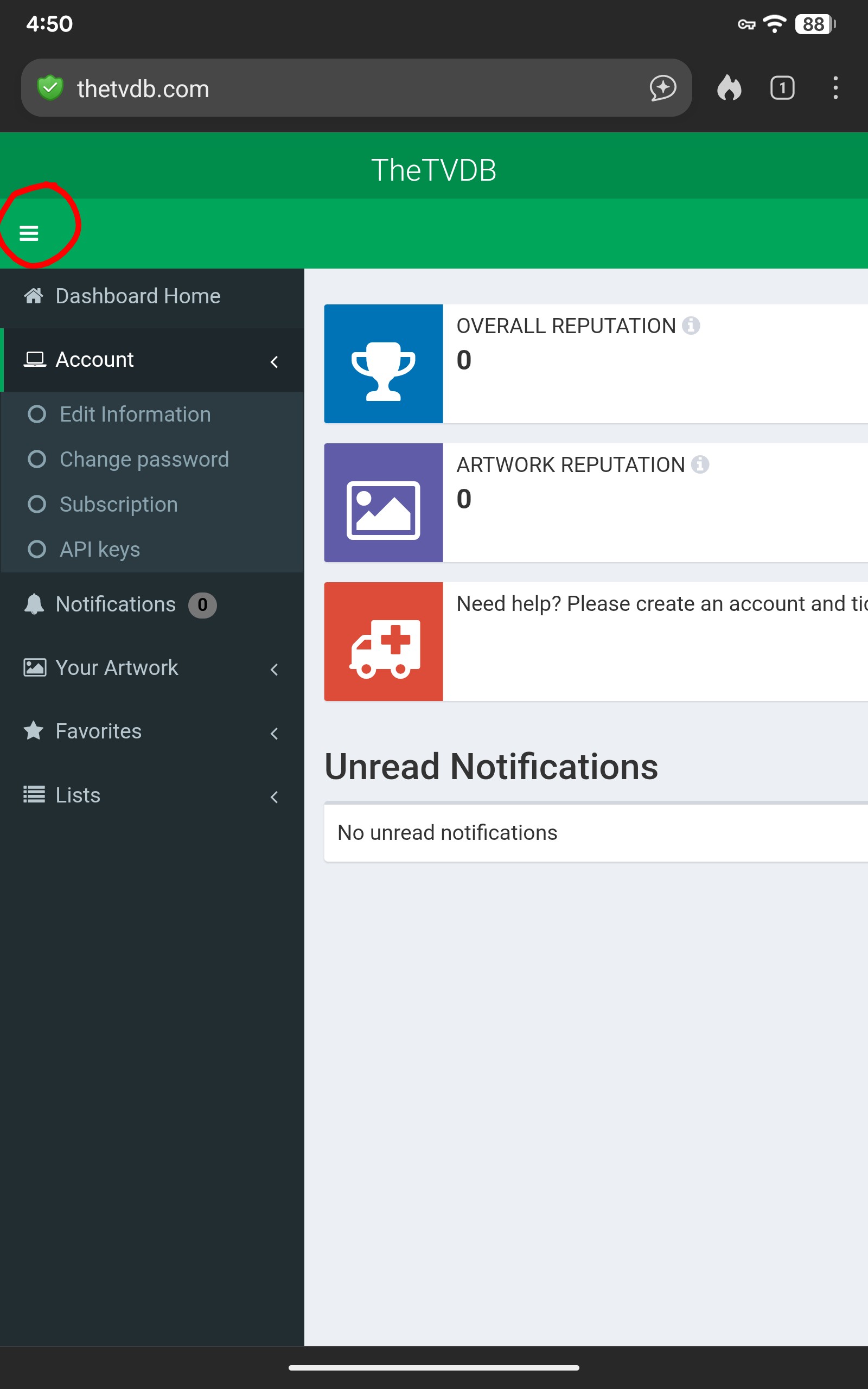
Best I can do for you guys. Hope the screenshots help.
Ugh…sorry to be “that guy” asking a ton of questions and thanks for being willing to assist. I am at step 5 On Troy’s install guide. At this website: https://stremio-addon-manager.vercel.app/ I have signed in to my streamio account. I have deleted all addons except for cinemeta, but I do not see an option to then move forward by adding an addon. I am attaching a screenshot of what I am seeing. What am I missing?
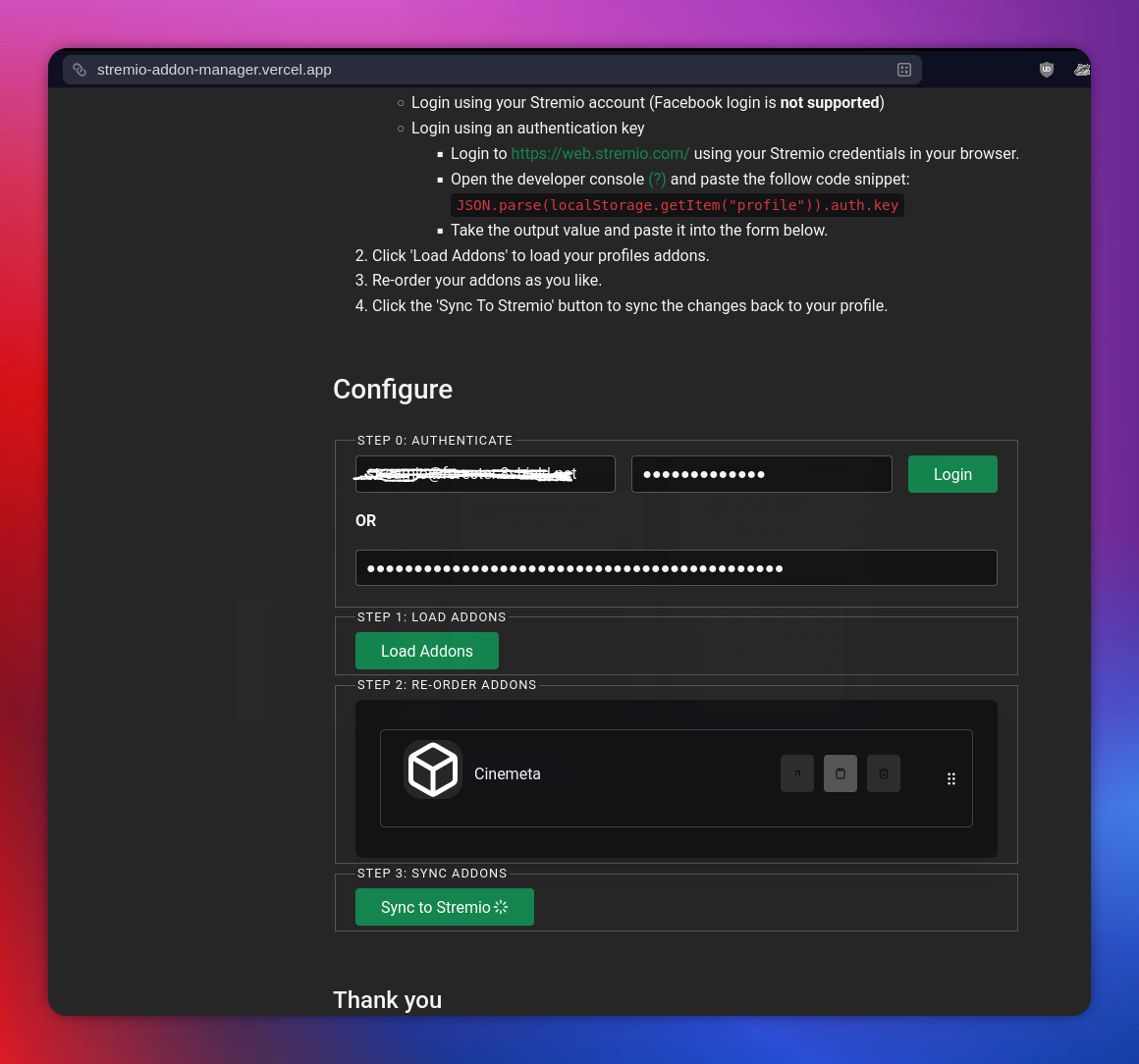
You don’t add the addons here. You don’t delete your addons in stremio before coming here. At that site follow the instructions from top to bottom. Once you put your login details for stremio click the load addon button. All your installed addons will be loaded into a page that pops up and allows you to rearrange them.
With all my addons in my stremio I clicked the load addons and this is what I get.
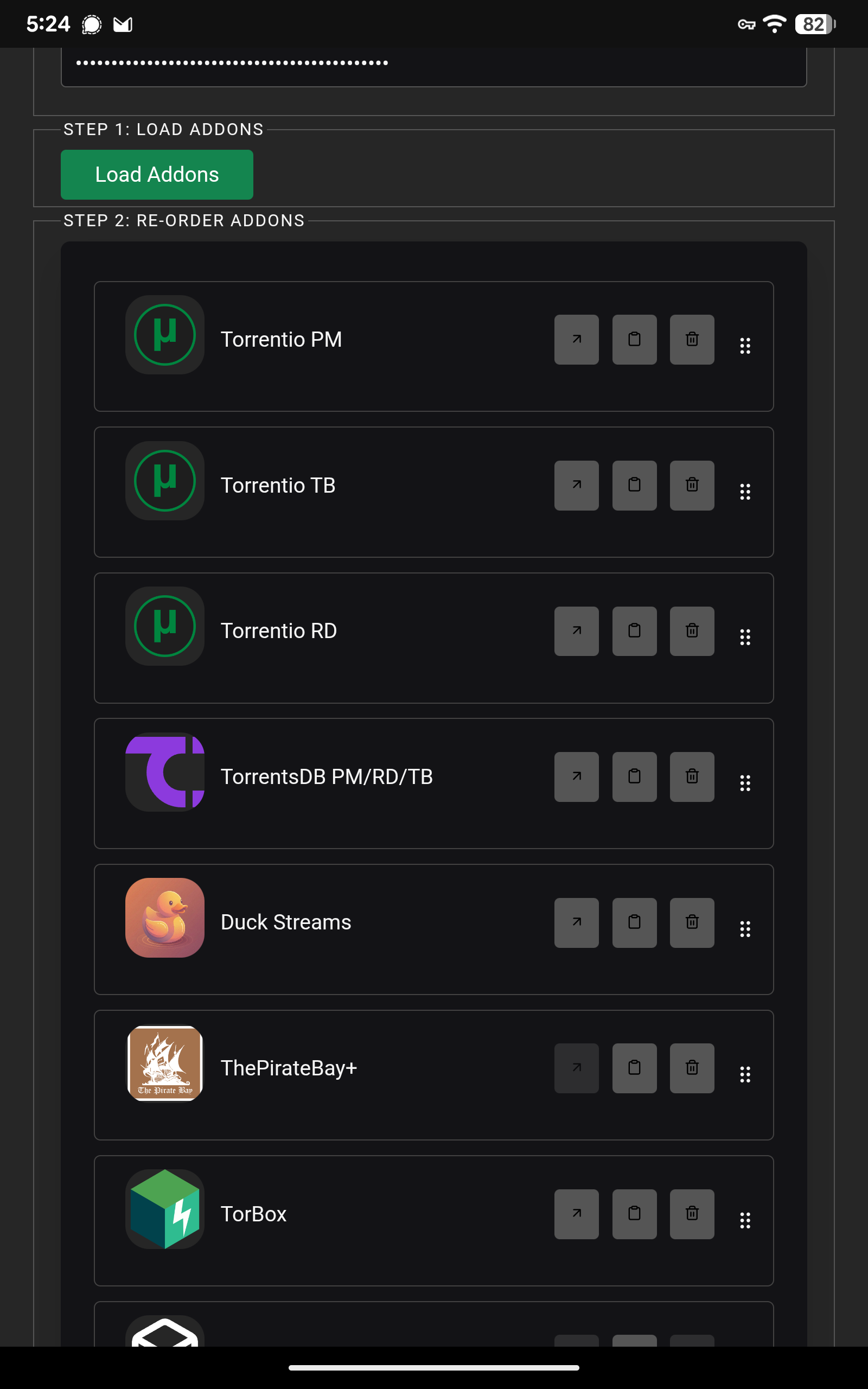
Then I press on any addon and keeping my finger pressed on it I can drag it up or down and release it where I want. Then after finishing I clicked the Sync and then get a finished syncing notice and voila your addons are rearranged in the order you want. Then you click sync and it will then sync to your Stremio and have their order rearranged to your liking.
I have everything ordered how I want, but what is throwing me…next to where it say sync to streamio… after you order things how you want, Troys document shows a “add addon” button. I do not see that add addon on the page https://stremio-addon-manager.vercel.app/ (the screenshot I shared above). Troys doc shows something different. His instructions say once you click on the add addon button, you would then enter the manifest url previously created from AIOMetadata
Sorry the instructions I gave were for rearranging existing addons in Stremio. You are trying to create a Stremio Build and that’s different. According to Troy’s instructions he is doing this on a computer and that is different. Start at the top and read his instructions. I don’t have a computer only my Tablet and not sure I can do it on my Tab.