I recently bought a new Bose soundbar to replace my old Zvox and the “change ir setup” in settings is greyed out. I need to change that so i can control the soundbar volume with my Shield remote. I use the triangular shaped one not the original flat one. In my research it appears I need the origiinal remote but that seems odd and i think ive changed that setting in the past with the current remote i using. Any help appreciated.
I don’t have a 2019 Shield but here is what AI said:
Good news: your triangular remote (the 2019 Shield TV remote) absolutely supports IR volume control, so you do not need the old flat one. That research you found is outdated or mixing up remote models.
The reason “Change IR Setup” is greyed out comes down to a simple conflict. The Shield lets you control volume through HDMI-CEC or IR, but never both at the same time. When you swapped in the Bose soundbar, CEC likely took over the volume handshake, which locks out the IR option. That is why the setting looks frozen.
Here is how to free it up:
-
Go to Settings > Device Preferences > Display & Sound > HDMI CEC and turn CEC control off.
-
Reboot the Shield (Settings > Device Preferences > About > Restart). This step matters, since the box needs a fresh start to release the old volume config.
-
After it powers back up, head to Settings > Device Preferences > Display & Sound > Volume Control and select Change IR Setup. It should now be clickable.
-
Follow the prompts, aim the remote at the Bose soundbar, and confirm when you see the volume move.
That didn’t seem to work either. I appreciate the reply. Didn’t think of trying ai. I posted that question on a Shield FB page and never got one reply, so I do appreciate it
Of course! I’m curious if @Miki or any other Patrons would have better insight here
Settings-> Display & sound → Volume Control
Settings → Display & sound → Power Control
Those should be the two areas you need to go to.
Yes Ive been to both areas and the change ir setup is greyed-out in both. I tried turning cec off completely and rebooting but that did t help. My set up has always worked using ir to control the volume and on/off on my Zvox soundbar and cec to turn on/off the the tv and shield together. I just need to change the Zvox sound bar to a Bose soundbar bar
Try this then.
Settings → Device preferences → Display & Sound → Volume Control. And you should be able to choose IR.
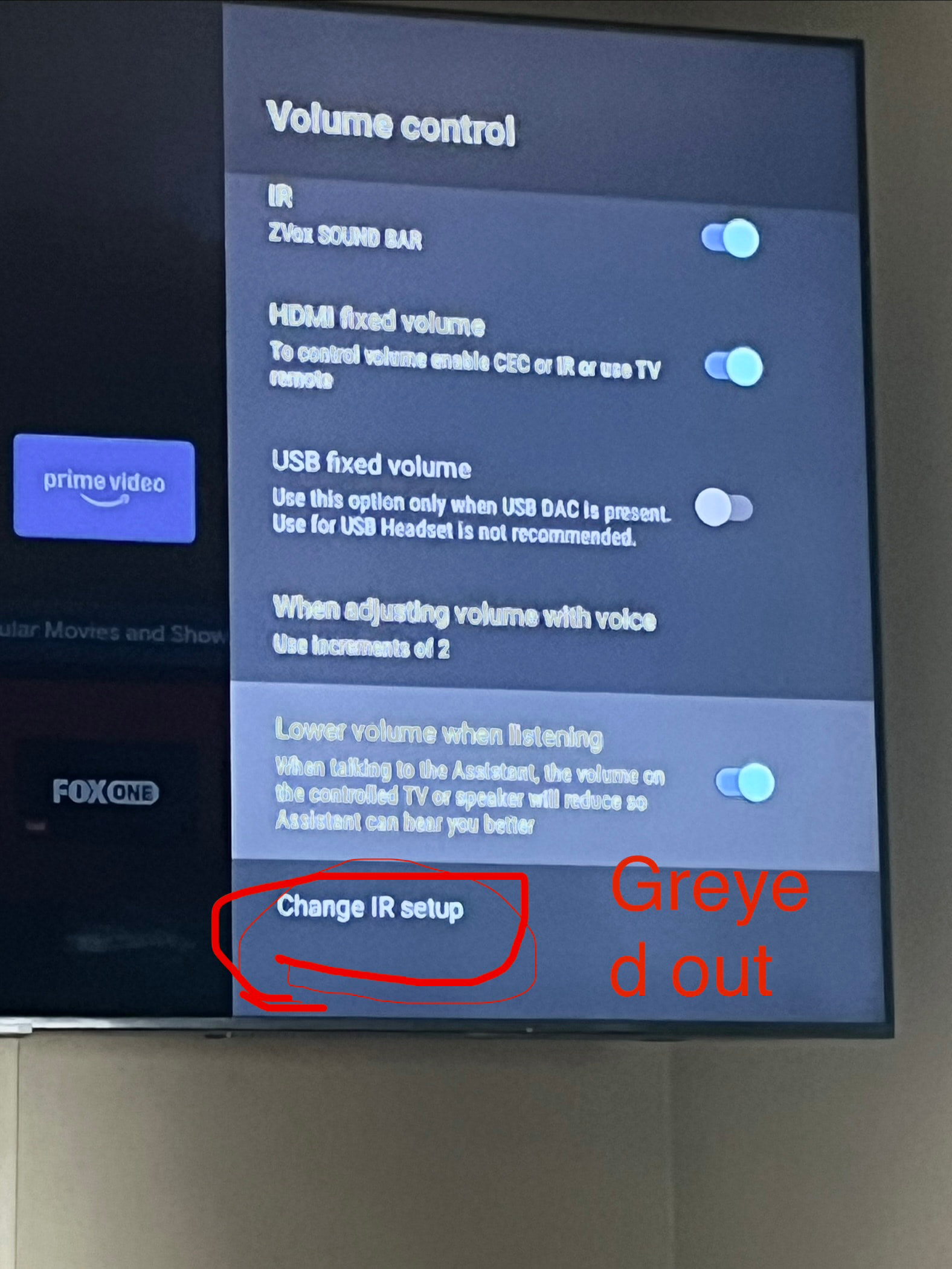
Well now that’s odd. Only one last idea. Do a hard reboot. NOT A FACTORY RESET. But actually unplug the power for a few minutes, plug it back and restart the Shield and then check again. I haven’t a clue as I used the rectangular remote and my Samsung soundbar used the infra red control for volume. I will do some surfing to see of anyone else has had this issue. Oh I almost forgot. This may sound ODD but I new another user who had this same issue and what they did was open the rectangular remote, remove the batteries, waited for a couple of minutes and the reinstalled the battery and then checked and the IR settings had been restored. Been so long since I used my Shield Pro I had forgotten, sorry.
Maybe try the live chat. It’s active now.
https://nvidia.custhelp.com/app/answers/detail/a_id/4890/related/1
No that didn’t work either. Thank you for all your efforts though. I really appreciate it. Maybe i try the live chat. Thanks again
Ok but I just took a close look at the screenshot you posted and it shows you have the IR setup turned on for the ZVox SOUND BAR. So I don’t think the IR will show as being active where you see it’s greyed out as you already chose IR. So try turning it off for the ZVox setting and then see if the IR becomes active in the greyed out area. Also turn off the HDMI fixed volume.
I turned ir off for zvox and turned of HDMI fixed volume but still greyed out so I rebooted but no joy. Still greyed out
Ok Live Chat is the last option as I’ve exhausted my thinking. Not that that’s hard. 
Thanks again. Much appreciated 