Better box for iptv?

The 2 boxes in question are the x88 prox5m (s905a) vs the tanix tx5 (s905y5)

Both have slimboxtv (atv) flashed

Or if I’m only interested in iptv with tivimate would aosp be better?

Thanks to troy I was able to flash these boxes. Although I had a little trouble with the x88 prox5m. There’s now a revision file with the firmware labeled s905a that I had to use. In the video he used the x5m but that didn’t work for me. I would get stuck at 6%…anyway i would be interested in hearing opinions on which of these 2 is better for iptv

imho aosp plays tivimate with no issues. If iptv is the main concern I think its perfect. Kodi also plays well with aosp.

I would also check out these boxes for streaming live TV & other content - Best Android TV/Google TV Boxes in 2026 (Goodbye Fire TV)

I just flashed Slimbox 14_18 AOSP in to a new Tanix TX5 box I just purchased. I have been running this box for the last few days & overall for it’s price point I am really impressed. Now I did flash Slimbox in to a X88 Pro X5M almost a year ago now building a box for my daughter & between the two the X88 is a little better on speeds from Geekbench with it compared to the Tanix TX5, but overall they are just about the same. The X88 has AI-SR but no AIPQ where the Tanix TX5 has neither. I can’t recall what the X88 has on the HDR but the Tanix TX5 will do HDR 10/10+ & HLG.

Last I checked the X88 Pro X5M is a little more in price than the Tanix TX5 but a little faster box with AI-SR, has the Mali G310 GPU where the Tanix TX5 has the Mali G31. I am comparing notes on speeds using 4G ram/32/64G storage with both having the DDR 4 ram in them. The X88 Pro will get about 550 quad scores on Geekbench, around 400 for the Tanix TX5. Actually the crappy remote that is IR that comes with the Tanix TX5 is really a bad deal & I connected a Ugoos UR02 up to it and works solidly. The extra expense of the remote purchase makes the X88 Pro 5XM a better overall choice for the overall cost as it’s just better overall & comes with Bluetooth remote that works very well as Troy has said. They both will do very well on WIFI, but the WIFI 6 in the X88 is a step up. My tests of my Tanix TX5 I get 250 of my 300+ internet speed on the WIFI of it so it’s solid. The lack of Dolby Vision in both is a factor if highly desired, but I believe they both run HDR 10/10+/HLG. Actually I am very happy and impressed with the Tanix TX5 for it’s solid operating with the Slimbox installed & although around 400 quad score on Geekbench, when you look in depth at the scores individually it’s really better than the numbers indicated overall as the major things that you want it to be quick on it is quick on. Below is a test of my Tanix TX5 w/slimbox installed & the numbers it got. I think Troy would agree that the X88 Pro 5XM wins out between the two, but for the bargain basement price this Tanix TX5 is a great option, & with 4G Ram/32 Storage setup it’s very solid running, even with the 1.7 CPU. The X88 Pro X5M has a 2.5, gets around 550 quad score, & with the better GPU plus the AI it is the better box of the two obviously. What I found after setting this TX5 up is it is a very solid box worthy of it’s price point.

https://browser.geekbench.com/v5/cpu/24498204

Appreciate the info, I am currently running the inn 4k pro v2 and it’s a great box but I do not like it restricted Ethernet/wife. I really want to locate a do all box, gigabit port, usb 3.0, WiFi 6 , AI upscalling. I don’t really care to pay $500 for a box as long as it checks the boxes. I just want smooth streaming . IPTV mostly but wife likes her Netflix and other paid apps on it. I still feel like it a little too much buffering here and there and I feel that it’s related to the ethernet inputs. that’s why I preferred to locate one that is not restricted. I get almost 1k download without my vpn. With it on anywhere from 30-80 max.

Anyone have box suggestions? I don’t care to buy the buzz box at the prices. They are listed, but if it’s not needed, I don’t need all that. We stream only on these boxes. I do all my gaming on the ps5 console.

The Onn 4k Pro only restricts Ethernet speeds , not WiFi…

@bkelso29 Your very welcome. This questions actually needs a bit more info than provided. If you insist on USB 3.0 then some of these are off the list. First of all the money issue & affordability is always in question, but from what your saying you want the internet not to be neutered shall we say & have the most benefits for you to stream tv without any issues having WIFI 6. You need to look deep inside the specs of many of these boxes to see what suits your needs. I will be clear on something that many may not realize. I highly recommend NEVER purchasing a box with only 2 Gig of ram. The reason for this is almost the entire 2G is taken up by the operating system. This is so important to a box as basically think of it as it’s brain & having more of it helps it think to stay ahead of what your telling it to do. Not only is the CPU/GPU important but also having enough ram to keep it thinking faster is far better. I never recommend to anyone to cut themselves to a 2 Gig of ram box - EVER! Not a good idea.

NO 1. - If you want the lowest cost bargain basement box that has USB 3.0, WIFI 6, AI-SR but no Dolby Vision or AIPQ, just HDR 10/10+/HLG with great 32 bit capability then you may want the X88 Pro X5M box w/Android 14 & Slimbox capable to flash their firmware in to it if desired. Also instead of the G31 Mali GPU that the Tanix TX5 has, this has the Mali G310 GPU which is a faster & better GPU. This box will get mid 500’s quad core score on Geekbench and will be solid & reliable for speeds & in my honest opinion the best box for the lowest cost. I built one of these boxes for my daughter & it’s cranking well to this day & I would guess it’s at least 9 months old now. I did put Slimbox in to it & it runs great. This box does tend to run warm on CPU Temps just like the Tanix TX5 does so I recommend putting a fan under both of them. The TX5 runs about 61-63C without the fan under it, now running 49-51C with the fan under it.

NO 2. - When it comes to the Tanix devices, I have a couple of their W2 boxes with only 2 ram/16 storage & only because I got them both for 50 bucks & got that money back for free on a rebate deal from one of the kickbacks extensions. This box is a TOAD & I do not recommend it. Although after putting Slimbox in to it the box works fairly solid, the guts in this thing will only do a quad score in the 100’s & the WIFI is 100mbps neutered. Good spare tire & since I got them so dirt cheap I grabbed them. The Tanix TX5 is a touch behind the X88 Pro X5M but a better choice.

NO 3. - The Tanix TX5 is a great option & has solid WIFI speeds, but is not WIFI 6, nor does it have USB 3.0. Since I just built mine I can tell you that it is getting solid 250’s from my routered WIFI 6 Cudy W/VPN on Surfshark of my 300’s fiber internet. My nominal speeds are generally in the 360’s range without VPN. For WIFI 5 this is very solid speeds. Slimbox works really solid in this box & I have been running it for a week now without any issues. The negative about this box is although less in price by the time you buy a good BT remote to use on it your about equal to the cost of the X88 Pro X5M box. The IR remote that it comes with totally sucks. There is a plus model & a max model of this TX5 but are harder to find. This one due to your statement is most likely off your list.

NO 4. - If you wish to have Dolby Vision in the guts of your box your going to have to dig a little deeper in to your wallet. For about the lowest cost option & solid speeds/workability that has DV capability, along with AI-SR & AIPQ I have the Ugoos SK4, but NOT the pro version & the wife runs this box every day & it is super solid. I do NOT recommend the pro version as it has level 1 certification, which means it is locked up to googleygoo’s control, but also I heard the Netfiix still won’t do hi resolution video on the pro version. The cost of this Box is far less than my AM9 Pro I have, about half really but is not as fast of a box as the AM9 Pro but not a factor to stream with. This box gets about the same speeds as the X88 Pro X5M on Geekbench so it’s a solid one for speeds, & does WIFI 6, DV, HDR 10/10+/HLG but is considerably higher in price. On our Sony the picture quality of this box is stand up superb equal to my AM9 in my honest opinion & a great cost saving option. I have 2 identical 90 series Sony Bravia tv’s & both look equally impressive.

NO 5. - For the best of the best at the lowest out of pocket costs the AM9 Pro I feel is the best one. Many others recommended the AM9 to me from this site, & yes @sim_bill I through my hand up to you my friend for all your insights before I purchased one. Your going to fork out 230+ tax for this box, but the benefits of this box is truly tops. From it’s DDR 5 ram to the true 64 bit processing it’s one of the best out there. Currently Am…n has the best price for it. The company store is best for the Ugoos SK4 at 125 from what I am seeing. I got 800’s quad score from the AM9, but the Pro version will do over 1,000 mainly due to it’s much faster ram memory. Since it can think much faster it makes a big difference. The newer CPU helps some also of course.

In my experiences from the improvements I have seen, having the AI-SR & the AIPQ is huge to improve picture quality along with the Dolby Vision. Do as you wish, but these 3 things are a great thing to have. I have an antenna up & have a 3.0 FL** tuner & run my locals through the app. Doing this makes incredible improvements on my antenna channels on my AM9 Pro as it ads both of the AI improvements to them before displaying on my Sony, especially for the 480i feeds.

These are the ones I know a lot about, & there may be others I am not aware of, so any other people reading this feel free to chime in on boxes & their picks, but the X88 Pro X5M wins for cheapest & best low budget option, then for the extra cost but more affordable the SK4 NON Pro version. My top pick is the AM9 Pro as it is the cheapest & fastest fully loaded box that isn’t missing anything. Also another pet peve for me on this AM9 Pro box is that if you run a fan with it, it will cut off power to fan from it’s USB ports on/off when you turn box on/off, whereas NONE of the other ones will do this which is super cool to me not having to monkey with the switch to manually turn on/off if you do desire to run one with a fan. After I lost my AM9 due to overheating awhile back I will never fail to run a fan under all my boxes. SK4 will also cut on/off same way. Although the SK4 doesn’t have vents under it, I put a fan under it anyhow just to help cool it some.

This was a great post. I will 100% agree with this as I have the x88 pro x5m with slimbox and the ugoos AM 9. They are solid boxes. I also have 3 onn 4k pro boxes. They all serve their different purposes and I am happy with all of them

Appreciate all the input. I did forget to mention I want the AI up scaling. I think I will use a launcher to activate the ai up scaling on the on 4k pro v2 and adapter for usb port to improve internet speeds. See if that helps with some of buffering issues. I am in contact with provider over the speeds being what I consider to low while VPN is activated.

Any more insight please reply, I can only reply I think once a day until I become patron (Friday).
Thanks everyone in advance

TZBox OS returns zero results in any search. I would stay a long long way away from a non-existent OS. Who know what it really is.

Agreed, I was wanting to wipe that OS and add slim box or another ROM to the device. I watched Troy’s video on the results of flashing slimbox onto a device and I was just wondering what the experts thought of flashing on this device with its specs.

I guess I didn’t explain myself enough. As this is a completely unknown OS that has no reference or history there is absolutely no way I would connect it to my system under any circumstances. It takes a brief second to initiate god knows what, and compromise your entire system, and you can’t wipe it or initiate a flashing without it being connected. Unless you know how to sandbox it without ever accessing your system, isolate it, and then completely wipe it, I would consider something else.

@Miki Thank you for your advice, it’s already isolated from my system from the beginning and I have previous experience flashing routers.

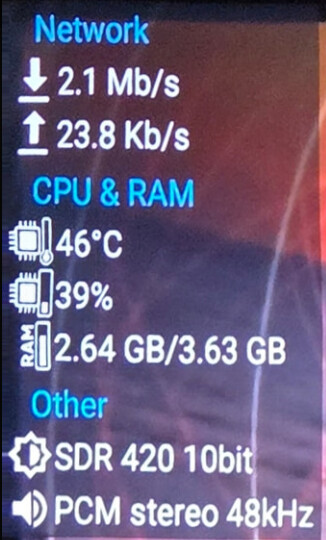
@bkelso29 Well then in my opinion the AM9 Pro would be the best choice as it has 3 - 3.0 ports, full AI-SR and AIPQ support, Dolby Vision, Android 14, true 64 bit processor so it runs 64 bit apps, and it is FAST! I do highly recommend a 120mm fan to run on high under it. Nice thing too is plugging the fan in to the USB on side of box it will power on/off with box so you can simply set fan on high and the box will do the rest. Nice too is this box has a setting to where you can hit the menu button quickly 3 times to turn on/off hardware monitor and in this photo you can see what I have toggled on for it. This is cool to quickly see if your getting Dolby Vision/HDR from feed being watched, and audio being played, but I have a fan running on high under mine and you can see the CPU temp here also with fan running right now. I run projectivy launcher on it.

Wow those are killer slow download/upload speeds.

@Miki Those are actual speeds in real time the box is pulling/using to run the stream Miki, NOT my internet speeds! Both the top which is the hardware monitor and bottom left which is my real time internet speed meter both show amount being pulled from the internet to run the streams in real time. The real time internet speed meter is on 24/7 so I can see if it is indeed pulling internet if a particular stream isn’t running or delayed to run. Better grab another coffee brother! :joy:

@informant , the only #'s I can see in the bottom left are .09 and .03, no matter how small or big I make the pic…

LOL He’s only getting 2.1 MB down. How the heck can you stream with that?

He’s not streaming anything. That’s why the numbers are low. The numbers are what is currently being used. Not what his bandwidth is.

@Masterofmydomain ok gang, you all are out in outer space somewhere and NEED more coffee. All of you are so far in outer space I will try to get all of you healed up on what is really going on here. I was streaming when I took this photo. H&I is a 720p/30fps feed. The 2 meg being pulled is what the stream is using from the internet to run the stream, NOT my availability of my total available internet speeds. This will also vary as how the app pulls the data, but 2-4mbps for this type of feed is perfectly normal. If I stream this through my app from my antenna it is 480i so it pulls far less data when you watch it. This is used data in real time usage. I don’t know why you all can’t get a grasp of this but it only what is being pulled through, used by the box to provide the stream being watched. The hardware monitor shows you what is being used to provide the stream, NOT the total internet I have available, & is the same as the real time internet speed meter. This app reads & displays every half a second or so to display what is being used in real time to provide the particular stream being watched. If you all wish to SEE for yourself, go to Aptiode app, search for real time internet speed meter (you will see 2 orange arrows, 1 up 1 down) & download this app. Also the white background internet speed test I use is shown along with this when you search for it. It is proven accurate as it pars up with the speed tests shown on this app to match the real time internet speed meter. This can be set in Projectivy to load when box boots up, has settings to size it, can move with real mouse & drag it to anywhere on the screen you wish to put it. What is cool about this app is if your waiting on a stream to load up to run it will show you if any data is being pulled to load the stream, & of course shows in real time what is being pulled to run the stream. If I were to pull up a 4K feed for example you would see far more than 2mbps of data being pulled to run the stream for example as the higher resolutions require more data draw to stream them. I have this app set to load on boot and is on 24/7. The download is on top, the upload is on the bottom, set for MBPS. If I do run a speed test this will also pretty much match the internet speeds I have in total from my internet speed test app & can watch it as it tests the internet to compare the two. The settings for the real time internet speed meter allow to size, take off the DL/UL logo, WIFI logo among other settings which I don’t need so I make it just big enough to suit me with only what I need to see in megabits per second & drag it with the real mouse in to the bottom left corner which is NEVER in my way. I can’t upload a video here or I would so you could see how it works. It reads about every 1/2 second in REAL TIME!

Ladies & gents you all need to understand that this is a tool to show real time usage, NOT total internet availability. The hardware monitor works the very same way, & on my AM9 Pro is able to be set for MBPS instead of KBPS in it’s settings.