# VPN Monitor Dot on Firestick/Android (VPNSafetyDot Alternative)
**URL:** https://troypointinsider.com/t/vpn-monitor-dot-on-firestick-android-vpnsafetydot-alternative/99424
**Category:** TROYPOINT.com Posts
**Created:** [October 30, 2023, 9:29pm UTC](https://troypointinsider.com/t/vpn-monitor-dot-on-firestick-android-vpnsafetydot-alternative/99424 "2023-10-30T21:29:56Z")
**Posts on this page:** 20
**Page:** 2
### Author:  [@PapaS](https://troypointinsider.com/u/PapaS)
#### Post date: [May 26, 2025, 3:34pm UTC](https://troypointinsider.com/t/vpn-monitor-dot-on-firestick-android-vpnsafetydot-alternative/99424/21 "2025-05-26T15:34:32Z")
Thanks so much, been waiting to get this on my phone forever.😅 Have a great day 😀
---
### Author:  [@Miki](https://troypointinsider.com/u/Miki)
#### Post date: [May 26, 2025, 4:43pm UTC](https://troypointinsider.com/t/vpn-monitor-dot-on-firestick-android-vpnsafetydot-alternative/99424/22 "2025-05-26T16:43:43Z")

---
### Author:  [@EngineerMind](https://troypointinsider.com/u/EngineerMind)
#### Post date: [May 26, 2025, 6:13pm UTC](https://troypointinsider.com/t/vpn-monitor-dot-on-firestick-android-vpnsafetydot-alternative/99424/23 "2025-05-26T18:13:44Z")
OK, I just posted a new “Test” version on my website specifically for Android 14 devices (_it will **NOT** run on Firestick devices_). _Please do NOT distribute/link to this test version_ so that it won’t get installed on too many devices in the event one or more bugs are discovered in it.
To install this new test version, use one of the two methods mentioned at the bottom of this page: [www.MonitorDot.com](http://www.MonitorDot.com).
**Please let me know if this new version works for you.**
---
### Author:  [@EngineerMind](https://troypointinsider.com/u/EngineerMind)
#### Post date: [May 28, 2025, 11:27pm UTC](https://troypointinsider.com/t/vpn-monitor-dot-on-firestick-android-vpnsafetydot-alternative/99424/24 "2025-05-28T23:27:02Z")
There are now two different versions of Monitor Dot:
- For Amazon Firestick/FireTV devices
- For Android TV/Google TV devices
Please see the website for the downloader codes for each.
---
### Author:  [@EngineerMind](https://troypointinsider.com/u/EngineerMind)
#### Post date: [June 8, 2025, 6:06pm UTC](https://troypointinsider.com/t/vpn-monitor-dot-on-firestick-android-vpnsafetydot-alternative/99424/25 "2025-06-08T18:06:40Z")
Hi,
There is a new issue effecting Monitor Dot. Please see this other post for the details:
> [@Surfshark causing blocked windows searching](https://troypointinsider.com/t/surfshark-causing-blocked-windows-searching/130637/40):
>
> Over the past month, some users have reported issues with Monitor Dot not loading properly. After investigating, it seems as if Surfshark blocks access to my website ([MonitorDot.com](http://MonitorDot.com)) when connected to nearly half of their U.S. VPN server locations. Here’s what I found: When connected to Surfshark’s “New York” server, the Monitor Dot app times out when trying to reach my site. The same happens when visiting the site directly using a browser like Silk. However, when switching to a different ser…
---
### Author:  [@carlbs](https://troypointinsider.com/u/carlbs)
#### Post date: [July 10, 2025, 3:13pm UTC](https://troypointinsider.com/t/vpn-monitor-dot-on-firestick-android-vpnsafetydot-alternative/99424/26 "2025-07-10T15:13:46Z")
Not bricking per say, but related. I have 4 ONNs. Three 4ks and a Pro. For some reason just in the last three weeks, my Pro (by far the most used) has been restarting on it’s own and sometimes going to Safety Monitor Dot update page on it’s own. Far preferable to bricking obviously since all you do is wait for it to restart or press the back button to get out of the Safety Dot page. Each happens usually once during a baseball game. Still strange. Hasn’t happened on any of the 4ks. I run a usb powered fan under this Pro too – not that I needed it, but just had it laying around anyway.
Also do not use Wolf launcher, which possibly has a connection to the bricking. Don’t feel any launcher is needed, though I can see how some would see this as part of the hobby.
---
### Author:  [@r1194](https://troypointinsider.com/u/r1194)
#### Post date: [July 10, 2025, 3:34pm UTC](https://troypointinsider.com/t/vpn-monitor-dot-on-firestick-android-vpnsafetydot-alternative/99424/27 "2025-07-10T15:34:22Z")
interesting, the monitor dot pops up randomly on my N Shield , back button and it’s fine
---
### Author:  [@carlbs](https://troypointinsider.com/u/carlbs)
#### Post date: [July 10, 2025, 3:41pm UTC](https://troypointinsider.com/t/vpn-monitor-dot-on-firestick-android-vpnsafetydot-alternative/99424/28 "2025-07-10T15:41:07Z")
The phantom restart is a little more annoying since I have to go back and check that my SurfShark has restarted and then (usually) to TiviMate.
Maybe the monitor dot is “asserting” itself because it wants you to update?
---
### Author:  [@Franksr](https://troypointinsider.com/u/Franksr)
#### Post date: [September 11, 2025, 4:41am UTC](https://troypointinsider.com/t/vpn-monitor-dot-on-firestick-android-vpnsafetydot-alternative/99424/29 "2025-09-11T04:41:55Z")
I have the same problem. I have 2 TVs and each now have Monitor Dot popping up randomly. How can we stop that? It never use to do that. As you stated, click the back button and it goes back to what I was watching.
---
### Author:  [@PapaS](https://troypointinsider.com/u/PapaS)
#### Post date: [September 11, 2025, 11:40am UTC](https://troypointinsider.com/t/vpn-monitor-dot-on-firestick-android-vpnsafetydot-alternative/99424/30 "2025-09-11T11:40:40Z")
If you have split tunneling option in your VPN, set the Monitor Dot to not use VPN.
---
### Author:  [@Franksr](https://troypointinsider.com/u/Franksr)
#### Post date: [September 11, 2025, 1:33pm UTC](https://troypointinsider.com/t/vpn-monitor-dot-on-firestick-android-vpnsafetydot-alternative/99424/31 "2025-09-11T13:33:31Z")
Okay, I will…Thanks so much!
---
### Author:  [@ashok2021](https://troypointinsider.com/u/ashok2021)
#### Post date: [September 16, 2025, 4:58pm UTC](https://troypointinsider.com/t/vpn-monitor-dot-on-firestick-android-vpnsafetydot-alternative/99424/32 "2025-09-16T16:58:21Z")
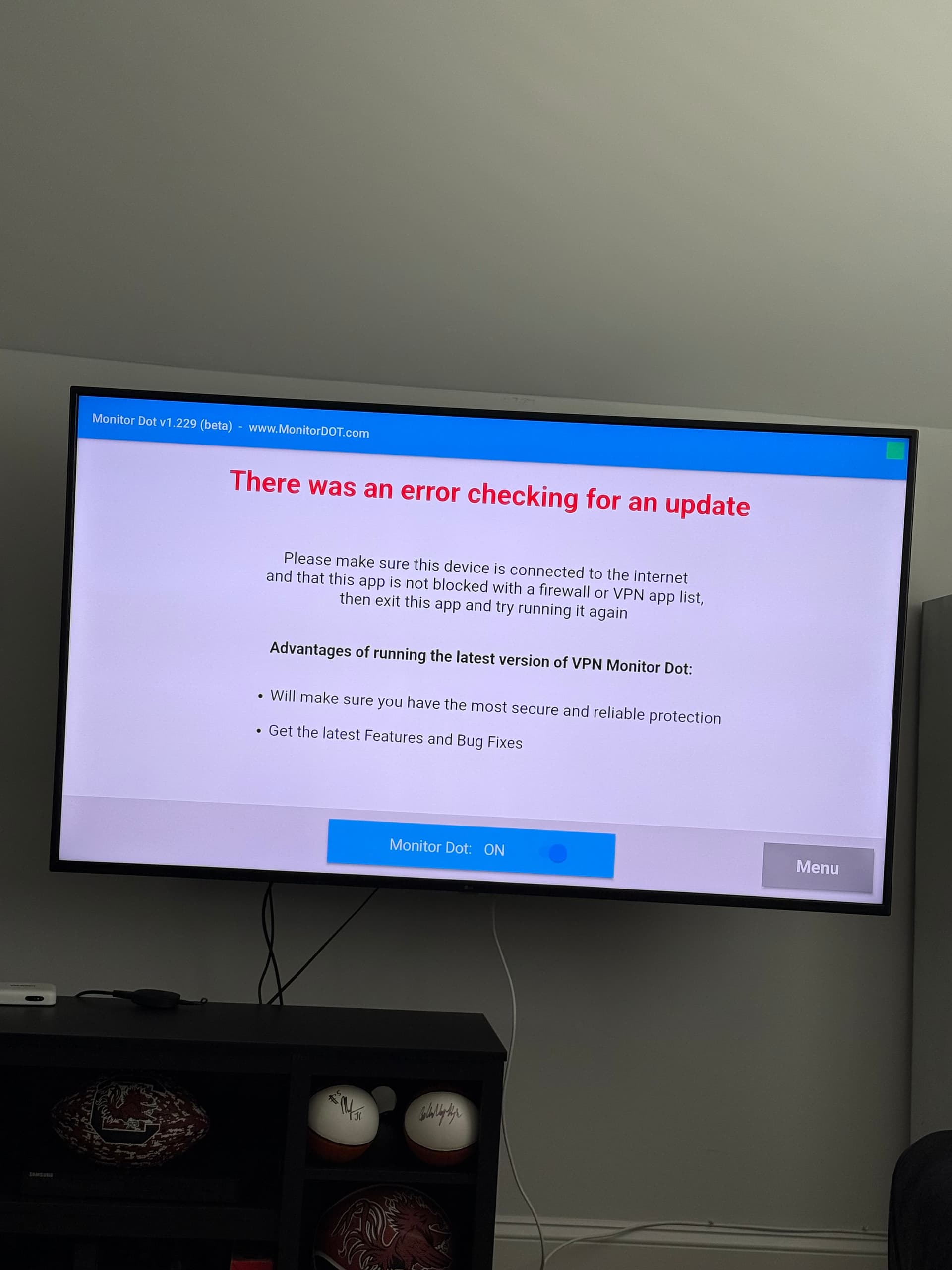
This keeps popping up when I’m watching tv, anyone know how to get it fixed? This has been going on for months, just now finding the time to ask. Thank you so much
---
### Author:  [@PapaS](https://troypointinsider.com/u/PapaS)
#### Post date: [September 16, 2025, 5:06pm UTC](https://troypointinsider.com/t/vpn-monitor-dot-on-firestick-android-vpnsafetydot-alternative/99424/33 "2025-09-16T17:06:55Z")
Please use Search function before opening new threads. This issue has been discussed diligently on here. Thanks 👍 😊
> [@VPN Monitor Dot on Firestick/Android (VPNSafetyDot Alternative)](https://troypointinsider.com/t/vpn-monitor-dot-on-firestick-android-vpnsafetydot-alternative/99424/30):
>
> If you have split tunneling option in your VPN, set the Monitor Dot to not use VPN.

---
### Author:  [@ashok2021](https://troypointinsider.com/u/ashok2021)
#### Post date: [September 16, 2025, 5:45pm UTC](https://troypointinsider.com/t/vpn-monitor-dot-on-firestick-android-vpnsafetydot-alternative/99424/34 "2025-09-16T17:45:19Z")
Thank you so much. My bad for not thoroughly searching before posting!
---
### Author:  [@Franksr](https://troypointinsider.com/u/Franksr)
#### Post date: [September 18, 2025, 6:49pm UTC](https://troypointinsider.com/t/vpn-monitor-dot-on-firestick-android-vpnsafetydot-alternative/99424/35 "2025-09-18T18:49:30Z")
This has worked on both TVs just fine.
**EXCEPT** , one TV it popped up again after I made the changes.
I’ve not had it pop up since. Just to let you know.
---
### Author:  [@sktn77a](https://troypointinsider.com/u/sktn77a)
#### Post date: [September 18, 2025, 7:29pm UTC](https://troypointinsider.com/t/vpn-monitor-dot-on-firestick-android-vpnsafetydot-alternative/99424/36 "2025-09-18T19:29:30Z")
I’m not having that issue since I took Monitor Dot out of the VPN. However, on the latest Amazon 4k Max (2nd Gen) firmware I keep getting a popup when I run Monitor Dot saying “this software was designed for an older version of Android”. It eventually works but the popup is annoying.
---
### Author:  [@EngineerMind](https://troypointinsider.com/u/EngineerMind)
#### Post date: [September 18, 2025, 9:53pm UTC](https://troypointinsider.com/t/vpn-monitor-dot-on-firestick-android-vpnsafetydot-alternative/99424/37 "2025-09-18T21:53:53Z")
> [@sktn77a](#):
>
> this software was designed for an older version of Android
You should only see the message “this software was designed for an older version of Android” when you first install the app.
Are you saying that you see that message well after you install the app?
---
### Author:  [@sktn77a](https://troypointinsider.com/u/sktn77a)
#### Post date: [September 19, 2025, 6:21pm UTC](https://troypointinsider.com/t/vpn-monitor-dot-on-firestick-android-vpnsafetydot-alternative/99424/38 "2025-09-19T18:21:02Z")
Not sure - I was installing 4 firesticks yesterday and this popped up when I ran them to set up the settings.
---
### Author:  [@EngineerMind](https://troypointinsider.com/u/EngineerMind)
#### Post date: [September 19, 2025, 6:58pm UTC](https://troypointinsider.com/t/vpn-monitor-dot-on-firestick-android-vpnsafetydot-alternative/99424/39 "2025-09-19T18:58:35Z")
There is a chance that with some versions of android you won’t see that warning when you install it, but instead you’ll see it when you run the app for the first time. But then you should not see that warning again after that.
---
### Author:  [@JerryJ](https://troypointinsider.com/u/JerryJ)
#### Post date: [December 18, 2025, 4:55am UTC](https://troypointinsider.com/t/vpn-monitor-dot-on-firestick-android-vpnsafetydot-alternative/99424/40 "2025-12-18T04:55:26Z")
@EngineerMind
I just wanted to tell you that I absolutely love using your Monitor Dot app.
I do have a question, if I may? I recently bought an Ugoos AM9 box and typically on a new unit I put the Monitor Dot app on first. On my Shield Pro and ONN Pro the dot is, what I would call normal size. But on the AM9 the dot very tiny for some crazy reason. I checked in the setting to see if could adjust the size. Is there a way to change the size of the block?
[Previous page](https://troypointinsider.com/t/vpn-monitor-dot-on-firestick-android-vpnsafetydot-alternative/99424.md?page=1)
[Next page](https://troypointinsider.com/t/vpn-monitor-dot-on-firestick-android-vpnsafetydot-alternative/99424.md?page=3)