Early Christmas gift. You deserve it.

1 Like
I picked up the AM9 last night at an Amazon Locker since I didn’t want it sitting on my porch.
I was just going to plug it in to see if it all worked and I really didn’t have time to get down to loading anything serious. I wanted to re-watch Troy’s “First Look” tutorial to make certain that I did the initial setting right. Then I got antsy and logged into my Google acct. At that point I went ahead and loaded Downloader which led to getting the Toolbox (with absolutely no issues). From there it was Surfshark, Kodi (64 bit, thank you Troy!), Smarttube, Monitor Dot, Projectivy, and last but not least..Analiti!
So I started SS and ran Analiti. I have to say that I was completely SHOCKED. I’ve routinely gotten 150mbs of 120-150 (wifi) on my dearly loved Shield Pro. (Note: the best I’ve gotten on my ONN 4k Pro was 65mbps,ugh). BUT, Holy Smokes, the AM9 was pulling 190-196mbs!!! I think that I said I was shocked, but I was shocked (we have a 1k gig service).
I should be able to report more of my discoveries once I get some stuff loaded up. I do have one question, the little blue indicator is always on? I put a small bit of green electrical tape over since the blue light permeates the dark room.
5 Likes
This is a bit of a surprise --i.e. great download performance with VPN on. Poor VPN performance was the biggest negative I saw in Troy’s review – one that caused me to abandon plans to get one. For download speeds, Troy got approx. a 65% loss of speed with VPN on (below). Can any other AM9 users confirm JerryJ’s great performance with VPN on ?
Gigabit Speeds
VPN Off: 869 Mbps Download & 514 Mbps Upload
VPN On: 302 Mbps Download & 218 Mbps Upload
WiFi Speeds
VPN Off: 619 Mbps Download & 277 Mbps Upload
VPN On: 232 Mbps Download & 117 Mbps Upload
If it’s the same as SK1, Settings >Device Preferences >Power>Power indicator and there’s some things to play with there.
3 Likes
Hello, this is the case for all VPNs and streaming devices…the stronger the CPU the faster the download speeds when VPN is active. I go over all of this in the following video linked below.
The one thing that I always remind people is that you only need roughly 20 Mbps to stream 4K content and anything more than what you need is overkill and won’t do anything for you. So, the guy with 200 Mbps download will have same results as guy with 50 Mbps…they are both adequate to stream movies and TV shows. Now, if you’re downloading files that’s a different story but most people aren’t doing that on these streaming devices.
If you want faster speeds from VPN then I suggest running it off a high-powered router with Wireguard and I show that in this video as well.
3 Likes
Thanks Troy. Watched both the videos – great stuff. Is the 65% reduction in download speed with VPN on about normal for a fairly high-end box with Amlogic S905X5 Quad-Core processor ?
Looking at your Buzz PS6 review, it has a 50% reduction in speed with VPN on and it is quite a beast. So, maybe a 65% loss in speed for a “non-beast” is not abnormal. Given what you say about fairly modest speed required for streaming, the AM9 may be much more than adequate.
When I look at this, I don’t look at it as a % and the reason why is because some streaming boxes are only capable of 500 Mbps whereas others are 900-950 Mbps with VPN off. The max VPN speed may be the same on both of those devices if they have the same CPU if that makes sense.
The BuzzTV has a faster processor than the Ugoos so it gets better dl speeds with VPN on.
Both the BuzzTV P6 and Ugoos AM9 are much faster than the cheaper boxes out there due to their more powerful CPUs.
I personally wouldn’t make a purchasing decision based off of this unless you need the speed for downloading. Again, you will notice absolutely no difference in playback on either of these devices when it comes to download speeds.
I’ve been testing the Ugoos boxes a lot more lately and I’m really liking their video upscaling and the BuzzTV doesn’t have that. If my best friend was asking me which to get between these two, I would say the AM9 as it’s cheaper and offers upscaling. The BuzzTV is going to be overkill for most people.
7 Likes
If you want to alter or dim or get rid of the power indicator light when the AM9 is off, go to power settings off device preferences and change your settings to your preferences. You can even change the color of the power indicator light.
1 Like
I confirm @JerryJ. My podunk condo included Wi-Fi is 100 Mbps. My AM9 runs 80-90+ Mbps with Surfshark connected. The AM9 is excellent!
3 Likes
I have 300/20 mbs internet. With Wi-Fi and my VPN connected I am getting 150-165 mbs down /15-18 mbs up speeds on the AM9. With LAN connection, I get 300-325 mbs down / 20-22 mbs up speeds. More than adequate.
4 Likes
I have the Amazon fire cube and now that I can’t use it anymore for kodi and real debrid, I was wondering what your thoughts were on this and does it look or compare to fire cube? Thanks 
1 Like

2 Likes
Deleted
1 Like
I may be able to assist. I, like a lot of us, started with Firesticks. Then I graduated to the 2nd Gen cube which I loved dearly. But like the sticks, it seemed like I kept bumping the limit on the internal memory. So as Christmas present (to myself) I got an Nvidia Shield Pro, two years ago. It had been around for several years at that time. So there was loads of info and a lot folks that helped in setting up and getting the best from that box. I still cherish the Shield Pro and still use it virtually all the time with no issues. But with some of the rumblings about Googles intent (which have been pretty much not going to be as bad as we all thought) I recent jumped on the AM9. I had been reading all the posts and Troy’s tutorials, to see what new box had the least complaints/issues. It was apparent to me, that the Ugoos boxes seemed to have the least complaints.The Buzz “top” box seemed to be a big hit, but I just couldn’t justify the price tag. After Troy’s “first look” write up stating that the AM9 was kinda perfect for streamer, I knew that the AM9 was perfect for me. I absolutely do not record, play games, or any of the stuff, other than stream. I grabbed the AM9 recently since Amazon had a coupon for $27 off which put it at $152 Prime shipped.
I will say, at this point, that there really isn’t a lot of set up info on the AM9, since it is very new. Troy’s tutorial was the place to start. And if you are comfortable doing some of the basics then you should be good initially. Here on the Insider, sim_bill and @ScoobyDoosSpots have a really good handle on small issue one might have.
So to answer your question, if i may…
This unit blows the Cube out of the water.
7 Likes
Preach it, @JerryJ  !
!
4 Likes
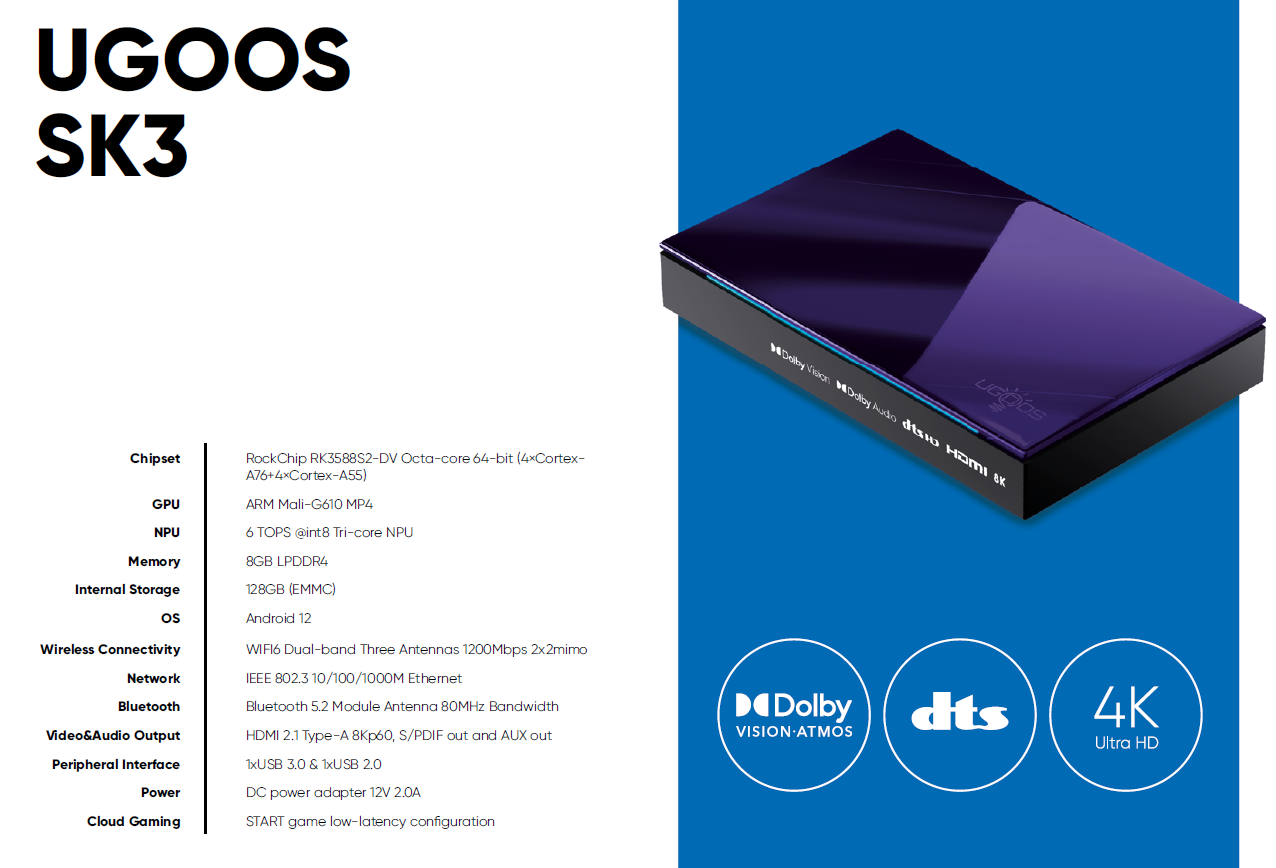
Looks like Ugoos is planning upcoming releases of 3 new devices, the AM9 Pro, the SK4 and the SK3. Only the SK3 appears to have any notable improvements over the AM9. Except for enablement of DolbyVision, the other 2 devices make me wonder, what’s the point? The SK3 will be the newest Ugoos flagship device, with an octacore Rocktech processor, 64bit, 6 TOPs rated tri-core NPU, 8 gbs RAM, 128 gbs internal memory, running on Android 12 O/S, etc. The SK3 appears to have been developed to challenge the BuzzTV PS6. No idea what the price will be but with the price I paid and performance level I’ve gotten from the AM9, I am completely satisfied and won’t be buying the SK3.
2 Likes
Yeah, we discussed those a couple of weeks ago in another thread. I don’t really see why they made a Pro version of the AM9 since it is mostly just Dolby Vision, they should have just had one version fully loaded since even $20 boxes have Dolby Vision.
I’m interested in seeing just what the SK3 brings to the table since thy don’t list as many specs/codecs as they do on the other models. I do like they are showing DV/Atmos and DTS. It should be blazing fast also. I was surprised it lists Android 12 since Ugoos seems to be moving towards A14. It doesn’t specify but I would assume it will be a 64 bit OS.
I know Bill says the AM9 has a better picture than the P6 and I believe him because he has had both. Still, I am quite happy with the P6 picture. I would expect the picture on SK3 to be about the same as the P6 because they both have the same chip.
The key will be if the SK3 has AI and processor upscaling like the AM9. If it doesn’t, that is an unforced error on the part of Ugoos and you are probably correct the picture quality will be no better than the PS6. Both the SK1 and AM9 already have the video upscaling options and the difference is plainly visible. The AM9 does not have DolbyVision but the SK1 does for those who have to have that. Personally, I just forget about DolbyVision on the AM9 and use HDR10, which provides a superior image.
2 Likes
I have an AM9 question. I unplug mine every night as I only have the TV on a few hours a day.
Curious if you all leave yours plugged in all the time or not? Does it matter either way? If you leave them plugged in, do you leave them ON? Thanks.