# Surfshark VPN on Linux Mint interface
**URL:** https://troypointinsider.com/t/surfshark-vpn-on-linux-mint-interface/121591
**Category:** Security
**Tags:** vpn
**Created:** [November 24, 2024, 2:09pm UTC](https://troypointinsider.com/t/surfshark-vpn-on-linux-mint-interface/121591 "2024-11-24T14:09:32Z")
**Posts on this page:** 10
**Page:** 1
### Author:  [@gonefishing](https://troypointinsider.com/u/gonefishing)
#### Post date: [November 24, 2024, 2:09pm UTC](https://troypointinsider.com/t/surfshark-vpn-on-linux-mint-interface/121591/1 "2024-11-24T14:09:32Z")
Looking at replacing Nordvpn with Surfshark,as I have now gone away with Windows altogether and have switched to Linux Mint 22, I do have all my Mint running Nordvpn,had to install from a terminal command that is a bit cumbersome. Doing my research on Surfshark and it looks like they have a interface that will run normally and not through a terminal setup. Is there any Troypoint users currently using Surfshark on Linux Mint?. would like your feedback on this if possible. thanks
---
### Author:  [@TXRon](https://troypointinsider.com/u/TXRon)
#### Post date: [November 24, 2024, 2:15pm UTC](https://troypointinsider.com/t/surfshark-vpn-on-linux-mint-interface/121591/2 "2024-11-24T14:15:43Z")
look in the software manager and install the surfshark flatpak version. Make sure you have flatpak updates enabled under preferences and in software manager make sure show un-verified flatpaks is turned on.
---
### Author:  [@AMD237](https://troypointinsider.com/u/AMD237)
#### Post date: [November 24, 2024, 2:19pm UTC](https://troypointinsider.com/t/surfshark-vpn-on-linux-mint-interface/121591/3 "2024-11-24T14:19:41Z")
I use SS on Mint, but only the browser extension. On this particular laptop, I really only use the browser, so it works for what I need it for. It runs well, for what its worth.
---
### Author:  [@gonefishing](https://troypointinsider.com/u/gonefishing)
#### Post date: [November 24, 2024, 2:28pm UTC](https://troypointinsider.com/t/surfshark-vpn-on-linux-mint-interface/121591/4 "2024-11-24T14:28:39Z")
TXRon, thanks for the info, I did turn on un-verified in Software Manager, but looking to find how to enable flatpak udpates under perferences. AMD237, does the browser extension have all the features, Like Kill switch, ad blocker,
---
### Author:  [@TXRon](https://troypointinsider.com/u/TXRon)
#### Post date: [November 24, 2024, 2:31pm UTC](https://troypointinsider.com/t/surfshark-vpn-on-linux-mint-interface/121591/5 "2024-11-24T14:31:32Z")
update manager\>\>\>preferences\>\>\>automation
---
### Author:  [@TXRon](https://troypointinsider.com/u/TXRon)
#### Post date: [November 24, 2024, 2:32pm UTC](https://troypointinsider.com/t/surfshark-vpn-on-linux-mint-interface/121591/6 "2024-11-24T14:32:31Z")
and under packages tab turn on updates
---
### Author:  [@gonefishing](https://troypointinsider.com/u/gonefishing)
#### Post date: [November 24, 2024, 2:37pm UTC](https://troypointinsider.com/t/surfshark-vpn-on-linux-mint-interface/121591/7 "2024-11-24T14:37:26Z")
TXRon, found them and turned them both on , Thanks
---
### Author:  [@AMD237](https://troypointinsider.com/u/AMD237)
#### Post date: [November 24, 2024, 2:41pm UTC](https://troypointinsider.com/t/surfshark-vpn-on-linux-mint-interface/121591/8 "2024-11-24T14:41:57Z")
It has all of the main features, including ad-blocking, geo-spoofing, etc, etc, except I honestly can’t find the kill switch on it. I will keep searching, but that might not be a feature in the extension.
---
### Author:  [@TXRon](https://troypointinsider.com/u/TXRon)
#### Post date: [November 24, 2024, 3:28pm UTC](https://troypointinsider.com/t/surfshark-vpn-on-linux-mint-interface/121591/9 "2024-11-24T15:28:44Z")
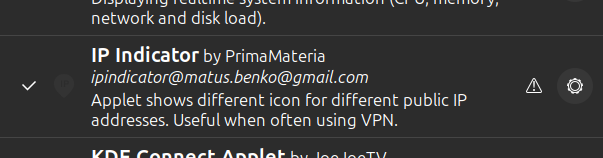
I dont use a kill switch on my desktop but I add an ip extension to my bottom panel.
---
### Author:  [@gonefishing](https://troypointinsider.com/u/gonefishing)
#### Post date: [November 24, 2024, 4:28pm UTC](https://troypointinsider.com/t/surfshark-vpn-on-linux-mint-interface/121591/10 "2024-11-24T16:28:27Z")
TXRon, is this like the VPN Privacy dot that I have activated on all my Android boxes?
How and where do I get this