# Surfshark Interface - new?
**URL:** https://troypointinsider.com/t/surfshark-interface-new/215899
**Category:** APKs (Android Apps)
**Tags:** vpn
**Created:** [September 29, 2026, 1:46am UTC](https://troypointinsider.com/t/surfshark-interface-new/215899 "2026-09-29T01:46:21Z")
**Posts on this page:** 20
**Page:** 2
### Author:  [@MaverickCoast](https://troypointinsider.com/u/MaverickCoast)
#### Post date: [September 30, 2026, 12:00pm UTC](https://troypointinsider.com/t/surfshark-interface-new/215899/21 "2026-09-30T12:00:15Z")
I think the new interface is great and am excited they cleaned it up!
There’s basically now only two pages. One is the settings page and the other is the opening page where you select your locations. ALL of the settings choices now are on one page, rather than having to click around the app like the old version, trying to find the setting you’re looking for. Also, as you scroll down the list of settings, it also gives you options and information on the right as you scroll. Reminds me of the ONN streaming boxes menus! You can also blaze through the choices in locations. Definitely faster than the last version. Plus, it even categorizes recommended locations by country. This new interface is so much less cluttered when you compare it to the old version. And, the fact you can create shortcuts for the apps of your choosing is genius (Less clicking!).
One other nice improvement is whether you tell which apps you want SS to protect, or which apps you want to bypass SS. IMHO the best selection is the latter. If you install a new app and forget to protect it with SS, it will still automatically protect it until you tell it to bypass SS. That, plus make sure your kill switch is active, so SS will disconnect your connection if something happens. THE switch is nothing new, but, how you choose the apps is.
Learning a new interface always takes getting use to, but this new look literally took me less than a minute to figure out the flow and where everything is.
The only critique I have is that I wish there was a small indicator on the screen which would let you know when Surfshark is active. Kind of like the VPN Dot, which doesn’t work on newer versions of Android apparently. I don’t run my VPN constantly and forget to turn it off occasionally. This would solve that problem.
Hat’s off to the Surfshark team for putting together a new interface that is so intuitive! 👍 👏 It’s easy peasy once you click around to check it out.
---
### Author:  [@Miki](https://troypointinsider.com/u/Miki)
#### Post date: [September 30, 2026, 12:56pm UTC](https://troypointinsider.com/t/surfshark-interface-new/215899/22 "2026-09-30T12:56:00Z")
I may be mistaken, but my app does indicate it is connected, and active, as what looks like radio waves pulse across the screen, from top left to bottom right, to let me know. Plus I get a “Your real location is hidden” notice as well as a VPN address and a timer letting me know how long I have been connected. But I can’t honestly remember the old interface as I barely had SS for a couple of weeks when the interface update was released.
---
### Author:  [@scooterboy952](https://troypointinsider.com/u/scooterboy952)
#### Post date: [September 30, 2026, 3:02pm UTC](https://troypointinsider.com/t/surfshark-interface-new/215899/23 "2026-09-30T15:02:09Z")
Does it have the CleanWeb setting Can’t find it.
---
### Author:  [@Fugly](https://troypointinsider.com/u/Fugly)
#### Post date: [September 30, 2026, 3:42pm UTC](https://troypointinsider.com/t/surfshark-interface-new/215899/24 "2026-09-30T15:42:50Z")
I’m thinking that’s the Ad Blocker button on the new version.
---
### Author:  [@DaleB1](https://troypointinsider.com/u/DaleB1)
#### Post date: [September 30, 2026, 4:07pm UTC](https://troypointinsider.com/t/surfshark-interface-new/215899/25 "2026-09-30T16:07:13Z")
## FYI I’m running a firestick my SS updated this morning I am now currently on 3.35.0 not much difference which didn’t expect Version 3.35.0 2026-09-28
We’ve added Accessibility/TalkBack support to improve our mobile experience, and made some minor bug fixes and improvements as well. sorry about font was trying to change but couldn’t get it
---
### Author:  [@scooterboy952](https://troypointinsider.com/u/scooterboy952)
#### Post date: [September 30, 2026, 6:57pm UTC](https://troypointinsider.com/t/surfshark-interface-new/215899/27 "2026-09-30T18:57:33Z")
So where is it in the new version? I don’t see the button you mention.
---
### Author:  [@Miki](https://troypointinsider.com/u/Miki)
#### Post date: [September 30, 2026, 7:06pm UTC](https://troypointinsider.com/t/surfshark-interface-new/215899/28 "2026-09-30T19:06:27Z")
Open SS. Then click “Settings” on the top, then down the left Click “Ad Blocker”
---
### Author:  [@MSYOLLIE2U](https://troypointinsider.com/u/MSYOLLIE2U)
#### Post date: [October 1, 2026, 4:15pm UTC](https://troypointinsider.com/t/surfshark-interface-new/215899/29 "2026-10-01T16:15:01Z")
me too. can’t save favorites anymore.
---
### Author:  [@ElmerFudd](https://troypointinsider.com/u/ElmerFudd)
#### Post date: [October 1, 2026, 4:53pm UTC](https://troypointinsider.com/t/surfshark-interface-new/215899/30 "2026-10-01T16:53:03Z")
Agreed. I don’t like it.
---
### Author:  [@TROYPOINT](https://troypointinsider.com/u/TROYPOINT)
#### Post date: [October 1, 2026, 7:47pm UTC](https://troypointinsider.com/t/surfshark-interface-new/215899/31 "2026-10-01T19:47:40Z")
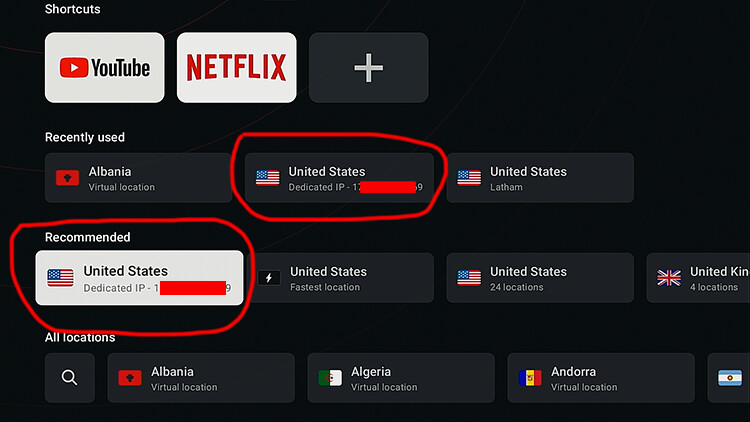
I’m with a lot of you and hopefully they will fix what’s missing from this new user interface **BUT** I am very happy that we can now use our dedicated IP address with the Android TV app! Yes, it costs more money but it makes a huge difference in terms of getting around sites/apps that block VPN access.
They’ve been saying that this is coming for the past year and happy it’s finally here.
---
### Author:  [@Miki](https://troypointinsider.com/u/Miki)
#### Post date: [October 1, 2026, 8:39pm UTC](https://troypointinsider.com/t/surfshark-interface-new/215899/32 "2026-10-01T20:39:33Z")
Is there a specific method to get a dedicated IP on SS Troy?
---
### Author:  [@JerryJ](https://troypointinsider.com/u/JerryJ)
#### Post date: [October 1, 2026, 10:49pm UTC](https://troypointinsider.com/t/surfshark-interface-new/215899/33 "2026-10-01T22:49:39Z")
Sorry, not Troy 😥, I seem to recall several options on the web page for SS.
---
### Author:  [@Miki](https://troypointinsider.com/u/Miki)
#### Post date: [October 1, 2026, 10:50pm UTC](https://troypointinsider.com/t/surfshark-interface-new/215899/34 "2026-10-01T22:50:48Z")
I got it now. Had to go into my web dashboard.
---
### Author:  [@Phar\_Lap](https://troypointinsider.com/u/Phar_Lap)
#### Post date: [October 2, 2026, 1:26pm UTC](https://troypointinsider.com/t/surfshark-interface-new/215899/35 "2026-10-02T13:26:44Z")
No it doesn’t. If I remember correctly, anytime you had an issue with SS, the first thing they would tell you was to turn it off. I suspect it may have been causing too many support issues. To be honest, I turned in off early in the game and have never missed it.
---
### Author:  [@Phar\_Lap](https://troypointinsider.com/u/Phar_Lap)
#### Post date: [October 2, 2026, 1:28pm UTC](https://troypointinsider.com/t/surfshark-interface-new/215899/36 "2026-10-02T13:28:12Z")
Having shortcuts is the real winner for me. I can launch Tivimate right from the SS app now!
---
### Author:  [@Miki](https://troypointinsider.com/u/Miki)
#### Post date: [October 2, 2026, 1:35pm UTC](https://troypointinsider.com/t/surfshark-interface-new/215899/37 "2026-10-02T13:35:30Z")
Yes it does. It’s just called ad blocker now. But IMHO it’s the same as clean web, other than interfering with things like recording it does absolutely nothing. Not one ad blocked and not one popup blocked. Never found the app setting useful as my system opens straight to my home page which only displays my daily driver apps and getting back to that from anywhere is simply a matter of clicking my home button on the remote. The missing favourite option is a bit annoying, favourites was always good when switching from apps like Tivimate to Nuvio/Stremio to duckduckgo search.
---
### Author:  [@MaverickCoast](https://troypointinsider.com/u/MaverickCoast)
#### Post date: [October 3, 2026, 2:06pm UTC](https://troypointinsider.com/t/surfshark-interface-new/215899/38 "2026-10-03T14:06:54Z")
\*\*\* Pay attention to this new feature \*\*\*
For those new to the new SS interface, be sure to check out how your apps are being protected by SS. Under the bypass swing, one setting you have to be proactive and tell SS which apps to protect (the more dangerous one for protection). That is, the app won’t be protected even though SS is active. If you choose the other, which is the better choice, SS will protect all apps unless you select an app to bypass SS protection. That way if you install an app and forget to tell SS to protect it, it will automatically be protected by SS.
If you’re not using these settings correctly, you could find apps not being protected when you thought they were being protected because SS was active.
Also, be sure that kill switch is turned on!
---
### Author:  [@Miki](https://troypointinsider.com/u/Miki)
#### Post date: [October 3, 2026, 2:58pm UTC](https://troypointinsider.com/t/surfshark-interface-new/215899/39 "2026-10-03T14:58:21Z")
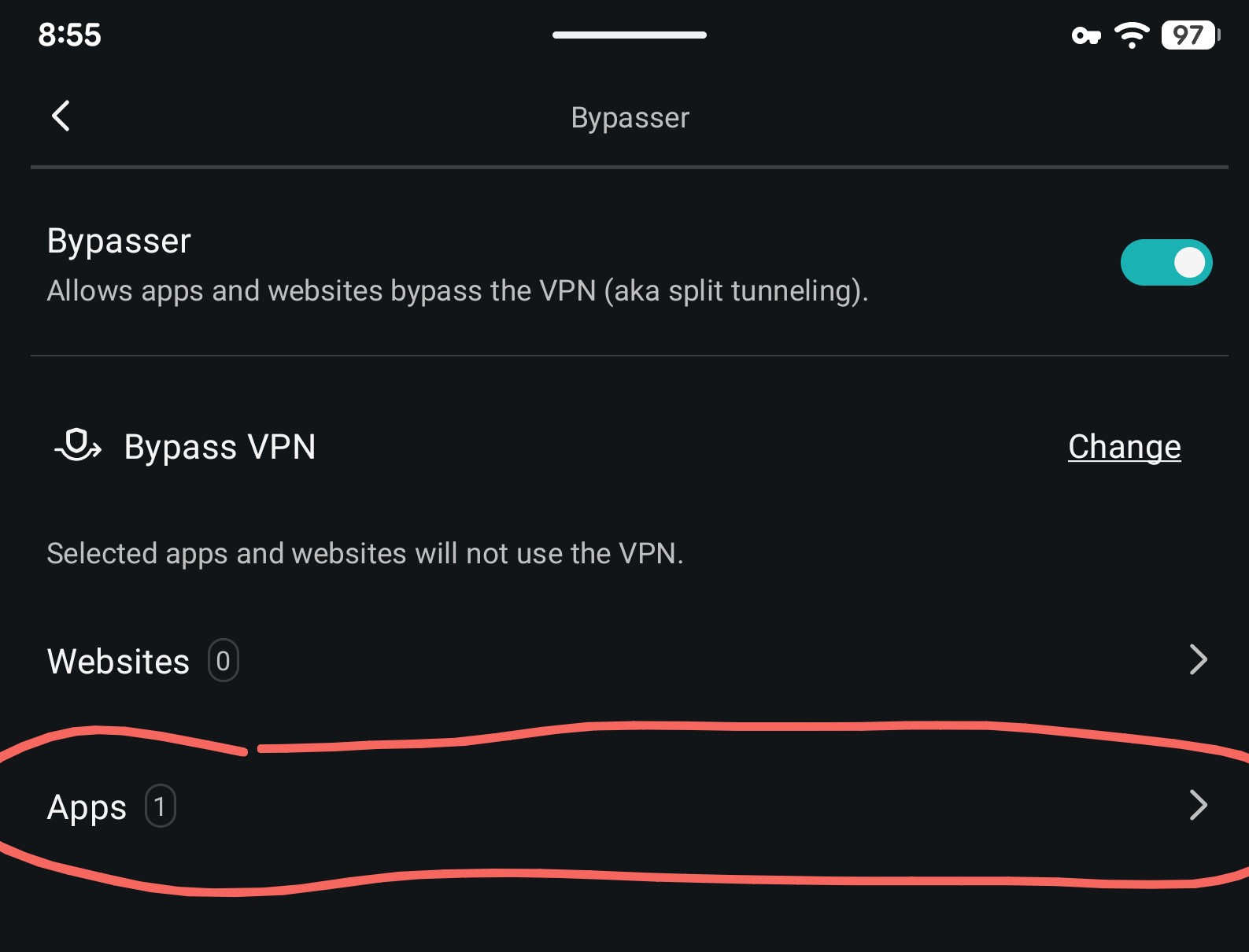
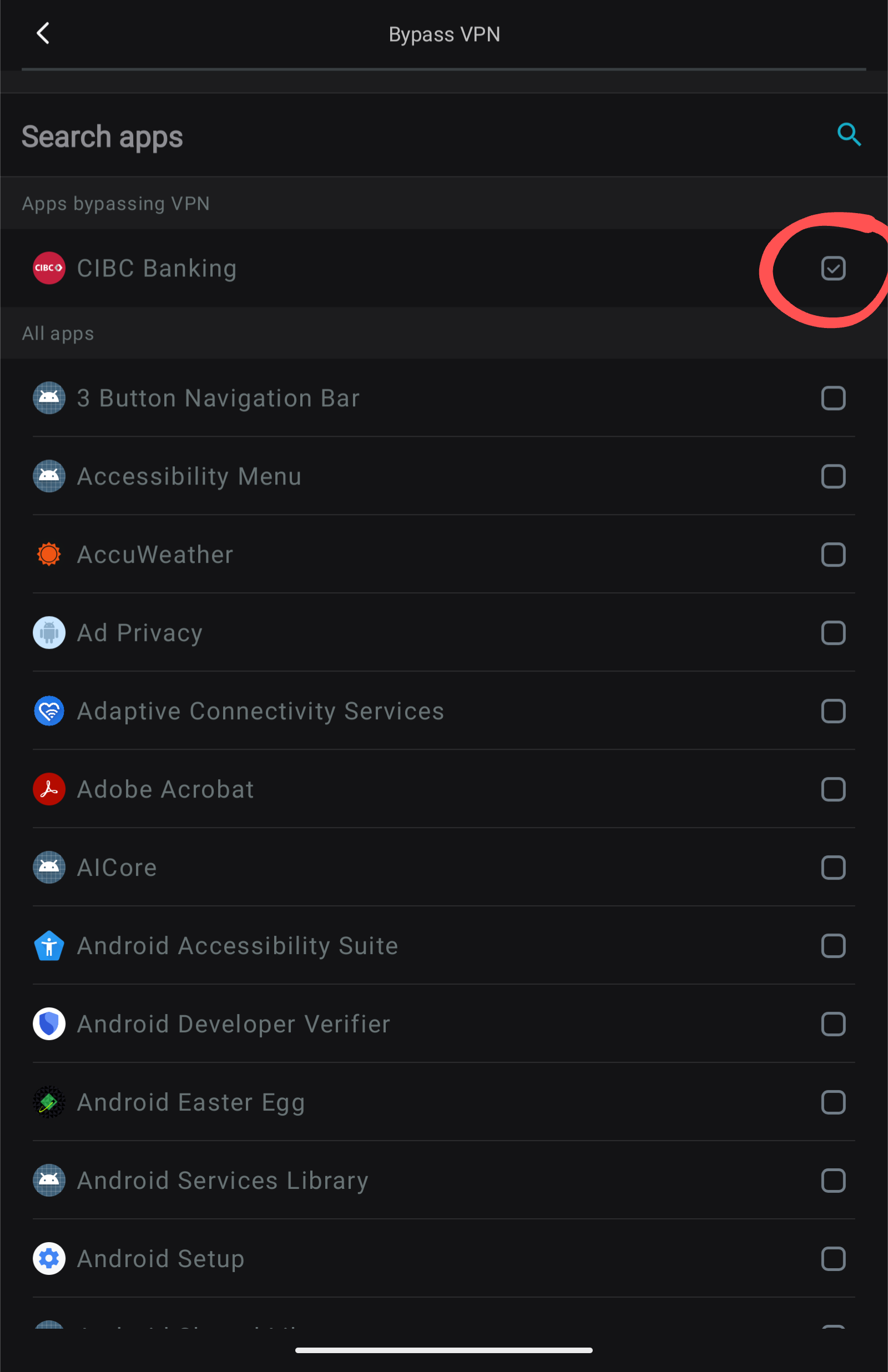
Not sure what you mean I install SS and all apps are protected until such times as I add an app to the bypass list such as my banking which often won’t work unless I disable the VPN for it due to the Fraud protection built into the online banking. So not understanding what you mean by “Swing” as if I do not have any apps I want to split tunnel/bypass the VPN then all are protected, and if I do choose the option to turn the bypasser on I can choose the option to only add apps or sites I don’t want going through the VPN tunnel, and all other apps are protected by being routed through the tunnel, including any newly added ones.
> [@Surfshark Bypass & Route via?](https://troypointinsider.com/t/surfshark-bypass-route-via/125667):
>
> So if i understand correctly, if i add apps to the Bypass VPN category, those apps will operate without being funneled through the VPN, thus no protection. And if i add apps to the Route via VPN option, those apps WILL be funneled through the VPN, thus being protected. My question is this, if I’m connected through Surfshark and neither one of those settings are turned on, what is being protected or not protected? Hope i explained my question so that everyone understands. v
---
### Author:  [@MaverickCoast](https://troypointinsider.com/u/MaverickCoast)
#### Post date: [October 3, 2026, 4:06pm UTC](https://troypointinsider.com/t/surfshark-interface-new/215899/40 "2026-10-03T16:06:11Z")
You only need to choose one or the other. Either choose the apps you want protected or the other option is to choose the apps that will not use SS to protect them. The latter will protect you from forgetting to indicate you want an app to be protected. With the latter setting every app will be protected unless you indicate otherwise.
Miki, there’s also the other option to choose the apps you do want protected by SS and the ones you don’t choose will not be protected. I’m using SS on my Android boxes and the interface is totally different from the phone version from what I’ve heard.
---
### Author:  [@itzme](https://troypointinsider.com/u/itzme)
#### Post date: [October 3, 2026, 5:44pm UTC](https://troypointinsider.com/t/surfshark-interface-new/215899/41 "2026-10-03T17:44:26Z")

[Previous page](https://troypointinsider.com/t/surfshark-interface-new/215899.md?page=1)
[Next page](https://troypointinsider.com/t/surfshark-interface-new/215899.md?page=3)