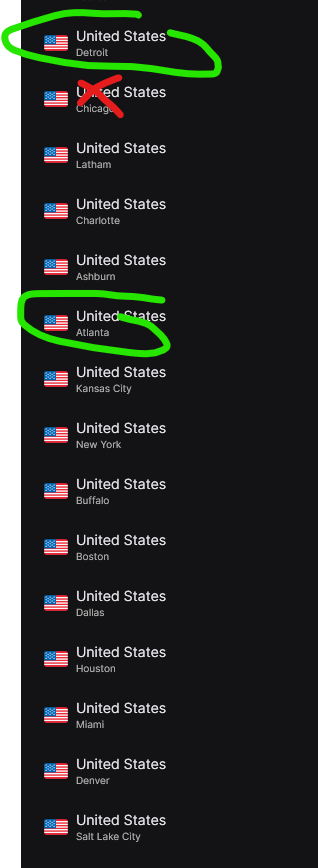
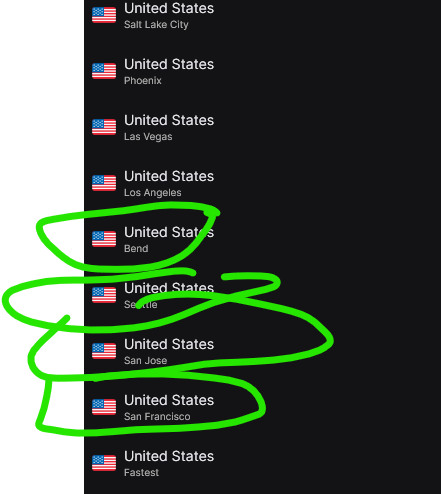
those two work for Krooz and so does NY Static #2 and 4
Just an FYI for those experiencing RECENT Surfshark issues. Troy’s excellent investigation revealed that issues with Kemo and their many IPTV resellers were due to the IPTV service blocking Surfshark’s US IP addresses. I have a Fromuler Z11 Pro Max as my main streaming device that I got back up and running with Troy’s suggestions.
Last week, I installed both the latest Surfshark and Formuler software updates on the same day. Afterwards, my download speeds using Analiti dropped from 110 mps down with Surfshark running to 1 mps (not just on IPTV). Changing server locations and DNS servers had no effect on the sudden 99% reduction in speed. After a few days, one of the Formuler senior staff on their blog reported from a reddit thread that the cause was due to the Wireguard protocol. I quickly to a different protocol and speeds jumped from 1 mps to 85 mps – not quite as high as with Wireguard before installing the 2 updates. I can’t say whether the virtual blocking with Wireguard was due to Surfshark or Formuler updates. Just wanted to give you a heads up that if you are having Surfshark issues, not only explore different server locations but also different protocols.
Surfshark Tech Support replied that my U.S. ISP, “Spectrum, might be actively blocking or throttling traffic on WireGuard’s default ports. Spectrum has implemented some security measures that can affect VPN performance – most likely Spectrum Security Shield, which tries to block some online content, therefore, we would like to suggest disabling it”.
If your IPTV isn’t working with a VPN—especially on U.S. servers—it’s likely due to IP blocks or geo-restrictions. Try connecting to non-U.S. servers like Canada, the UK, or the Netherlands. Switch VPN protocols (OpenVPN or IKEv2), and disable the kill switch or use split tunneling to bypass the VPN for your IPTV app. For better results, consider a VPN with a dedicated IP, or switch to an IPTV-friendly VPN provider like Torguard or VPN Unlimited.
Got a new IPTV service today, only it didn’t work. I remembered this thread and info from Troy.
First, I switched to the open WiFi and it worked. I ended up switching the Surfshark location on the Asus router to Canada and then it worked with Surfshark.
Today, I was blocked by Surfshark. Second time in 30 days. I used SurfShark for over a year. Tivimate with IPTV on three devices. Also, running SurfShark through my Asus router. Since they do not have logs, the rep(s) cannot tell what the issue is. The only thing that seems to be the same for each time blocked is it happens when I travel with my work laptop. I turn on the VPN when I am in hotels. I do have NordVPN and Proton.
Proton seems okay with IPTV and Tivimate. Issues with Proton are I need to turn it on when I turn on the TV (automatic with SS) and a lot of buffering with US servers. Been using Ireland and UK but a lot of lag.
Hello, I moved your topic to this one as it may have to do with your IPTV service. Please check out the following video. If you’re using a Kemo/Lemo reseller they are blocking some Surfshark servers.
I also had my Surfshark account blocked for the 2nd time in 30 days today with no explanation other than I broke a term of service for which they could not tell me what one and basically stole my money and provided no refund after being a customer for multiple years and still had over a year left i had paid for. I believe they are trying to move hefty users of data off their servers. It was completely ridiculous as I am just a regular family user and run no servers or anything out of the ordinary. These guys may be moving down the list soon.
I think I might switch back. I feel it’s Surfshark
Turning off “Clean Web” will correct issue, which makes me wonder if this is a SurfShark issue because it happened right after I updated SurfShark on my devices?? Coding updates can cause conflicts?? But if you turn off “Clean Web”, your service will work again, at least mine did.
So I have three tv’s all using the T95Z Plus box with Tivimate Pro. I won’t mention my IPTV provider, but it ain’t Amber Baby. All are running Surfshark and that’s the problem.
If it’s turned on the tv won’t work. I’m not the only one with this problem. Tired of fighting with it.
I installed Express VPN and it’s doing great so far. I only signed up for a month in hopes that I can find something that works as good but cheaper.
Is there such an animal?
I have only used IP Vanish and Surfshark. They both seem to run similar but SS gives a tad quicker speeds. My problem is the Kill Switch. I turn it on and everything is fine, a short time later I lose my internet connection and it’s the Kill Switch that does it. My download slowed from 350+ to 50. I changed connection sites (to fastest) and no change. I turned off the Kill Switch and speeds returned to “normal”. When my subscription runs out I am changing VPN provider. At that time I’ll check again and use the introductory method of determining which is best.
More thank likely you are using a Kemo/Lemo reseller. I show how to fix this with Surfshark in my video on the following page.
Having an issue with surfshark and my iptv. Whenever I connect to surfshark my iptv service stops working, is there a setting on surfshark I need to change? Thanks
How many different locations have you tried within Surfshark?
I had the same issue. Turning off clean web solved the problem
Just a couple..
Clean Web is off. Not the fix for me..,
Hello, watch the video on this page for fixes.
@TROYPOINT thank you. Lathrop didn’t work but other countries did.
I have a unique issue with one of my streaming providers where a successful connection occurs only when using U.S. VPN servers, even though I reside in Canada. This occurs with both Surfshark and ProtonVPN and includes the use of Static IP servers, Connection failure occurs even when a VPN service is disengaged. I continue to exchange tech tennis emails with said Provider who thus far have not admitted any server IP blocking. Device, player, ISP, and VPN provider issues have all been ruled out as potential weak points.