I tried to install STRMR. When I get to the place where the scrappers option should be (under account) it’s not offered. I found information at this site above that suggested it might be an VPN issue. So I turned Surf Shark off, but the needed scrapper option did not re-appear when I opened STRMR. So when I try to play anything I’m told there are no links available.
I understand the need to find a server that works with STRMR, but shouldn’t shutting SS off, work also? @Miki you mentioned Montreal working for you. So I tried that on SS, and still +Addons is all I get under Settings < Accounts then +Addons where Troy’s video shows Scrappers?
If you follow Troy’s video he shows step by step how you can use the Stremio addons to add sources. Might be worth uninstalling the old STRMR as things have greatly changed, and then start Troy’s tutorial from the beginning.
I do have torrento, for example, on Stremio and know how to add it there. The STRMR app I am using is the latest and Troy’s video is of an older version. I just finished watching it for STRMR. I’ll look again at what you just added above, thanks.
I just downloaded the STRMR from Troy’s Toolbox and it is the latest. So I just did it following Troy’s instructions exactly and once again have STRMR latest version on my Buzz P6L. So the tutorial is indeed up to date and working. I am going to delete it again as I don’t want it. I just wanted to make sure the tutorial was the latest STRMR. You need to have say a tablet to do an install on and have you streaming device on and install it first on your tab, then go as far as you can, doing the verification code stuff, then install on your streamer and get to the point where it provides a code then click the link new device on your yab enter the code to link your tab and your streamer and then carry on with the setup.
it is the latest (on ToolBox) but Troy’s video is not of the latest version which doesn’t have the scrappers menu. I don’t see having watched the video twice how to select scrappers when the option show on Troy’s video is not there. if I click on Addons (my only option) it says I can install from URL. Would you have the URL for Torrentio? Torrentio STRM fun didn’t work when I typed that in.
The scraper menu is gone. As I said this is a whole new setup and Troy’s tutorial I provided the link to is the latest and newest one and now requires you have two devices. In my case a Tab and my Buzz. So delete your old STRMR and follow the tutorial.
Thanks. I’m not able to follow up until tomorrow, but I figured out why we seemed at cross purposes. I did have the newest STRMR (1.1.28), BUT I had looked up an old Troypoint video!!! lol. So when I look into this tomorrow morning, I will use the video from the tool box, as well as what you just sent me. That might explain why we haven’t been getting that many links in Stremio.
I found the info needed on picture instructions that followed under Troy’s STRMR set up video. I had not looked for more after the video. On the picture instructions “scrappers” and “addons” are now missing from under Accounts–good.
it’s now apparent what is needed are the URLs for Comet and/or Torrentio. My initial attempts to find them all point to Stremio not STRMR and without these, STRMR won’t produce links. I have gotten this far via my P6L and PC. I’ll pick up the search another time as surely someone must have provided them on this sight. Tally ho.
Dena I don’t get it. Troy’s tutorial shows you exactly how to get them. You really must start at the beginning and follow his tutorial step by step. It is literally all there in the instructions and how to do it.
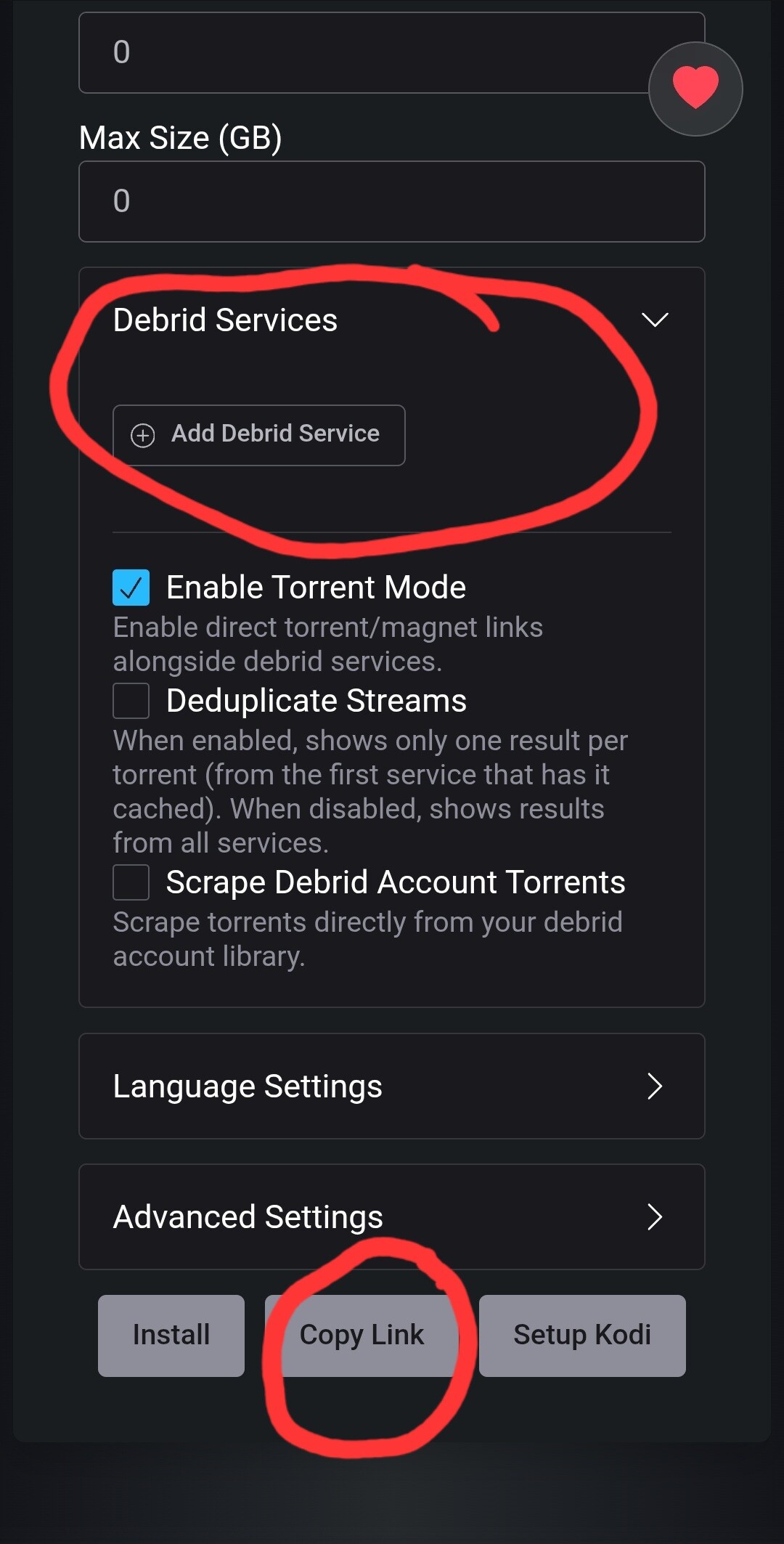
I’m really at a loss as to what I am doing wrong. I connected real debrid and TorBox via my phone. I followed everything without issue. Troy shows how to add Comet via pics below the video (not on the videos I watched. I blew up the pic to read the URL for Comet, but it’s not complete (continues past the pic) and it is hard to make out some of the letters cause it is blurred. That link is what I need and if he included that in a video or some other place I haven’t found it. Below is the screen shot where I am stuck.
You have to go retrieve your own url. Go to link below for Comet configuration page. Configure that page to your preferences including whatever Debrid services you have and when that’s done, click the copy link. That’s the url you need.
Thank you! I’m burnt out today from messing with everything for hours, but will try tomorrow.
I re-stalled Stremio with all the new addons and now shows I had been watching, which had many links to choose from, have disappeared? For example no links for The Morning Show. Why would I have less links now, I wonder? Do you think this might be the VPN blocking people are talking about and I’ll have to experiment with different locations?
Well this is so weird. I can no longer get links in Stremio that I had before, BUT I can get them in STRMR even though I have not linked Comet or Torrentio addons? it’s like STRMR blocked Stremio. And now I’ve lost sound in Tivimate. Good grief. I think STRMR is causing issues for me, since anytime I try to install it, other problems arise.
deleted STRMR, volume back on TIviMate. so strange.
I got my links back in Stremio by going to bootstsrapper and putting in the API for Real Debris rather than TorBox, which I had in before RD. After that I found I was getting the same error you mentioned on a. number of links. Switching b.w libVLC, Exo or external would not fix it. I couldn’t get any links to play until I chose links from Comet.
Unfortunately you will get those occasionally, especially if the source has used an unusual encoder or codec or wrapper, what ever it’s called. So Exoplayer may not be able to play it. With the update to 1.9.4 Stremio has changed the internal VLC player dramatically with the new version having some additional newer codecs, but I still also have Just movie player and MX Pro installed from Troy’s toolbox I rarely use Exoplayer as the Dev actually discontinued the Development of exoplayer and it’s just in maintenance mode now. I find myself using Just Player or the new VLC that libVLC was updated to and now shows a full lower popout panel with a full spectrum of tools and settings when you start your video, including subtitle option, pause, replay, sound adjustment, screen stretch and so on. Between Just and VLC there are fewer of those problems.
I have Just Video Player as well as MX Player Pro. Both from Troy’s Toolbox Then I have external player chosen and use Just mostly, on the odd occasion I use MX. This is something new in the last couple of months as exoplayer is no longer being developed and is in maintenance mode. I wish Stremio would replace it with the newer replacement.




 I rarely use Exoplayer as the Dev actually discontinued the Development of exoplayer and it’s just in maintenance mode now. I find myself using Just Player or the new VLC that libVLC was updated to and now shows a full lower popout panel with a full spectrum of tools and settings when you start your video, including subtitle option, pause, replay, sound adjustment, screen stretch and so on. Between Just and VLC there are fewer of those problems.