# Adding storage to Onn 4k Pro
**URL:** https://troypointinsider.com/t/adding-storage-to-onn-4k-pro/126257
**Category:** Streaming Devices / Hardware
**Created:** [March 13, 2025, 7:44pm UTC](https://troypointinsider.com/t/adding-storage-to-onn-4k-pro/126257 "2025-03-13T19:44:20Z")
**Posts on this page:** 20
**Page:** 3
### Author:  [@Wizzard](https://troypointinsider.com/u/Wizzard)
#### Post date: [March 16, 2025, 1:23pm UTC](https://troypointinsider.com/t/adding-storage-to-onn-4k-pro/126257/41 "2025-03-16T13:23:11Z")
My question would be, with it set to internal storage, yes it could be used for apps but they had to be moved over or could be set for new ones to install there. When it’s internal memory, is it acting as contiguous memory, in other words once you fill up the Pro memory is it automatically going to the usb drive. My experience was it didn’t and was still seen as a drive. Please let us know.
---
### Author:  [@mrpink](https://troypointinsider.com/u/mrpink)
#### Post date: [March 16, 2025, 1:59pm UTC](https://troypointinsider.com/t/adding-storage-to-onn-4k-pro/126257/42 "2025-03-16T13:59:50Z")
Yea , ya see that’s what i assumed would happen. Onn 4k storage would fill and auto go to thre other shared internal. But @chillenandy321 says if i add [ar.tvplayer.tv](http://ar.tvplayer.tv) folder in my android section of xplore app that sees the thimb drive, turn add that same folder path in tivimate it will recognize it then. Gonna try it
---
### Author:  [@MNBob](https://troypointinsider.com/u/MNBob)
#### Post date: [March 16, 2025, 4:17pm UTC](https://troypointinsider.com/t/adding-storage-to-onn-4k-pro/126257/43 "2025-03-16T16:17:44Z")
I don’t have an Onn, but I do have an Android 14 TV box (unrooted). With that box, I was able to add a 1/2 TB thumb drive to extend internal. Not only was it added, but it was kept as exfat formatting and I was able to record files greater than 4GB.
Within Tivimate, I was able to use the file selector (not system picker) to choose Internal(root)/Download/Tivimate/Recordings as the recordings folder. You may have to create the Tivimate and Recordings folders with Xplore. The Download folder is an open writeable folder on most systems. Also you can use Xplore to navigate to your Recordings folder to view them or open with a player.
---
### Author:  [@chillenandy321](https://troypointinsider.com/u/chillenandy321)
#### Post date: [March 16, 2025, 8:50pm UTC](https://troypointinsider.com/t/adding-storage-to-onn-4k-pro/126257/44 "2025-03-16T20:50:43Z")
Did this work ? Inside the [ar.tvplayer.tv](http://ar.tvplayer.tv) folder you create also make 2 folders one for backups and other for recordings. The usb drive has to be formatted for internal storage only.
---
### Author:  [@mrpink](https://troypointinsider.com/u/mrpink)
#### Post date: [March 16, 2025, 11:02pm UTC](https://troypointinsider.com/t/adding-storage-to-onn-4k-pro/126257/45 "2025-03-16T23:02:28Z")
👍 thanx gonna give it ho now
---
### Author:  [@mrpink](https://troypointinsider.com/u/mrpink)
#### Post date: [March 16, 2025, 11:21pm UTC](https://troypointinsider.com/t/adding-storage-to-onn-4k-pro/126257/46 "2025-03-16T23:21:13Z")
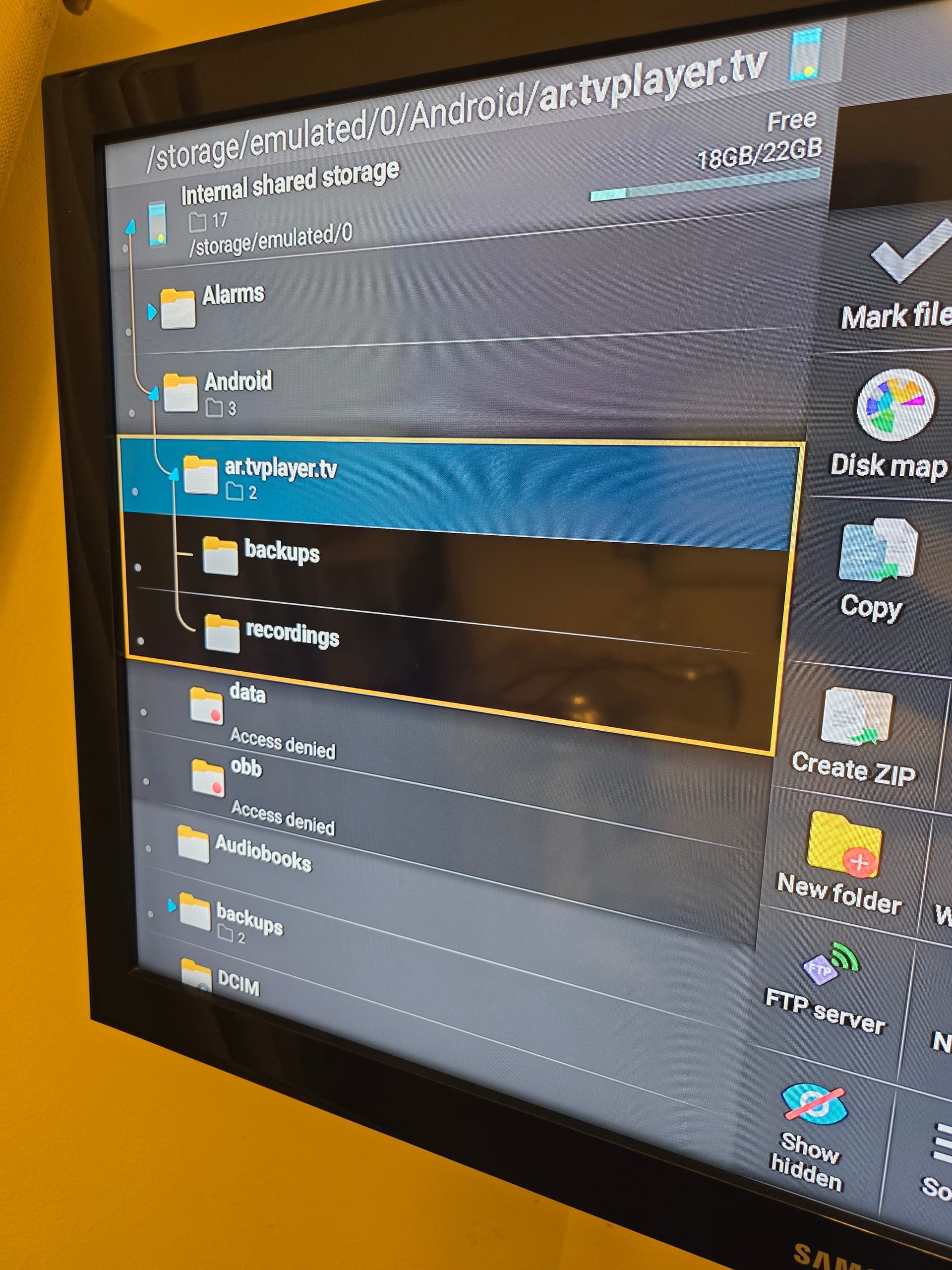
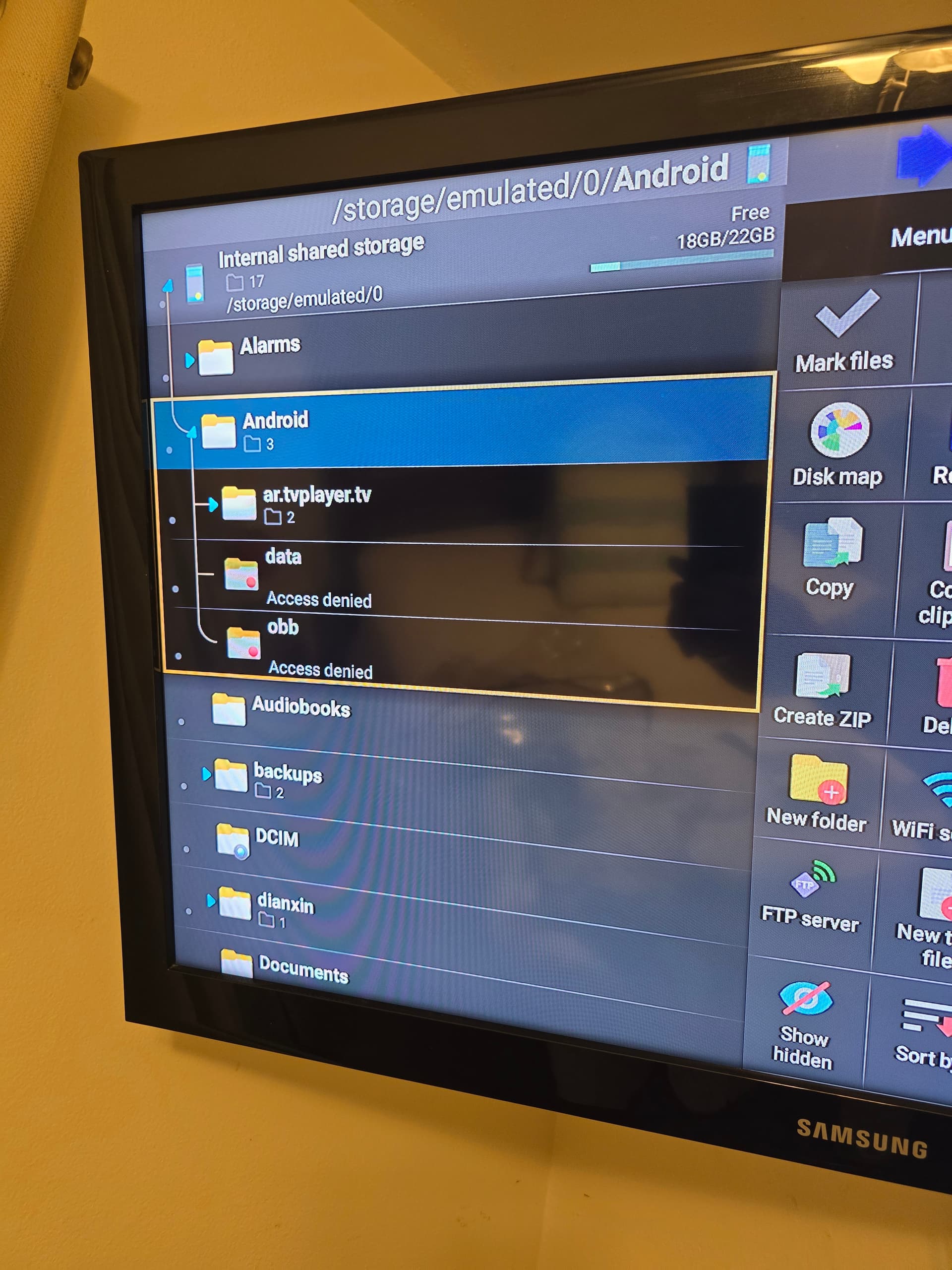
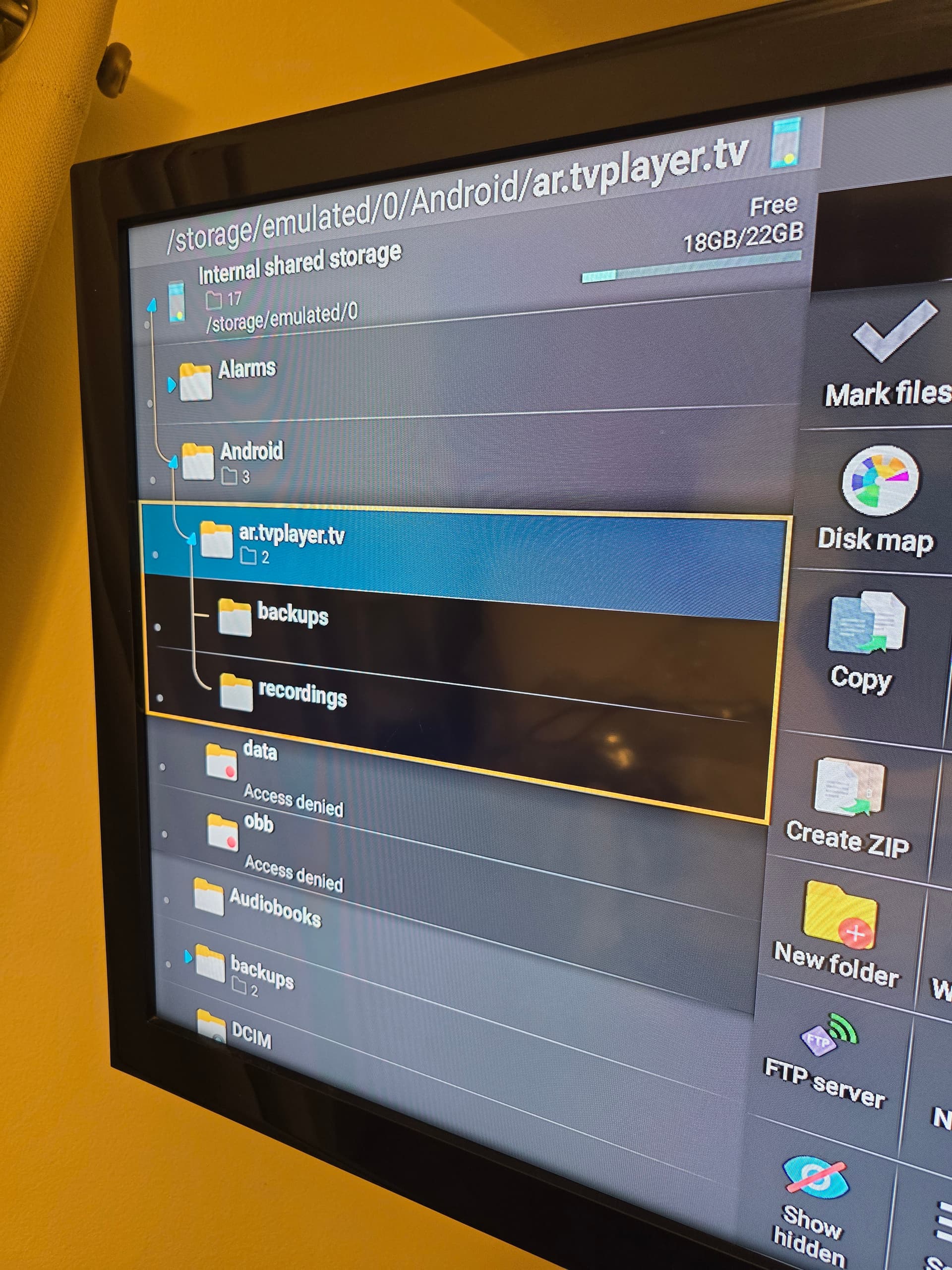
Okee doke. Under Android got a folder named [at.tvplayer.tv](http://at.tvplayer.tv) and in that folder there are 2 folders 1 titled backups the other recordings. And the 128 g thimb drive is formatted as internal storage. My only question is that under Android in my xplore app the data folder and the obb folders both say access denied. Will that have any impact on tivimate recordings going into the thumb drive ?
---
### Author:  [@chillenandy321](https://troypointinsider.com/u/chillenandy321)
#### Post date: [March 16, 2025, 11:27pm UTC](https://troypointinsider.com/t/adding-storage-to-onn-4k-pro/126257/47 "2025-03-16T23:27:49Z")

This how I have mine setup
---
### Author:  [@chillenandy321](https://troypointinsider.com/u/chillenandy321)
#### Post date: [March 16, 2025, 11:28pm UTC](https://troypointinsider.com/t/adding-storage-to-onn-4k-pro/126257/48 "2025-03-16T23:28:56Z")
Media folder is not denied access. I just recorded something earlier. Works fine
---
### Author:  [@mrpink](https://troypointinsider.com/u/mrpink)
#### Post date: [March 17, 2025, 12:05am UTC](https://troypointinsider.com/t/adding-storage-to-onn-4k-pro/126257/49 "2025-03-17T00:05:26Z")
Ok what am i doing wrong?, I think I’m close to gettin this right. Just work me please. sorry don’t mean to be such a dutz.
---
### Author:  [@mrpink](https://troypointinsider.com/u/mrpink)
#### Post date: [March 17, 2025, 12:06am UTC](https://troypointinsider.com/t/adding-storage-to-onn-4k-pro/126257/50 "2025-03-17T00:06:52Z")
What are the 2 items in tivimate backups ?
---
### Author:  [@mrpink](https://troypointinsider.com/u/mrpink)
#### Post date: [March 17, 2025, 12:10am UTC](https://troypointinsider.com/t/adding-storage-to-onn-4k-pro/126257/51 "2025-03-17T00:10:09Z")
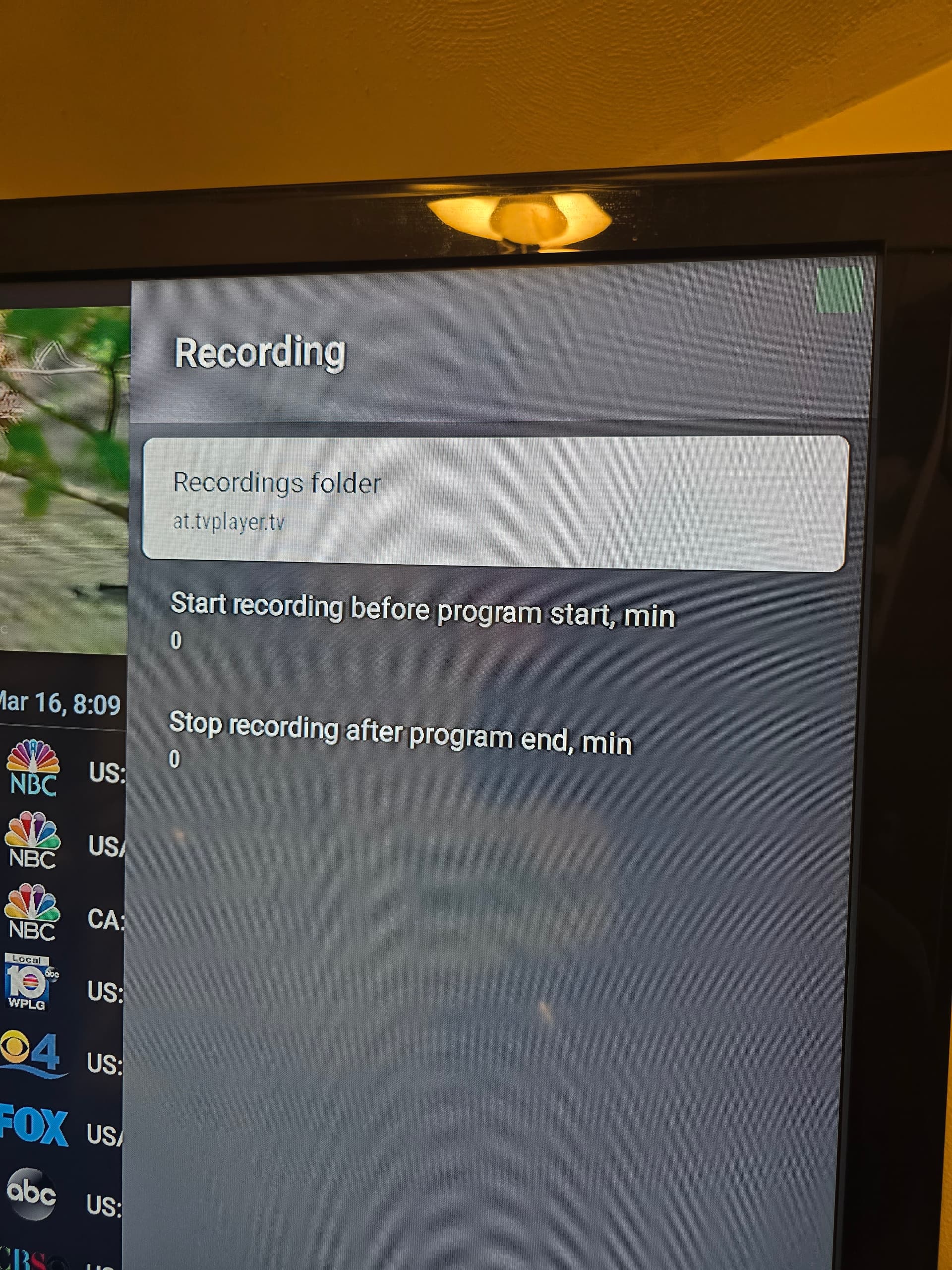
And this is what i input in the recordings folder in tivimate
---
### Author:  [@mrpink](https://troypointinsider.com/u/mrpink)
#### Post date: [March 17, 2025, 12:11am UTC](https://troypointinsider.com/t/adding-storage-to-onn-4k-pro/126257/52 "2025-03-17T00:11:30Z")
No pressure @chillenandy321 , but I’m countin on ya
---
### Author:  [@chillenandy321](https://troypointinsider.com/u/chillenandy321)
#### Post date: [March 17, 2025, 12:22am UTC](https://troypointinsider.com/t/adding-storage-to-onn-4k-pro/126257/53 "2025-03-17T00:22:17Z")
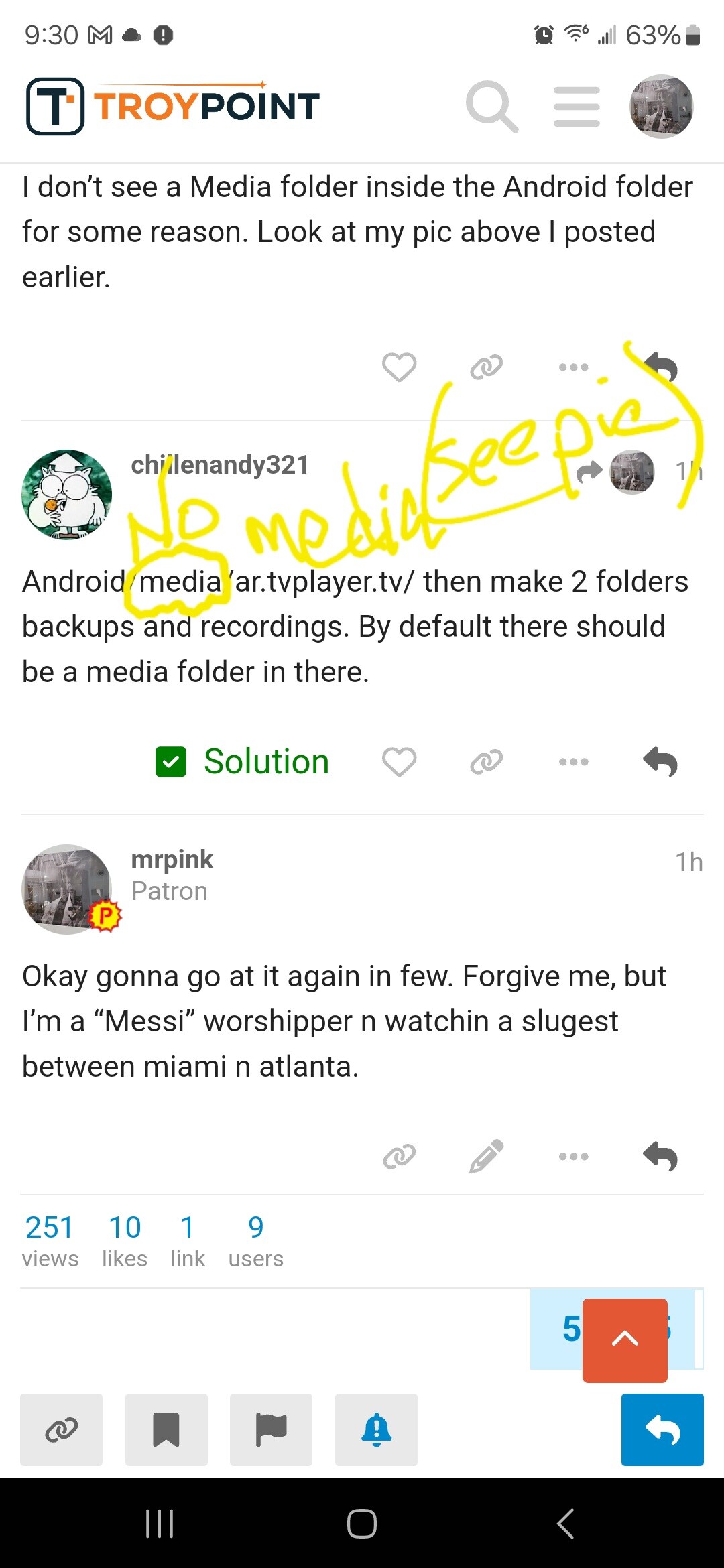
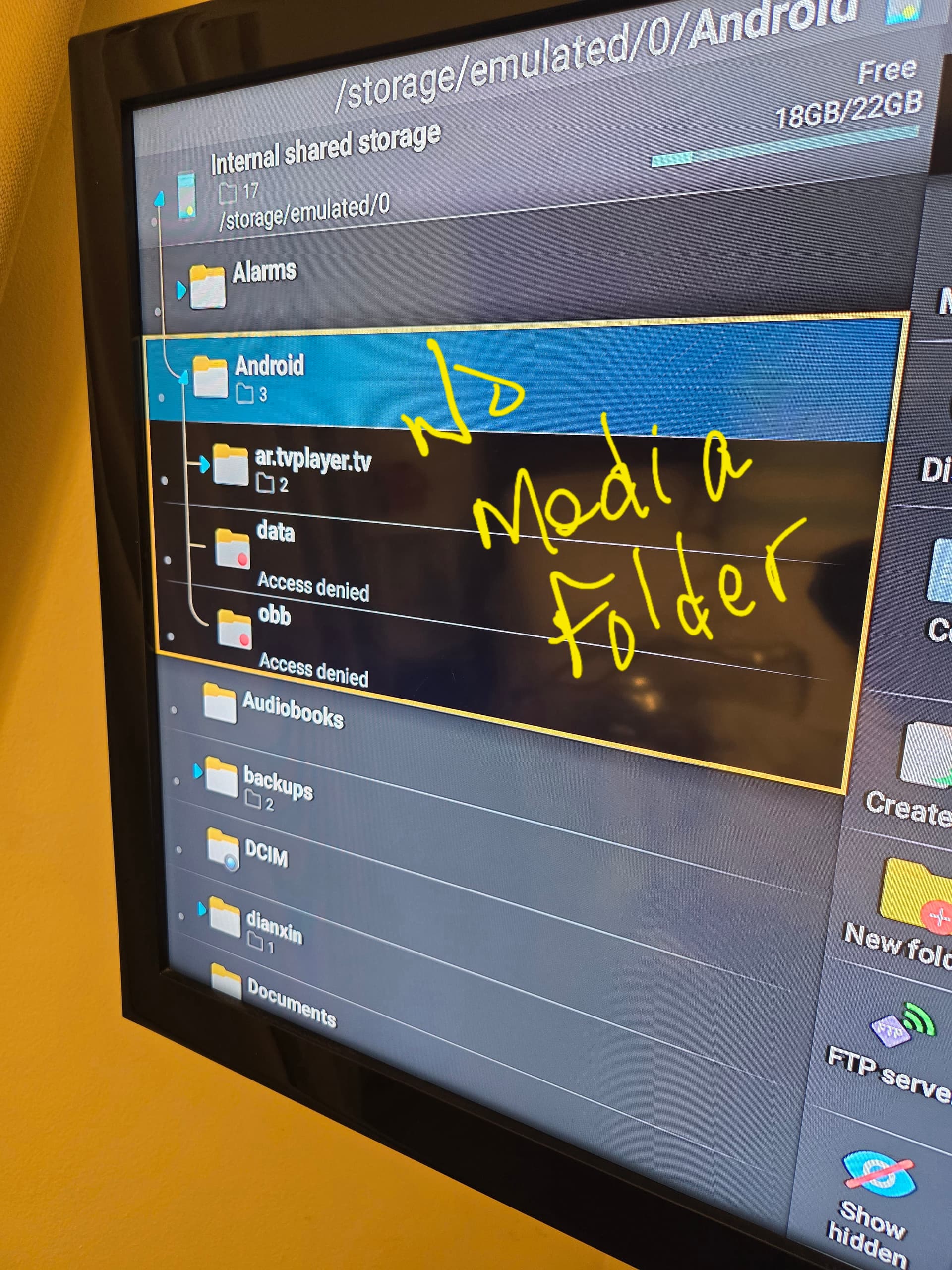
I don’t see a Media folder inside the Android folder for some reason. Look at my pic above I posted earlier.
---
### Author:  [@chillenandy321](https://troypointinsider.com/u/chillenandy321)
#### Post date: [March 17, 2025, 12:24am UTC](https://troypointinsider.com/t/adding-storage-to-onn-4k-pro/126257/54 "2025-03-17T00:24:32Z")
Android/media/ar.tvplayer.tv/ then make 2 folders backups and recordings. By default there should be a media folder in there.
---
### Author:  [@mrpink](https://troypointinsider.com/u/mrpink)
#### Post date: [March 17, 2025, 12:44am UTC](https://troypointinsider.com/t/adding-storage-to-onn-4k-pro/126257/55 "2025-03-17T00:44:14Z")
Okay gonna go at it again in few. Forgive me, but I’m a “Messi” worshipper n watchin a slugest between miami n atlanta.
---
### Author:  [@mrpink](https://troypointinsider.com/u/mrpink)
#### Post date: [March 17, 2025, 1:38am UTC](https://troypointinsider.com/t/adding-storage-to-onn-4k-pro/126257/56 "2025-03-17T01:38:42Z")
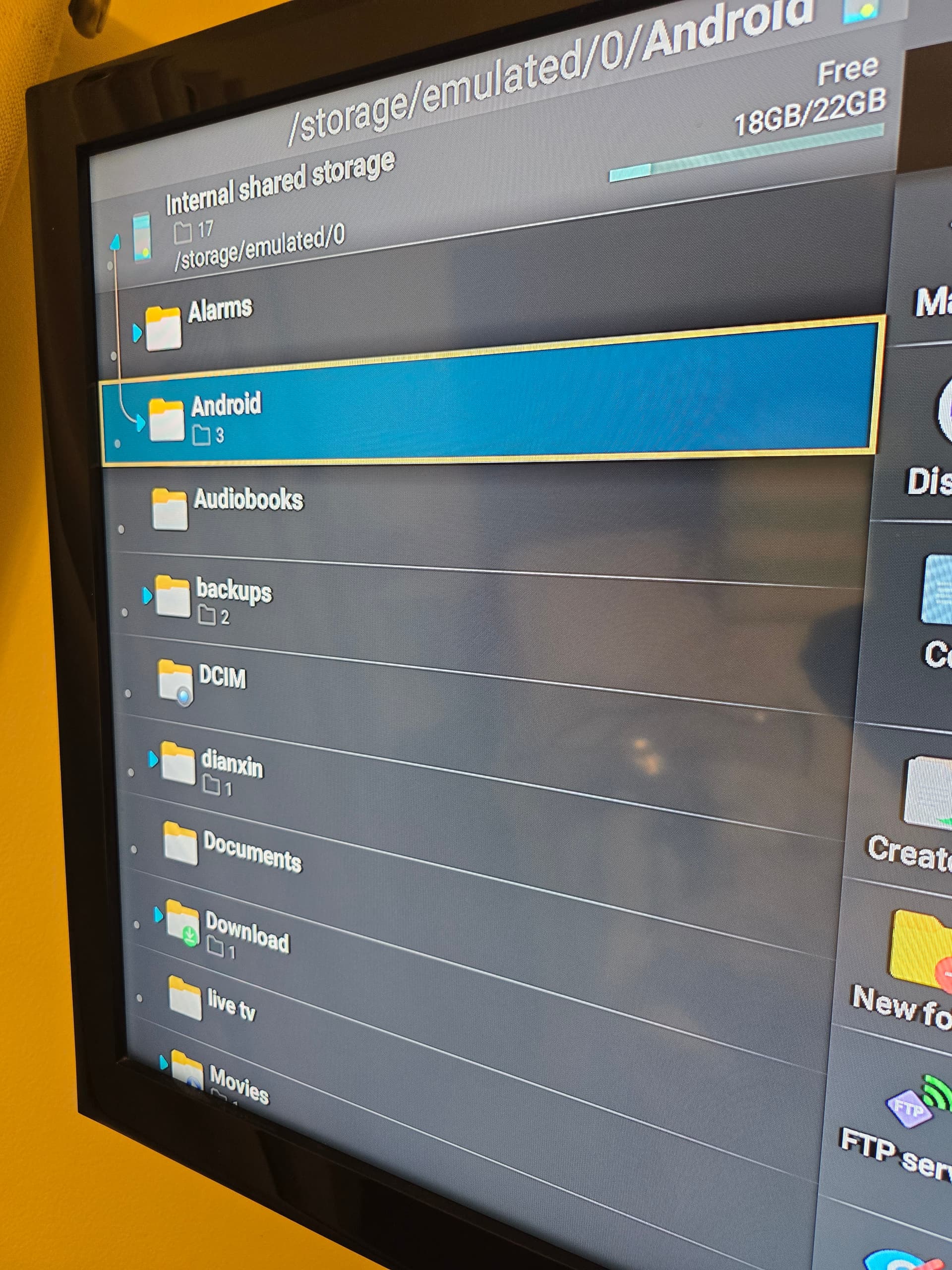
Good news Messi n Miami 2- 1 WIN!! Bad news there’s no default media folder when I expand Android. /ar.tvplayer.tv/data Acces denied/obb Access denied. As you see when [ar.tvplayer.tv](http://ar.tvplayer.tv) expanded / 2 folders under it/ backups & recordings. Confused 😕
---
### Author:  [@chillenandy321](https://troypointinsider.com/u/chillenandy321)
#### Post date: [March 17, 2025, 3:37am UTC](https://troypointinsider.com/t/adding-storage-to-onn-4k-pro/126257/57 "2025-03-17T03:37:11Z")
Try and add a media folder in android folder. Then add [ar.tvplayer.tv](http://ar.tvplayer.tv) in media. See if that works. Not sure why yours doesn’t have it by default.
---
### Author:  [@mrpink](https://troypointinsider.com/u/mrpink)
#### Post date: [March 17, 2025, 1:04pm UTC](https://troypointinsider.com/t/adding-storage-to-onn-4k-pro/126257/58 "2025-03-17T13:04:19Z")
Thanx I’ll give that try 🙂
---
### Author:  [@mrpink](https://troypointinsider.com/u/mrpink)
#### Post date: [March 17, 2025, 1:07pm UTC](https://troypointinsider.com/t/adding-storage-to-onn-4k-pro/126257/59 "2025-03-17T13:07:19Z")
Just had a thought, are you using xplore fiile mgr.? Or another file mgr ? If it’s differen , I can try using that one.
---
### Author:  [@Miki](https://troypointinsider.com/u/Miki)
#### Post date: [March 17, 2025, 2:30pm UTC](https://troypointinsider.com/t/adding-storage-to-onn-4k-pro/126257/60 "2025-03-17T14:30:05Z")
What Android version is your device?
[Previous page](https://troypointinsider.com/t/adding-storage-to-onn-4k-pro/126257.md?page=2)
[Next page](https://troypointinsider.com/t/adding-storage-to-onn-4k-pro/126257.md?page=4)